



Finding customers and prospects with WhatsApp and Telegram: incorporate them into your communication strategy
Telegram and WhatsApp can be two strategic channels of communication
In this article we see:
- How and why to use Channels in Telegram and Lists in WhatsApp.
- Main differences between the two channels
- How to create your own Broadcast Channel on Telegram
- How to create your Broadcast list on WhatsApp
Reading time: 5 minutes
Finding customers with WhatsApp and Telegram
Do you have a business and don’t know how to give it the right visibility?
With WhatsApp and Telegram, you can make the best use of all your contacts.
You have probably never thought about using these two tools, or rather, channels of communication.
Now let’s look at why they can be critical to your market positioning and the creation of lasting relationships with your potential target audience.
As always, the basis of everything is building the right strategy.
It is not enough to have contacts and inundate them with communications.
We must ask ourselves first:
- How do I want to be positioned in the market?
- What is my target audience?
- Who do I want to talk to or at least, sell my products or services to?
- How are my Competitors doing?
- How can I make a difference for my clients?
I know, these are tough questions.
You have a restaurant, a gymnasium, a professional studio, or a business. Your job is to run it. Maybe you’re thinking that you don’t have time to waste on these maneuvers.
Would you like to have more customers?
Would you like to have the queue of people who want to make reservations right in your restaurant or who want to join your gym?
If the answer is yes, it means you are looking for a marketing and communication strategy that will allow you to differentiate yourself from your competitors.
You are in the right place.
If you want to read about how a strategy can dramatically change your business, I recommend you take a peek at the articles in the Marketing and Communications Strategy
What we analyze today, in this article, is one of the central elements of what is referred to as a Social Media Marketing Strategy.
That is, communication through Social Channels. In this case we are talking about WhatsApp and Telegram, two messaging apps.
In this article we look specifically at how to construct the two channels.
If you are still not convinced that it is essential to use these two channels I suggest you read this article:
Finding customers with WhatsApp and Telegram
Let’s start with the objective. To send a communication, simultaneously to multiple people. Without having to do it manually. One at a time.
The special feature that makes these channels interesting and strategic is that only the channel creator can send messages.
Participants can only read in the case of Telegram and possibly reply to the message, as far as WhatsApp is concerned.
Unlike groups, no one sees the contacts of other members.
Before seeing the various steps to create your Telegram and WhatsApp channels, you can see in this table the main differences between the two channels.
For number of options and opportunities, at present, Telegram definitely wins.
Let’s start with Telegram
How to build your own Channels on Telegram
When we want to send a message to multiple people, we can use create one or more different channels on Telegram.
Unlike WhatsApp, which offers exclusively private broadcast lists, with Telegram we can create both public and private channels.
For example, I can create a private channel on Telegram to quickly update all my co-workers or partners.
We use the public channel to talk to the world. Unlike WhatsApp, with Telegram, I can also advertise my Channel, directly on the site.
In this way people who we do not know directly but who find interesting, what we say, can also sign up.
Another opportunity is provided by the fact that you can send the sign-up link via email, social etc.
Are you subscribed to Linkedin? How many people each day contact you to connect with you?
From today you can reply to them thanking them for the contact and inviting them to subscribe to your channel on Telegram.
Great opportunity.
Thanks to Telegram’s broadcast lists, it is possible to send text messages, photos, images, voice and audio notes, links, videos, files, documents. As is the case with single chat.
Difference between public and private channel on Telegram
The public channel, that is, the one we are most interested in right now, has a unique custom link.
It is similar to any link, such as a Facebook Page or Linkedin.
What is extremely interesting is that it can appear in Telegram’s Global Search results. This can generate additional visibility, free of charge, to our Public Channel. Anyone can see it and subscribe.
The private channel, on the other hand, can only be accessed through an invitation link.
Unlike WhatsApp, where there can be a maximum of 250 list subscribers, telegram channels can have an unlimited number of subscribers.
In addition, even new members can see the entire broadcast history, and each published post has its own view counter.
WhatsApp, on the other hand, only shows messages sent after signing up.
If you are looking for a Channel full of information, strategies and ideas you can subscribe to our Channel.
Now let’s see, in 3 easy steps, how to create your Telegram Channel.
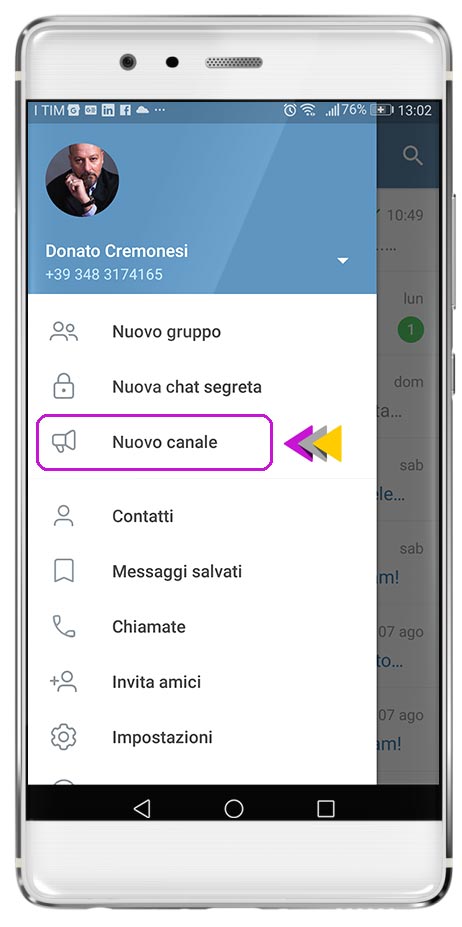
Creating the Channel
Log in from your cell phone to your Telegram profile. Click on the pop-up options menu on Android (top left) or the New Message menu on iOS (top right) and select: New Channel.
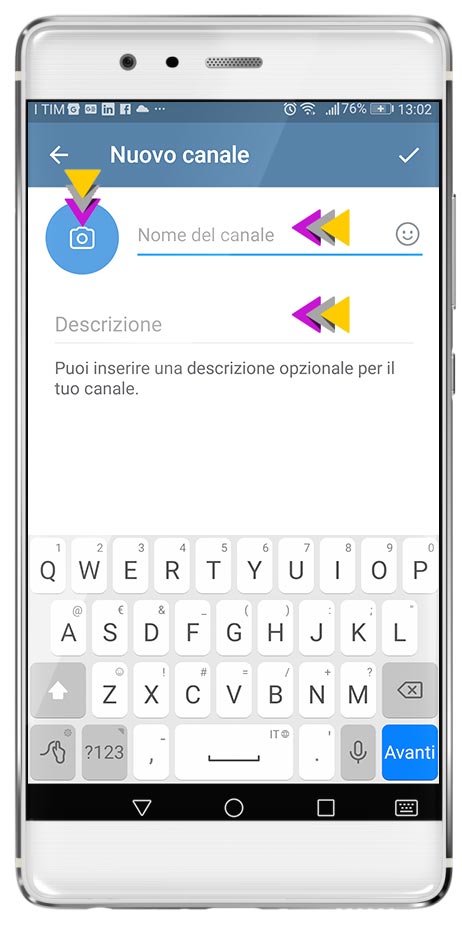
Channel Setup
After clicking on “New Channel” we come to the panel where we can enter the name of the Channel, a brief description and the channel icon
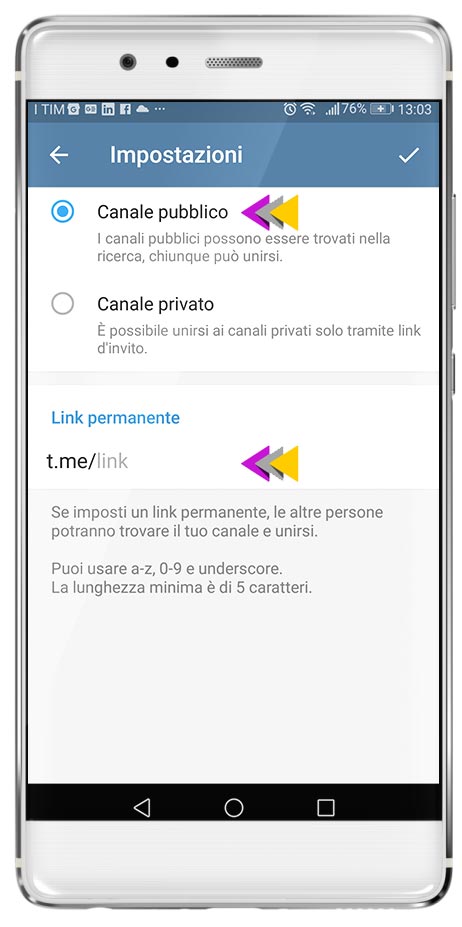
Public or Private?
We are now at the last step of creating your new Broadcast channel on Telegram. You can choose either Public or Private. Also, Telegram asks us to enter the link that we can use to share the channel.
Create Broadcast List on WhatsApp
The steps on WhatsApp are extremely simple, partly because they offer significantly fewer options.
It is sufficient:
- Access your own profile on your Mobile Phone
- Click the options menu, the same one where we also find Groups
- Click on “New Broadcast”
- Add the people to whom we wish to send our communications
- Naming the list.
Finding customers with WhatsApp and Telegram: Create your own Fast Letter
Let us first start by explaining what a Fast Letter is.
Don’t look up this term on search engines … I don’t think it exists.
I just created it 5 minutes ago, to convey the concept….🤪😂
By Fast Letter I mean an extremely fast and effective communication tool using WhatsApp, Telegram, and willing Messenger.
Now, before we look in detail at how and why, it is only fair that I tell you that increasing one’s communication to users and the market is not an option. It is an imperative.
You’re probably wondering why, since I’m in Marketing Strategy and Communications, I invest my time talking about Telegram, WhatsApp and Messenger?
Well, what you are about to read is a practical example of a communication strategy.
Telegram, WhatsApp and Messenger are simply tools or rather channels of communication.
Create direct and effective communication
As always, it is essential to have “something to communicate” because otherwise the situation becomes significantly more difficult.
You’re wondering.
What can I communicate to people?
Don’t worry every company or business has something to communicate.
Suggestion, let’s get it out of our heads now to communicate promotions, costs, discounts etc.
We need to think about and organize valuable communication.
Now focus. Think about how you can help your clients or potential clients.
What can you do that is really helpful for them?
How you can make their work easier or their day better.
Do you want to find customers with WhatsApp? Read these articles:
- Selling on WhatsApp: strategies to increase sales
- Finding clients for accountant: comprehensive strategy
- How to find customers for your business: 15 strategies for Entrepreneurs
- What are the advantages of integrating WhatsApp with HubSpot?
- WhatsApp catalog: what it is and how this new sales tool works
- Finding customers with WhatsApp and Telegram
- Custom Facebook audience
Want to find customers with WhatsApp: 6 FAQs you need to know if you want to sell
WhatsApp is effective for both pre-sales (information, advice, quotes) and closing, especially when you integrate payment systems and structured processes. In many industries, the “let’s talk on WhatsApp” step is what turns a curious person into a customer by deciding on the ideal timing and mode of response.
The key is opt-in and segmentation: gather clear consents, divide the base into homogeneous groups, and send only relevant content to each segment. Use professional mailing tools that manage unsubscribes, frequency and measurement of results, and avoid using impromptu lists from your phone.
Short, clear, visual content works: product photos, short videos, timely voice messages, concise text with precise call-to-actions. Combinations are also very effective: context message + product image + link to purchase or payment page, all in the same conversation.