



Want to increase relationships with your users? Add Facebook Messenger to your website
Facebook has announced the new Messenger live chat that allows the famous live chat to be placed on its website.
Before going into the technicalities, I would like to analyze with you the pros and cons of this integration.
As a first step, it is important to ask the question: What is my goal?
- Offer customer support?
- Increase sales?
- Increase customer loyalty?
- Profiling users?
These are just some of the goals we can achieve, but each goal has its own problems and strategies to accomplish.
For example, customer care involves having a person constantly available to provide accurate and comprehensive answers to the user.
If, on the other hand, your goal is to increase sales, then the person in charge of managing the chat must have a strong business aptitude.
If the goal is to profile the user, perhaps this is not the most suitable solution. We will see this step later.
From Website to Facebook Messenger
This website connection to Facebook Messenger, essentially, combines Web Marketing strategies with Social Media strategies.
They are two parallel worlds that can sometimes come together, as in this case.
Implementing Facebook Messenger on one’s site means, inevitably, opening the doors of our Facebook Page to the user.
It is therefore essential to check, first of all, the structure of our Facebook Page.
How does it communicate? Is it rich in information? Do we keep it constantly updated?
Another extremely important aspect is determined by user expectations.
Those who use social media are accustomed to quick responses.
If we implement Facebook Messenger on the site, will we be responsive?
This implies a person who, constantly, keeps the msn messenger chat monitored and responds to various inquiries, competently, pertinently and comprehensively.
It is incumbent on us to make this introduction because, otherwise, we risk not meeting user expectations by generating a negative user experience (user experience).
If your goal is to increase sales, through proper user profiling, you will also find an alternative solution at the end of this article, implemented with HubSpot CRM.
How to integrate Facebook Messenger on your website for free
1. Log in to your Facebook Page. Select Settings. You will access the “Page Settings” menu. Click the “Posts” button.
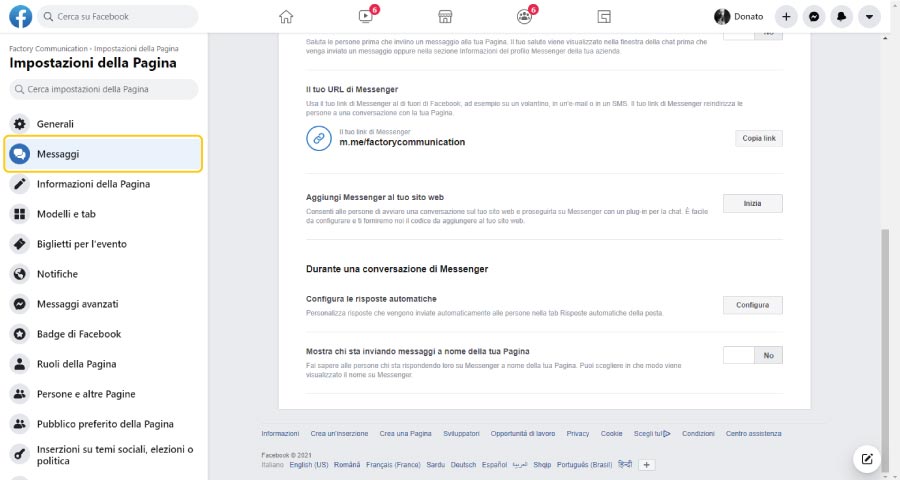
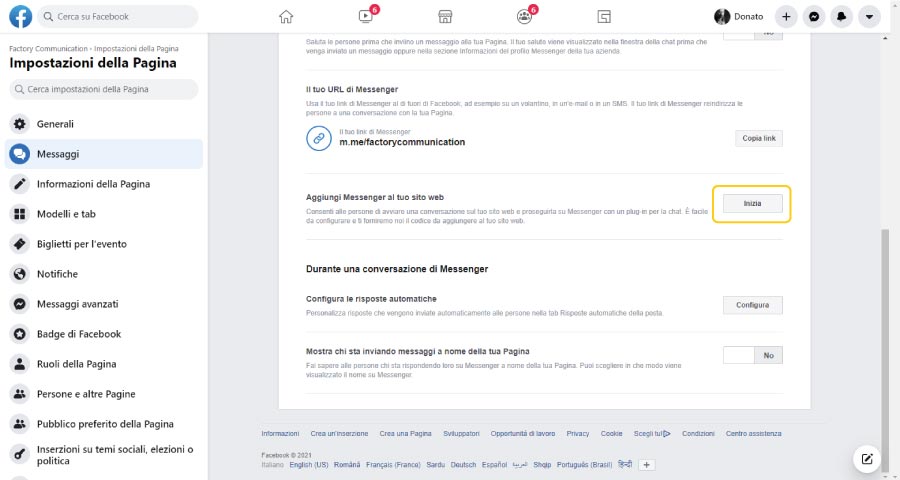
2. Scroll down to the “Add Messenger to your website” section and click Start.
3. Configure the welcome message
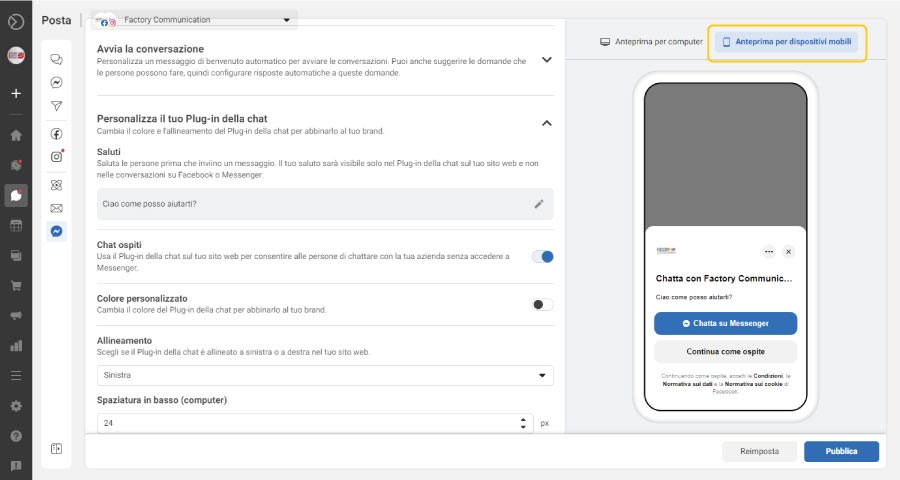
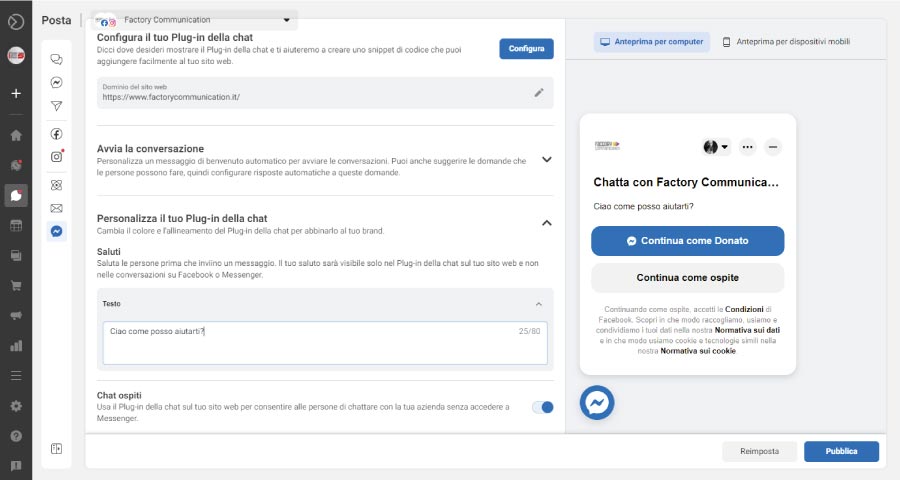
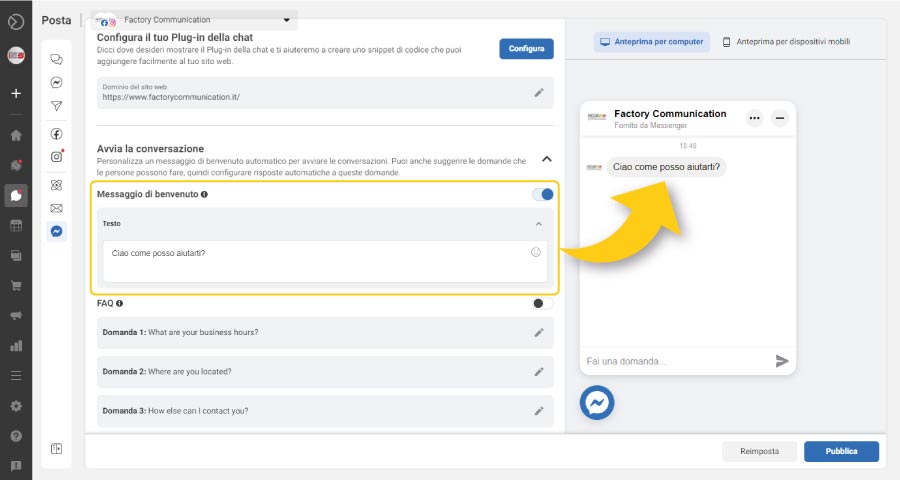
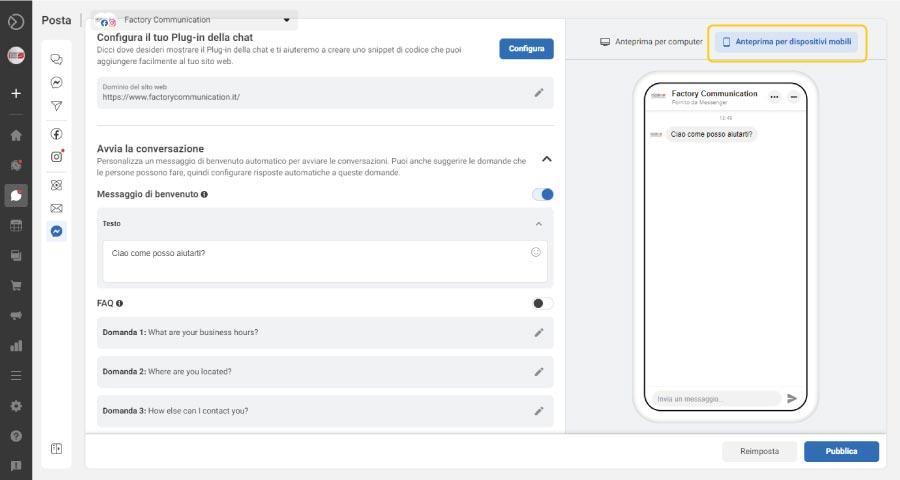
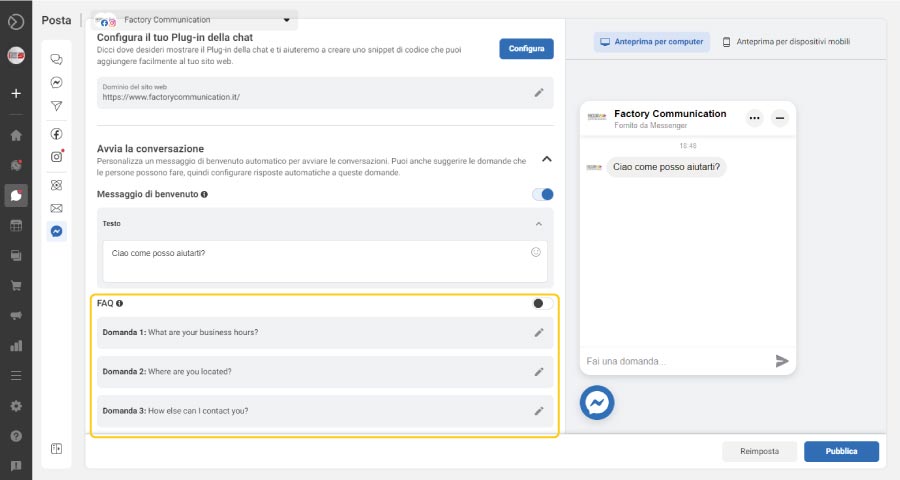
4. If you want, you can use the FAQ section to post some questions to your users and gather more information about their real needs
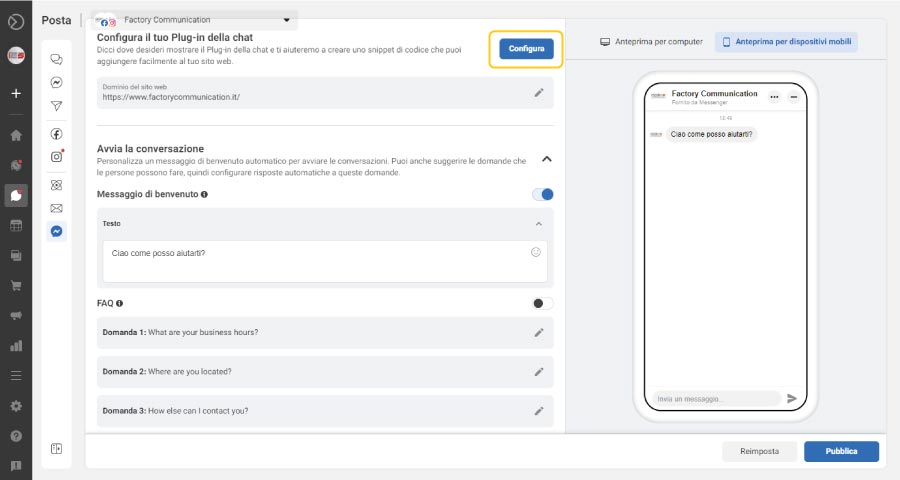
5. Click the “Configure” button in the “Configure your chat plug-in” section.
6. Choose the language you want to use
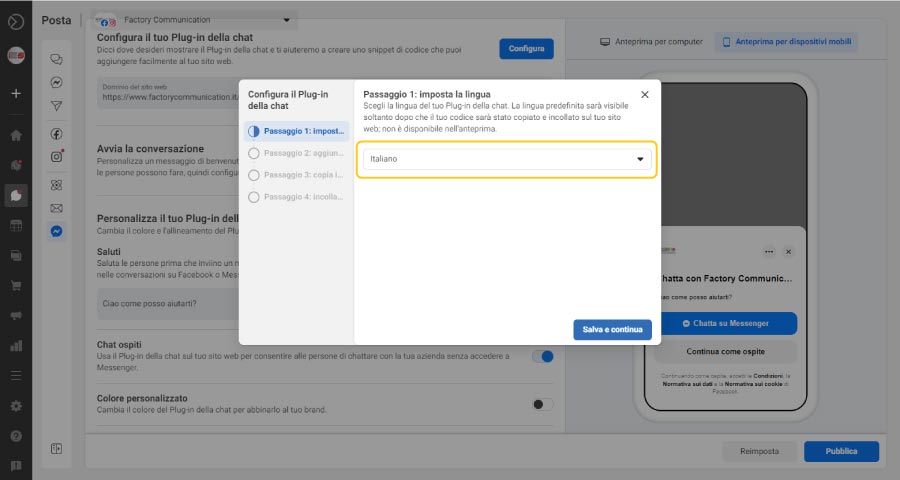
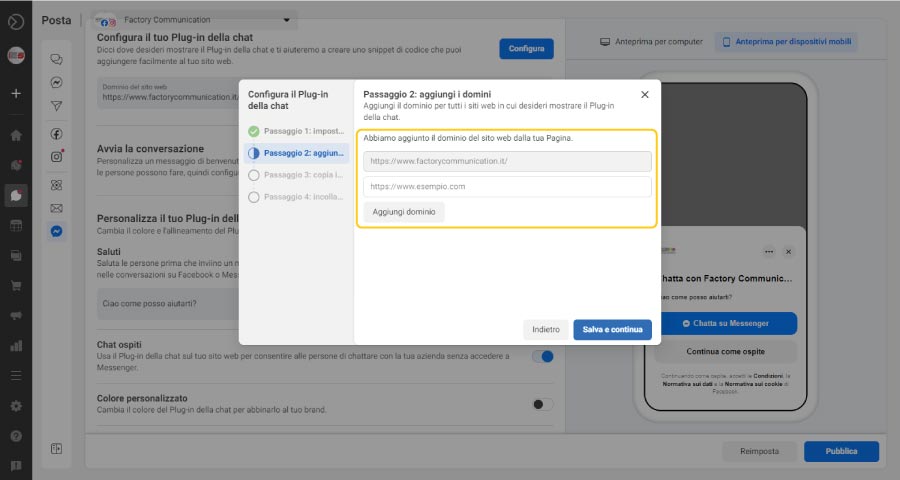
7. Enter the web domains of the websites where you want your Messenger Chat to appear.
N.B. You can enter multiple web domains, so you can centralize all Marketing and Communication activities in one msn messenger chat.
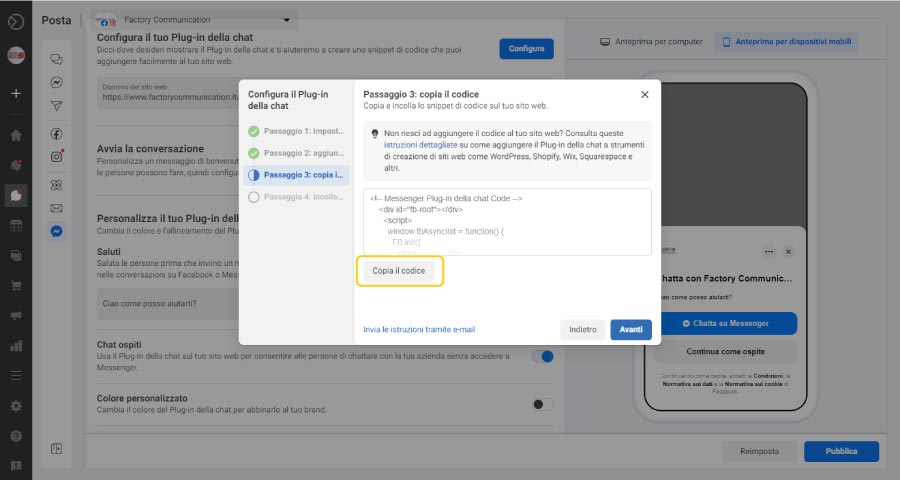
8. Now you are ready to publish your msn messenger chat on your Web site.
Click on the “Copy Code” button
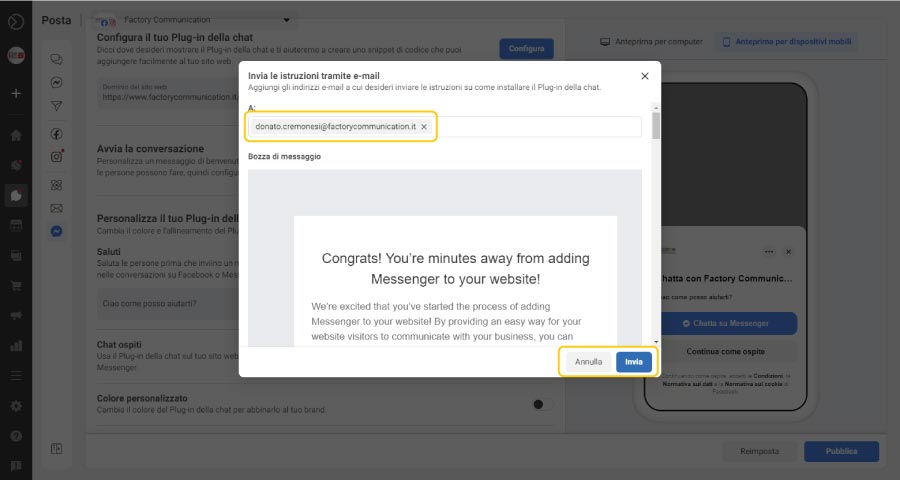
9. Do you have doubts about the procedure? You can send your Webmaster the instructions
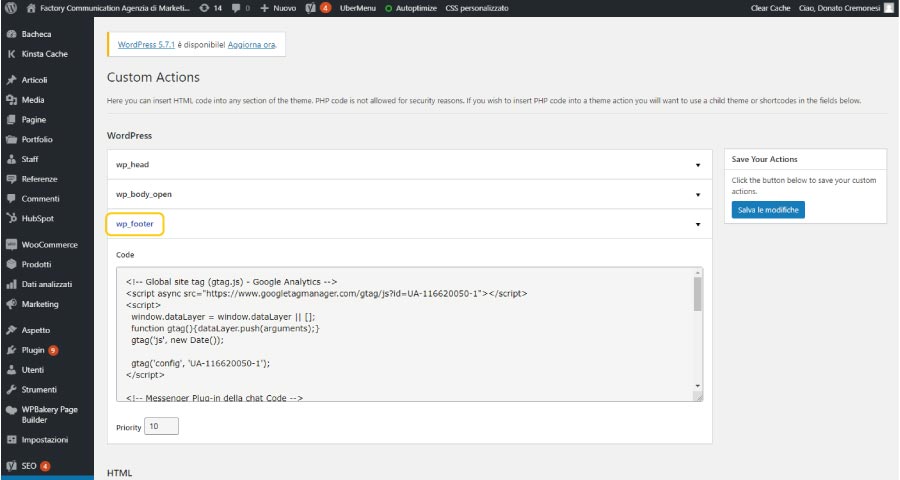
10. Insert HTML code into your Web site
N.b. If you use WordPress you can access the “Custom Actions” section which is generally located in the Template setup.
If you want to display the chat on all pages of the site, we recommend that you put the HTML code in the “wp_footer” section.
We do not recommend putting it in the “wp-header” section because in downloading HTML code it is the first section to be downloaded by the Browser and may slow down the page downloading operations.
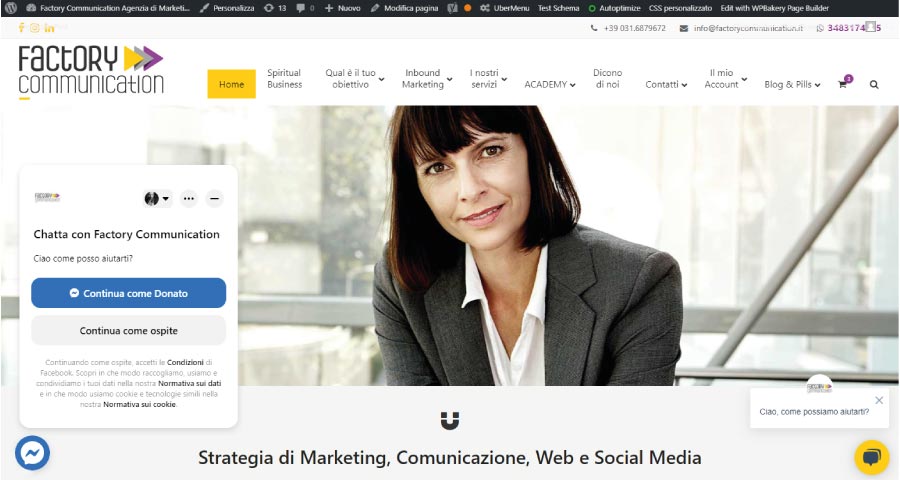
11. Final result. Now the chat is posted on the website
Is your goal to acquire customers and profile them?
As we often say, social amplifies your communication and can help you increase customers, leads and sales.
As anticipated at the beginning of this article we address the topic of user profiling.
This is an extremely important issue because, to profile a user correctly means to really understand what needs they have.
People who conduct an online search have a specific need. He is looking for a restaurant, a consultant, the new grass-cutter, or an Agency to work alongside him to implement the Marketing and Communications Strategy.
Therefore, it is strategic to collect and catalog as much information as possible to perform precise profiling:
Inbound Marketing: The right message, at the right time, to the right person.
All the more so if you have implemented, or want to implement, strategies for Inbound Marketing and/or Marketing Automation.
If your goal is to accurately profile your contacts, regardless of whether they are Prospect, Lead or Customer our advice is to use a CRM such as HubSpot.
HubSpot is not only a very powerful Customer Relationship Management, but also the platform that gave birth to and spread around the world the strategies of: Sales Funnel, Inbound Marketing and Marketing Automation.
With Hubspot you can integrate all communication channels into one service:
- Site Chat (Live Chat and Chat bot)
- Facebook Messenger chat (Live Chat and Chat bot)
- Newsletter subscription form
- Self-profiling information request form
Not only that. When a user uses one of the contact points, listed above, they are automatically profiled by HubSpot, which detects the pages they visit.
In this way it is possible to understand what services or products, our user is interested in.
N.B. if you want to find out how to make the most of your newsletters, to increase sales and turnover I recommend you read this article: Want to increase your users’ loyalty? Send out your newsletters with HubSpot
Did you find this article interesting? You can explore further by reading these articles.
- 6 reasons why your business needs a chatbot
- 14 Customer Loyalty Strategies That Work
- Customer experience what is it? Why is it important?
- Facebook Messenger ADS: What it is and how to use it for your business
- A positive Customer Experience greatly improves the Business of our companies
- Facebook video streaming for groups and events!
- Facebook Messenger Bot: New frontier for web marketing