


Add url to Google (Add url) is an extremely important function because it allows us to make our website or eCommerce pages visible immediately.
To rank on Google, it is essential to write quality content.
This activity that goes by the name of Seo Copywriter is extremely complex and onerous. It requires a lot of energy and time because it has to involve several activities, we report the main ones:
- Online SEO analysis of competitors
- Analysis of keywords used by users to conduct searches
- Choice of keywords to be used for content writing
- Implementation of the editorial calendar
Therefore, after accomplishing so much work, it is critical to communicate the new content to Google as soon as possible.
How to report a URL to Google
Until recently, there was a specific Google command.
Today to report new content to Google, we need to use Google Search Console.
Operation is extremely simple.
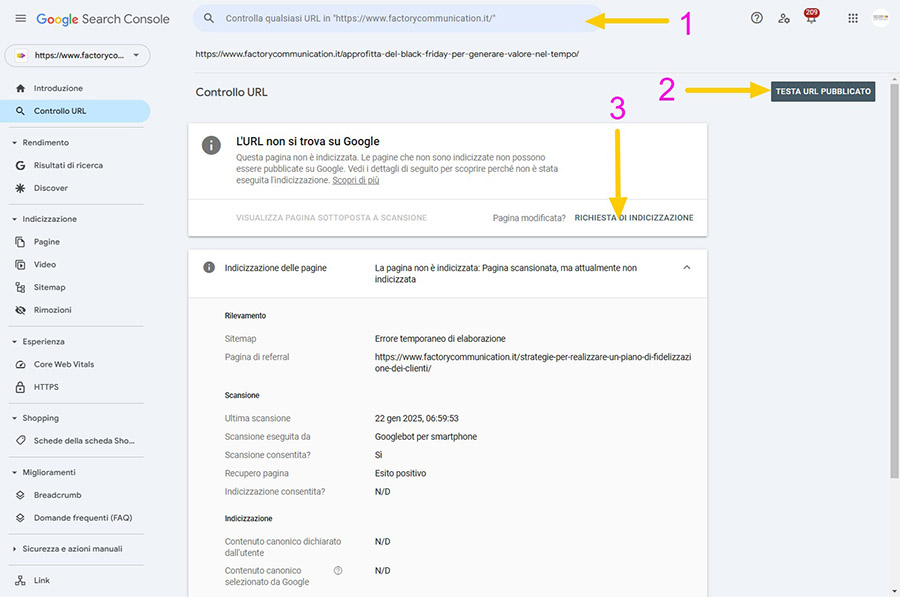
After logging into your Google Search Console Account, all you need to do is:
- Enter the URL you want to verify and/or report to Google (Step 1)
- If the URL has not already been indexed I suggest you run a test to make sure there are no problems on the page (Step 2)
- If the test comes back correct, you can submit the “Request for Indexing” (Step 3)
Add url: use sitemaps
The optimal solution to make the indexing request and avoid manual reporting of new pages to Google, is to upload on your site, what is called Sitemap.
The sitemap is basically the map of your site. It contains all the links in it.
If your site is built in WordPress, we recommend that you use the Yoast Seo plugin (external link to the site), which allows you to create different sitemaps: pages, articles, images etc…
Adding Google url, when to use it:
- Publishing new content: When you publish new articles, web pages or significantly update existing ones, you can use this tool to notify Google and accelerate their indexing.
- Indexing problems: If you feel that Google is not indexing your website or specific pages correctly, you can use “Add URL” to report the problem.
- Launching a new website: When launching a new website, you can submit the homepage and sitemap URL to facilitate initial crawling by Google.
Adding urls to Google, advantages:
- Faster indexing: In some cases, submitting a URL via “Add URL” can speed up indexing by Google compared to natural crawl times.
- Increased visibility: Having your website indexed on Google quickly can lead to increased visibility on search results for relevant keywords.
- Problem diagnosis: If Google encounters problems while crawling your URL, you will be notified, allowing you to fix any technical problems.
Added url removal on Google, issues to consider:
- Not a guarantee: Submitting a URL does not guarantee immediate indexing or ranking in search results. Google will still evaluate the quality and relevance of your website.
- Google Overloading: Do not over-submit URLs via this tool, as it may be counterproductive and flag your website as spam.
- Alternatives: There are other methods to facilitate indexing, such as creating an XML sitemap and submitting it to Google Search Console.
In general, “Add URL” is a tool that is used by webmasters as Factory Communication and should be used strategically and in combination with other SEO practices.
Remember that this command is specific to Google and does not apply to other search engines! Check adf example the bing webmaster tools.
Report URL: Notes provided directly by Google
Our crawler adds new sites to the index and updates existing ones after each network scan. Alternatively, you can send us the URL directly. It is important to remember that not all URLs reported to us are added to the index. Therefore, we cannot provide any indication of timing or guarantee that the reported URL will be added to the index.
To report a site, you must enter the full URL, including the prefix http://; for example : http://www.google.com/. You can also add comments or keywords describing the content of the page. These elements are used only internally and do not affect in any way the indexing or use of the site by Google.
NOTE: It is sufficient to indicate the top-level domain. It is not necessary to submit all individual pages because our crawler, Googlebot, is able to detect them. Important note: Google updates the index regularly, so there is no need to report any URL updates or deletions. Obsolete links are removed automatically at the next crawler scan and when the index is fully updated.
Are you passionate about SEO? Read these articles: