



In this article we look at how to share a story on Instagram, or a post in stories.
Social media have brought lifeblood to brands’ marketing strategies. Their power in creating engagement and community has made the relationship between people and companies immediate.
Thus, social strategies have become pillars for marketing and communication.
If you are reading this article you probably typed one of these keywords into Google:
- how to share a story of others on instagram
- how to share a story on instagram
- how to re-share a story on instagram
- how to share a story on instagram
- how do you repost a story
As we often say, social amplifies your communication and can help you increase customers, leads and sales.
Instagram is one of the most widely used social platforms, with about 2 billion monthly users worldwide.
In recent years Facebook has adapted to some of Instagram’s trends, even going so far as to acquire it under the Meta banner. But one of the features that distinguished Instagram from Facebook in its early days was stories.
Present on major social media today, stories are 60-second pieces of content. They remain visible for 24 hours and have great engagement potential for users.
Instagram Stories in brand strategies

Brands have not missed the potential of stories and are using them to build relationships with followers.
One of the most compelling aspects is that the stories are interactive. You can add gifs, music, polls, countdowns to product launches, etc.
Therefore, the publication of stories is a full part of the actions included in companies’ social media marketing strategies.
In some cases, however, brands may choose to share stories from other profiles. For example?
- Stories about the brand itself: awards, recognition, events, etc;
- Stories of customers who use a product and have added a tag to the company’s profile.
- When engagement is created such that users feel comfortable posting and tagging the brand, it is called user generated content. This is then content generated (for free) by users and customers. These stories have great value because every follower can become an influencer in their circle;
- Topical stories or focused on topics related to brand values;
- Stories that meet the tastes of the community.
Not in all cases, however, can stories posted by others be shared on Instagram. If the person who created the story has not added the tag to the brand profile, the story cannot be shared.
In detail, let’s see how to share someone else’s story on Instagram.
Instagram Stories: how to share a story on Instagram if your tag is on it
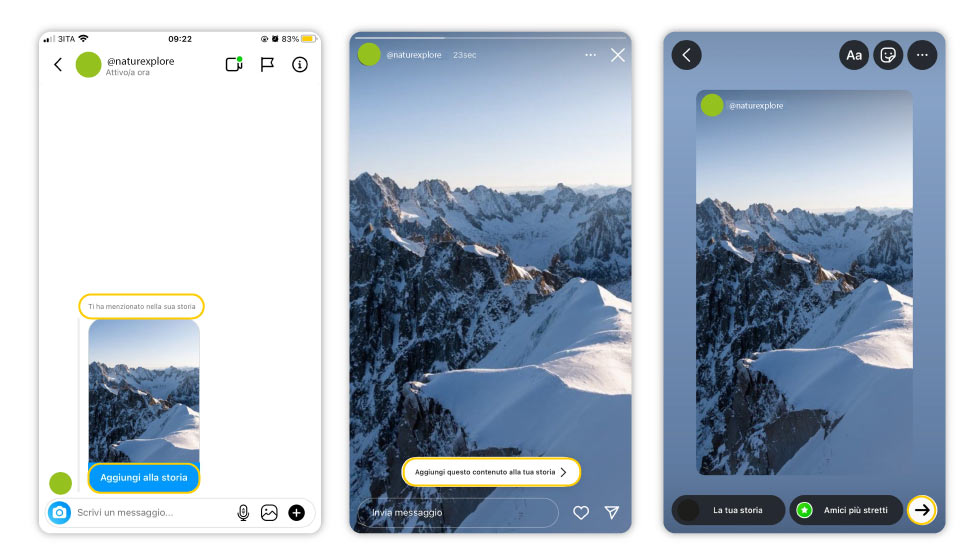
If you’ve received a notification saying you’ve been* tagged* in a story, then you can share it seamlessly on your profile as well.
Open Direct messaging and select the message where the story with your tag is.
Open it and tap “Add to your story.”
You can customize your story from the original content. You can add:
- filters
- gif
- music
- link
- surveys
- liking sliders
- countdown
- weather information and date, etc.
How to share a story on Instagram: Branding tip
If you use Instagram for your business, we’ll give you a smart tip.
Very often brands also include in their social strategy guidelines on the type of content to share and not to share, the font to use, and the best color palette.
These details can affect brand identity and make even a story created by a third-party user recognizable.
If there is no tag, you cannot share
Unfortunately, Instagram does not allow you to share a story in which you are not tagged*. If the profile that shared the story is public, you can direct message it to your friends via private message.
Is there a way to share between stories content in which you are not tagged*?
Yes. You can share posts. Here’s how.
How to share a post in stories on Instagram
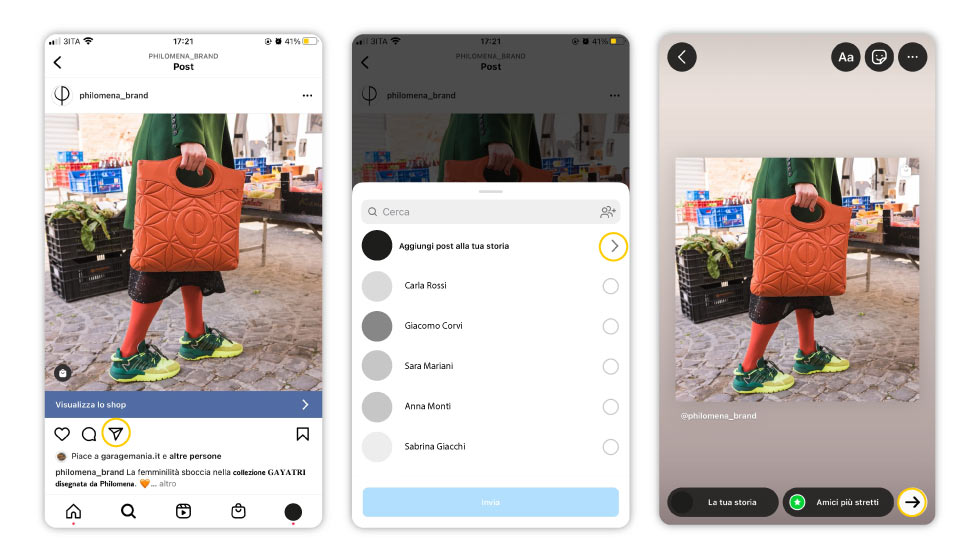
Even if the post does not carry your tag, you can share it in the stories.
Branding advice
You can incorporate this tactic into your corporate Instagram strategy.
Many brands share posts from partners or employees, but not only that. Have you ever thought about sharing topical posts or posts committed to values that are related to your brand and community?
When a brand takes a stand on a hot topic, it is called Brand Activism.
The risk is to come across as disingenuous ( greenwashing is well known) or misplaced. But dosed wisely, and on issues to which you are truly committed, it can strengthen the bonds between members of your social community.
Just below the post, you will find an airplane icon. Tap it.
Then click on the “Add post to your story” option.
Again, you can customize your story as you see fit, taking advantage of all the features of Instagram stories.
Stories in social media strategy

What has been said about Instagram applies to all other social networks that allow sharing stories: Snapchat (indeed, the first to make stories available to users), Facebook, WhatsApp.
For this reason, when building a social strategy, you should not just limit yourself to thinking about what to post and when.
Interaction with users is one of the aspects that have made social networks a beneficial marketplace for brands. A plaza, not a showcase: a place to meet and exchange.
Through stories, you can push users to create content about your brand and become testimonials for your products.
You can strengthen the community and take part in important debates and choices, even to the point of making a difference to society.
In a strong community, followers are not just passive “followers,” users to be approached or customers to be seduced. The brand that succeeds in building around itself a community of people who espouse its values gains trust, affection, and lasting relationships.
This is why Instagram stories (and in general, stories on social) are great tools, if you grasp their potential.
Want to increase the visibility of your channels? Request your personalized social media marketing consultation.
Are you interested in learning more about Social Media Marketing Strategies?
Read these articles:
- What is Engagement, how it is created and why it is so important
- Why does Instagram want to remove likes from posts?
- Instagram consulting for Companies
- The best Hashtags for your Social Media Communication.
- GeoTag Instagram for your Marketing Strategy
- Giveaway on Instagram
- How to enable posting notifications on Instagram
- How to do a Social Media Audit in 5 steps
- Instagram statistical data 2024–need to know