


If you want to advertise on Instagram you should know that Instagram sponsorships have arrived and in this article we explain how to make them in 5 steps!
Advertising on Instagram is a trending topic, today let’s find out together the first steps to make the best use of this tool.
If you are reading this article you have probably typed one of these keywords into Google:
- instagram sponsorship price
- sponsoring on instagram works
- instagram sponsorship price
Factory Communication Marketing and Communication Agency designs and implements for its Clients, Social Media Marketing activities, which aim to generate visibility, market presence, engagement, acquisition of new leads and Clients, sale of products or services.
Instagram sponsorships
Let’s start by listing the possible benefits you can get from your sponsorships:
- Acquire of new followers
- Increase the engagement of your posts: likes, comments, shares
- Improving Brand Awareness
- Acquiring new possible customers: lead generation
- Increase sales of your products and services
- Increase your company’s visibility and positioning in your target market
- Increase your Customers’ sense of belonging and loyalty.
Instagram post sponsorship
Have you noticed something strange when opening Instagram these past few months? You are not mistaken, what you read was indeed the words “sponsored”!
Well, yes, after much rumor, listings have officially arrived in 30 countries, including Italy, after several tests in recent years in the United States.
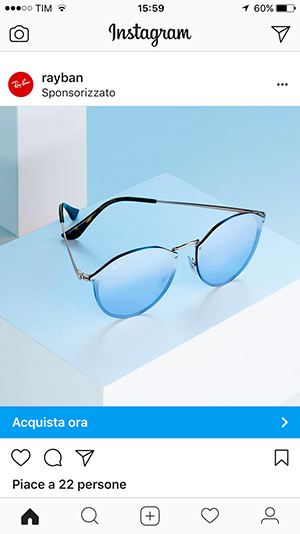
Thus ends the fairy tale of “free is good” even on Instagram: it’s time to start earning money. How? In the style of Social, that is, adding advertisements in the users’ home.
Sponsorship on Instagram blends perfectly with the rest of the feed and is also very pleasant, obviating the problem of invasiveness.
We at Factory Communication, who specialize in social media marketing projects, are intrigued by this additional step offered by the platform.
The new features should enable us to help small and large companies achieve their business goals with inspiring content of the highest visual quality.
Instagram sponsorships: the types of ADSs
There are three types of paid campaigns you will be able to carry out: through photographs, through videos and with carousels.
Using images you can tell any story, giving emotions to users: clearly the photo or graphic you choose must be of a good standard. The format you can choose is square (1080×1080) or rectangular (1200×628).
Instead, with videos lasting up to 30 seconds, and in horizontal format, you can try to engage your audience through the power of evocative images, but with the added bonus of having them in motion and aided by sound.
Last but not least, there is the possibility of creating carousels (carousels) consisting of a minimum of three and a maximum of five scrolling images, so that a message that perhaps through a single image would have been truncated can be shown in more depth.
The minimum resolution allowed is 600×600 px while the maximum is 1936×1936 px, the file must necessarily be in .jpg or .png format with a weight of no more than 30MB.
Sponsoring with Instagram ADS and Specific Call To Action.
Instagram offers the ability toaccurately customize ads by allowing users to perform specific actions.
With traditional and carousel images:
- “Look more” e “Learn more” to direct users to specific external links: for example, a website
- “Buy Now” To get users access to an e-commerce
- “Book now” In case you are the owner of an accommodation facility
Through images and video:
- Ask to do actions pertaining to an app of yours to promote: specifically, you can ask to download or install it.
Instagram sponsorship: your campaign in 5 steps
And now let’s look together at the procedure for creating your first Campaign. If you are wondering “does sponsoring on Instagram work” the answer is yes, especially if you define:
- in a clear way the objectives of the campaign
- which market you want to address
- who is the target audience: buyer person
- the right Budget based on the marketing and business goals you want to achieve.
And now let’s look in detail at the procedure you need to use to create your first sponsorship with Instagram and get tangible results.
1. Link Instagram Profile to Facebook Page.
The procedure is simple and can be done through two different routes:
1. Connect Instagram account via Facebook page settings.
- Go to page settings
- Select from the Left Menu the item “Instagram Ads”
- The system will ask you to link an Instagram account to your page
- Enter Username and password of your Instagram account
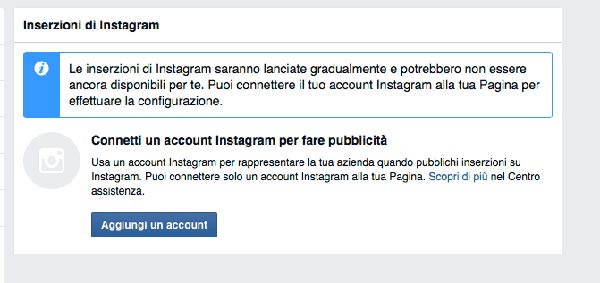
This way your Instagram account turns out to be linked to your Facebook page, every time you use your Facebook page to create an ad you will have the opportunity to show it on Instagram as well.
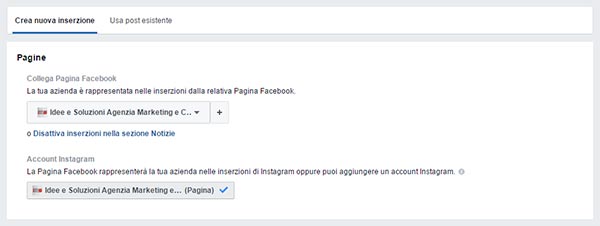
2. Linking in the Ads/Business Manager area.
With this procedure you will make the connection when creating the campaign.
That is, while creating the individual ad, after specifying budget and target audience, before identifying the creative to be sponsored, you can “Add Your Account” Instagram.
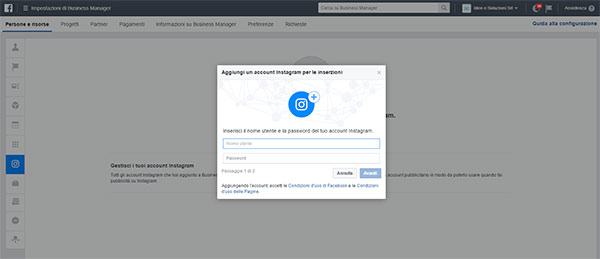
2. Add Instagram accounts in Business Manager
Especially useful procedure for all those who, like us at Factory Communication, manage the Facebook pages of many Clients. In this case it is essential to add the Instagram account also in the Business Manager area:
- Enter Business Manager;
- Select “Settings” in the left column and the “Instagram Account” item;
- Select “Add,” enter the details of the Instagram account to be linked, and then “Save.”
- Select the advertising account to associate with the Instagram profile.
3. Create a campaign for your Instagram ad.
- Log into Business Manager and click on the “Manage Listings” tab at the top of the page;
- Click on “Create Campaign.”
- Enter the Campaign Name and choose an advertising target that supports Instagram ads:
- Highlight your Posts (formats: photos, videos)
- Direct people to your website (formats: photos, videos, carousel)
- Increase conversions to your website (formats: photos, videos, carousel)
- Increase interaction with your application (formats: photos, videos, carousel)
- Get your application installation (formats: photos, videos, carousel)
- Get video views (video format only)
4. Create a listing group for your listing
- Access Business Manager in the “Listing Group” area;
- This is where you will have to specify budget, schedule, interest, cost ec…;
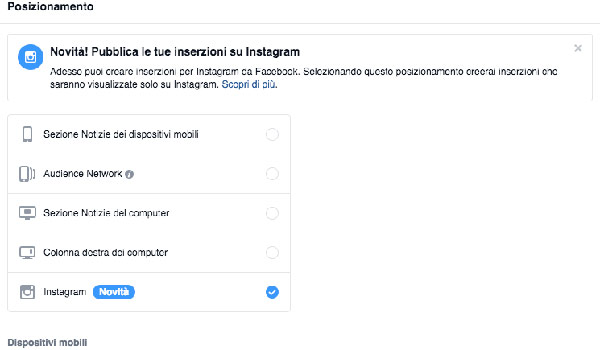
- Choose where to have your ads appear, whether only on Facebook or also on Instagram. To have the ad appear only on Instagram simply check the appropriate item:
5. Create an ad on Instagram
- Access Business Manager in the “Listing” area;
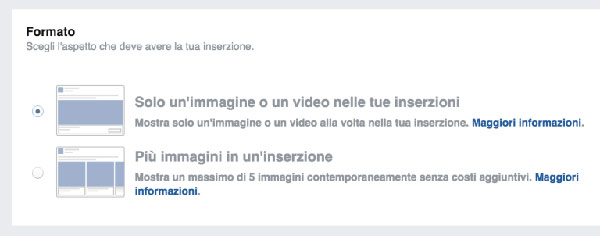
- Choose the format of your ad: just an image (1200×628 pixels), a video or a carousel of images (1080×1080 pixels);
- Complete the details of your ad: text, image and choose your call to action;
- Once you have optimized all fields, see the preview of your ad and proceed with publishing your Instagram ADS.
Do you want to increase the visibility of your Company or Professional Activity on Instagram? Find out how to. Read these articles.
- Discover some Tools to find the best Hashtags for your Social Media Marketing Strategy.
- Instagram Stories. A new visibility opportunity for your company
- Social strategy: find out how to identify the best Hashtags for Instagram!
- Social Media Audit for Companies
- Instagram hides post likes. Why?
- How to share a story on Instagram
- Instagram countdown for your business: 4 ideas to inspire you
- Social strategy example: ‘hhsdjh’ the 6 letters IKEA went viral