


This article takes a cue from an error that is occurring more and more often, during theme and plugin updates in many WordPress sites. Don’t worry you also find some tips on which version of PHP to use to stabilize your website or eCommerce.
Updating themes and plugins fails because these components, in the latest versions, require PHP 8.3 or higher.
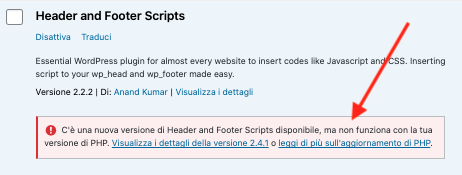
It is therefore clear that the site is using a version earlier than version 8.3, and this puts it in a risky situation.
PHP is the engine that makes your site run, that shows your web pages to the world, and the compatibility and security of this component are critical to the smooth operation of a site and its performance.
As of the date of this article, the most recent stable PHP version is 8.5, released on November 20, 2025 and recently updated to version 8.5.2.
WordPress 6.9, on the minimum requirements page, requires version 8.3. It also works with earlier versions, but you may run into minor or major glitches depending on the themes and plugins installed.
Which PHP version should you use for your site?
The recommended version is definitely the latest 8.5, it is the leanest and cleanest in terms of code, and the best performing, as long as you do not use themes or plugins that have not been updated in a long time.
We have tested version 8.5 on several sites, and are using it to our satisfaction. The advantages are obvious, especially in terms of code cleanliness and performance.
If you notice problems, after upgrading to PHP 8.5, you can assess which site component generates them, theme or plugin, and see if updates to the same are available.
If problems persist, you can try backward through the available PHP versions, however, I recommend that you do not go beyond the minimum useful version, 8.3; earlier versions would be best avoided.
How to verify the PHP version used in your site?
You can find out the PHP version active on your site by poking around in your hosting settings, or thanks to various online tools.
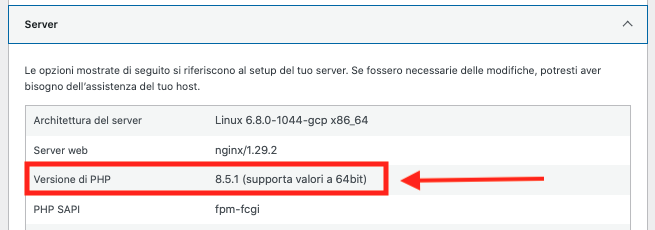
The easiest way is offered by WordPress itself: go to your site’s bulletin board, access the “Tools” menu and select “Site Health.”
Under “Settings” > “Server” the PHP version in use is indicated.
How do you update the PHP version of your site?
To update the PHP version you cannot do it from WordPress, but you have to use the tools offered by the Hosting’s technical control panel, be it cPanel or a proprietary panel. Generally, even the cheapest hosts offer this option.
The PHP versions available for your site depend on your hosting; the best providers usually are very careful about system component updates, and generally make available the latest stable versions, from 7.x to the latest releases.
Unfortunately, some hosting services are not so careful, and the PHP versions available are old and outdated, some still listing version 5.x and stopping at already discontinued versions, such as 7.4 or 8.1.
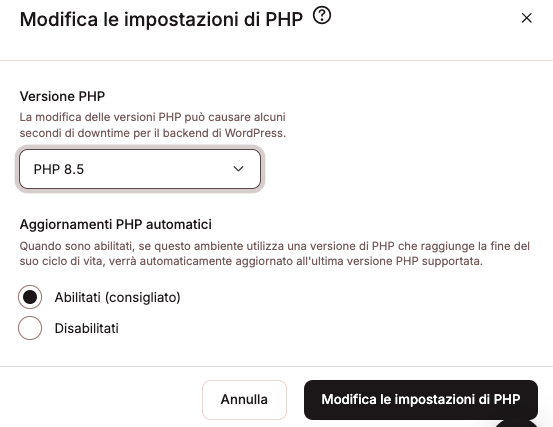
On Kinsta, our flagship hosting, there are PHP versions from 7.4 to 8.5. and each major release is automatically updated for security. Older versions are discouraged, but are still supported to allow older sites to function during migrations.
This in the example is the PHP update tool offered by Kinsta, which is simple and intuitive.
PHP update tips and precautions
Please note: the PHP update is immediate, you can check the outcome right away, and immediately reversible, if something goes wrong you can restore the version you originally set up, and the site goes back to working as before.
- Make a backup of files and database.
- Update the PHP version to the most recent one available.
- If you use a caching system, clear the cache.
- If you notice strings or error warnings on the site or bulletin board, check them carefully because they may be simple warnings that do not cause malfunctions or actual errors, and they can be recognized by the initial [notice] [deprecated ] or [error] markings.
Thanks to these warnings you can trace which component, theme or plugin, is generating them. - If your site shows no apparent errors, but you want to make sure everything is working fine, you can turn on WordPress debugging or comb through the hosting error file.
- If the errors are such that they affect the operation of the site, you can proceed to setting the PHP version immediately prior, e.g., 8.5 to 8.4, and eventually proceed to the version that no longer causes problems.
Life and death of PHP versions
The life of a PHP version is characterized by three phases:
- Active Support: the version is supported in all aspects: enhancements, implementations, bugfixes and especially security.
- Security Support: version is no longer developed, no longer receives updates regarding enhancements and implementations, only security updates.
- End of Life: the version is no longer supported, not even for security updates; it has basically ended its life cycle and, while functional, should no longer be used.
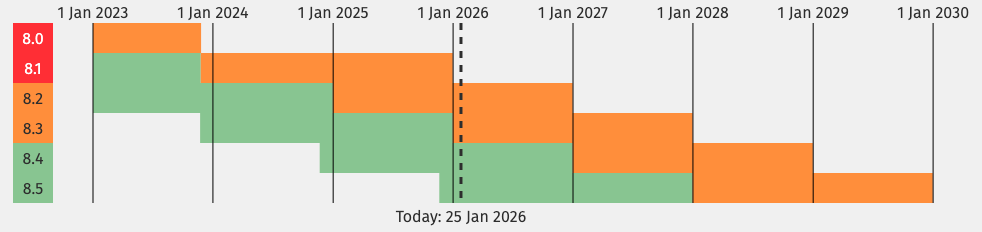
As can be guessed from the image, the PHP versions currently active in all respects are 8.4 (until 31-12-2026) and 8.5 (until 31-12-2027), after those dates they will become “Securiry Support” and receive only security updates for a limited period of 2 years.
They receive only security updates for versions 8.2 (until 31-12-2026) and 8.3 (until 31-12-2027).
They no longer receive any updates, support or security that is, End of Live versions such as 8.1 and all previous versions, which are to be considered defunct for all intents and purposes and would be best not used any more.
In conclusion
Using the latest version of PHP offers greater overall site performance, and compatibility with the latest, increasingly demanding themes and plugins.
An updated PHP also provides as much security as possible, regarding this important component of Web sites, which is always highly targeted by malicious attackers of all kinds, who try to exploit known vulnerabilities to do damage.
Do you need assistance?
Updating PHP is a relatively simple practice, but I understand that it may seem challenging to the uninitiated.
If you have any doubts about what PHP version you are using, if you are apprehensive about upgrading PHP, or if you encounter any errors on your site, please contact us without fail for all the necessary verifications.
Roberto Salandin
Factory Communication Staff
WordPress site maintenance: related articles
- WordPress 6.9.4 updates: critical security maintenance
- Breadcrumbs: What they are and what they are for!
- What is Kinsta and why it is critical for your site
- WordPress site security with 2FA dual authentication
- WordPress backup: how is your company set up?
- llms.txt indexes your site for ChatGPT and Gemini
- Fast hosting for WordPress: why it’s critical for SEO
- Schema.org what it is and why it is critical for SEO
- WordPress xml sitemaps: how to submit them to Google?