


In this article we look at how and why to perform WhatsApp HubSpot integration: a Guide for Entrepreneurs and Business Managers
Native integration between HubSpot CRM and WhatsApp to respond to messages from leads and customers directly from your phone has arrived.
A real game changer for customer service and for marketers who want to build direct relationships between companies and users.
If you have come to this article you are probably wondering how:
- Connect a WhatsApp business account as a marketing channel connected to HubSpot
- Using WhatsApp for customer service in HubSpot
- Automating marketing activities on WhatsApp with HubSpot
In today’s digital age, integrating effective tools into the CRM system can mean the difference between the success and failure of a business strategy.
WhatsApp, with its more than 2 billion monthly active users, together with HubSpot, a leading platform in CRM, inbound marketing, sales and customer service, offers a powerful combination for businesses.
Let’s see why an entrepreneur or sales manager should consider this integration and what benefits it can bring.
Why Integrate WhatsApp with HubSpot?
- Instant Communication: WhatsApp enables near-instantaneous communication with customers. Integrating WhatsApp into HubSpot allows companies to manage these communications in a more organized manner, tracking interactions within the CRM for a complete view of customer activity.
- Customer Service Personalization: Using HubSpot, companies can segment customers and personalize messages on WhatsApp based on previous interactions, interests, and demographics. This increases communication effectiveness and customer satisfaction.
- Automation and Efficiency: The integration enables automation of certain communications, such as automated responses, purchase notifications, and order status updates. This reduces the workload of the customer support team and improves the overall customer experience.
- Improved Lead Nurturing and Sales: HubSpot can use data from WhatsApp to nurture leads more effectively and move them through the sales funnel with timely and relevant communications.
Benefits of Integration
- Increased Customer Engagement: The direct and personal nature of WhatsApp, combined with HubSpot’s analytical capabilities, can lead to a significant improvement in customer engagement.
- Optimizing Marketing Campaigns: By analyzing interactions on WhatsApp through HubSpot, companies can refine their marketing strategies to be more targeted and effective.
- Operational Efficiency: Centralizing customer communications and data in one system reduces complexity and improves operational efficiency.
- Improved Customer Support: With integration, companies can offer timely and personalized support, increasing customer satisfaction and loyalty.
The integration does have some limitations, however, chief among them being that it is only available to Professional and Enterprise level HubSpot accounts.
Everyone else will have to continue using third-party applications to connect the CRM and messaging app.
Does integrating WhatsApp and HubSpot improve Marketing and Communication Strategies?
More and more companies are using WhatsApp Business as a customer relationship tool. In fact, we are talking about the most popular instant messaging app in Italy: an indispensable tool to get in touch and establish a direct line with leads and customers.
Among the most popular and beneficial uses of WhatsApp and the HubSpot CRM is undoubtedly Customer Care, a field that requires a direct and constant relationship between the brand and its acquired or potential customers.
Marketing and communications can also benefit from the widespread reach and immediacy of Meta chat, a perfect resource for sending direct and effective communications.
Integration with HubSpot has been in the air for years because it is a major need among CRM users, who until now have had to rely on third-party applications to integrate the two platforms.
With this integration, it will be even easier and faster to collect data from the new contacts and turn them into customers.
In fact, you will be able to manage from one platform information that was “separate” before, giving your users immediate feedback in chat, for every need.
Companies today are increasingly looking for a “smart” solution to create a direct communication channel with their people. Undoubtedly, therefore, the integration of WhatsApp with HubSpot is important to make marketing and communication strategies even more effective.
Does it help you increase sales?
Many times marketing and communication strategies are ineffective because they use tools that cannot communicate with each other. This makes it more difficult to hit the main goal of all businesses: increasing sales.
A website or e-commerce can have multiple points of contact with the user:
- Information request form;
- Newsletter subscription form;
- Chat and chatbots;
- Integration with WhatsApp or other messaging system.
However, if these sources are managed separately, it is difficult to get a complete picture of the demands, with the risk of creating inefficiencies, errors, or lost sales opportunities.
Integration with Hubspot allows all data to be collected in a single container, improving the strategy to increase sales.
There is one catch, however: the newly available native integration works only with HubSpot’s Professional and Enterprise solutions.
Integrating WhatsApp with HubSpot: useful info
Now let’s look in detail at some useful information before proceeding to the integration of the two platforms.
What you must have before you start
To natively integrate the two platforms and use WhatsApp as a HubSpot inbox channel you must have:
- Administration permissions for your company’s Meta Business Manager account
- A verified WhatsApp Business account from Meta Business Manager
- A HubSpot Marketing Hub Professional (Enterprise) or Service Hub Professional (Enterprise) license;
- The URL of your website
- The institutional e-mail address
- The legal name of your company and the name displayed on your WhatsApp channel
- Access to a business phone number from which to send messages, enabled to receive calls. It must not be part of an Interactive Voice Response (IVR) system or be disabled for a certain period.
Please note: The phone number you want to use for integration with HubSpot must not be connected to another WhatsApp account, the WhatsApp for Business app, or another WhatsApp integration. If the number is already associated with another WhatsApp account, you must disconnect it before connecting it to HubSpot.
WhatsApp HubSpot: limitations
We list below some limitations that you need to take into consideration:
- Each WhatsApp for Business account can have up to 25 phone numbers associated with it.
- Only new messages after connecting the WhatsApp Business account will be synchronized with HubSpot. Historical WhatsApp conversations will not be synchronized.
- After you connect WhatsApp to HubSpot, messages will no longer appear in the WhatsApp mobile app or web app, but only in the HubSpot account’s conversation inbox.
- Due to Meta requirements for using WhatsApp integration, it is not possible to link a personal WhatsApp account to HubSpot, but it is necessary to link a Business account.
How HubSpot and WhatsApp work
To connect WhatsApp and HubSpot, go to your HubSpot account settings and click on the “Inbox” item. Then connect a new channel, choosing the WhatsApp option.
Then, follow the wizard by entering all the required information.
1. Log in to your HubSpot Account and access the Conversations section > INBOX
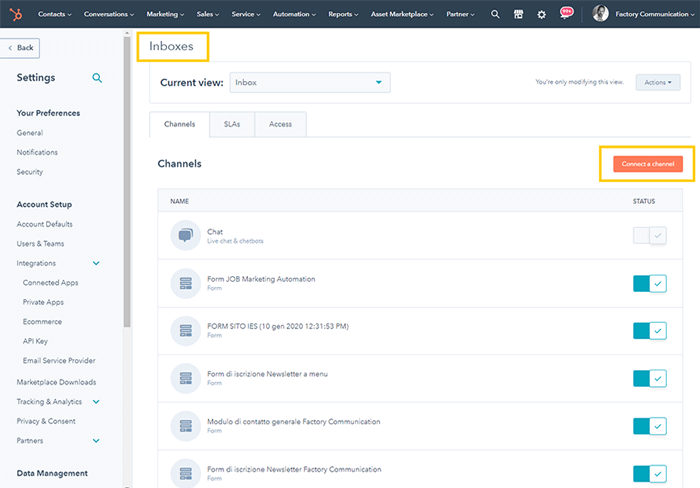
2. Select the integration with WhatsApp.
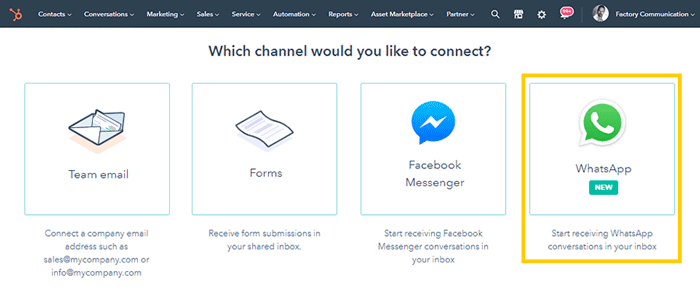
3. Select “Continue with WhatsApp.”
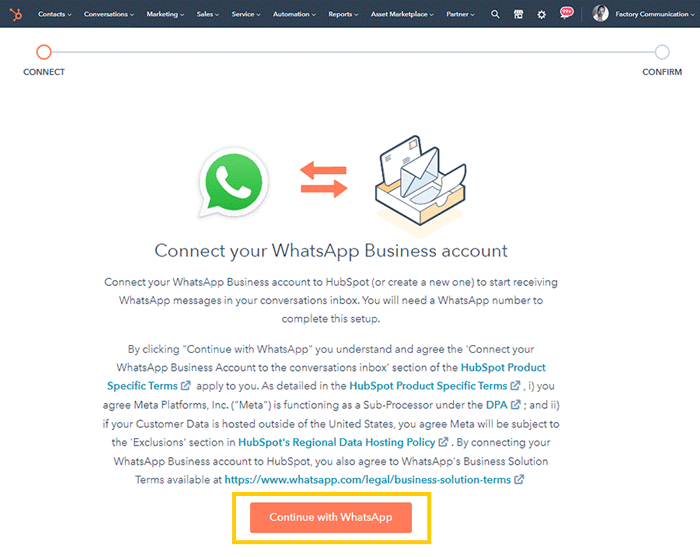
4. You will be asked to choose the “Facebook Profile” you want to use to make the connection.
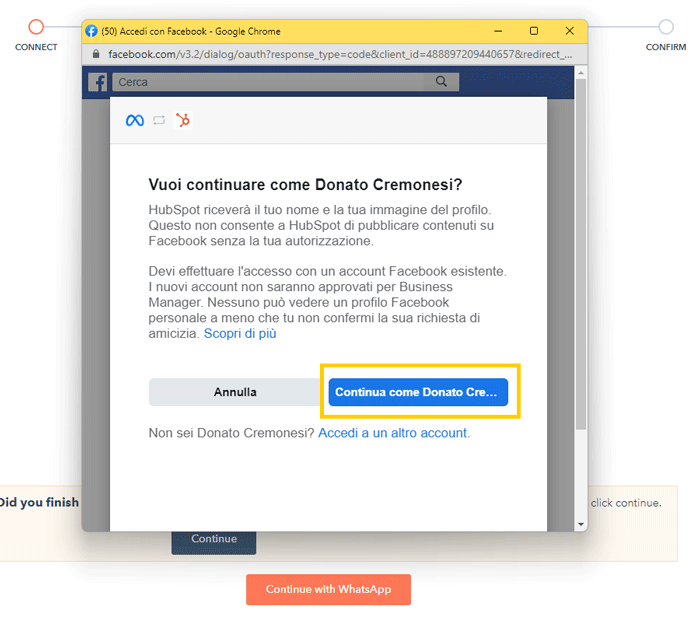
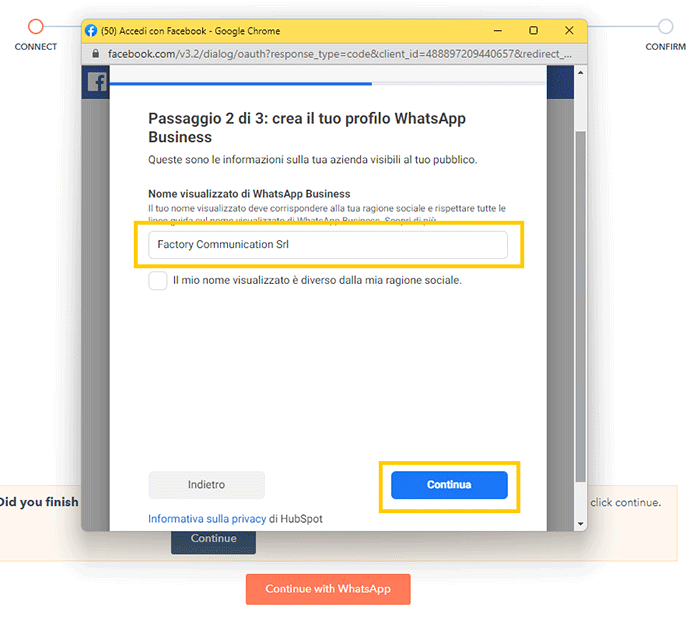
5. Here you must enter the name of your business.
6. If your phone number is already associated with a WhatsApp Business Account you will need to disconnect. See link provided in the article.
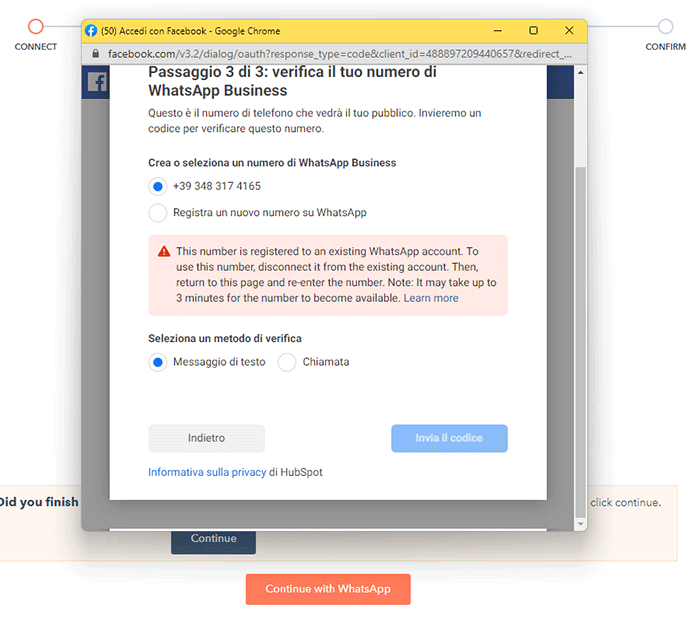
N.B. If you use a phone number already associated with a Business Account during the synchronization process, WhatsApp will ask you to delete it using this procedure:
https://developers.facebook.com/docs/whatsapp/cloud-api/get-started/migrate-existing-whatsapp-number-to-a-business-account
At this point you have connected the two platforms.
Now your customers can start contacting you on WhatsApp. Whenever a message arrives, you will receive a notification. If you don’t want to receive any, however, you can change this setting.
HubSpot and WhatsApp: information management
When the message arrives from a new number, a new WhatsApp inbox conversation thread opens in HubSpot.
You can respond for the duration of the messaging session, which expires 24 hours after the last response from the client.
What if you haven’t made it in time to respond? You can send a preset message. As soon as you receive a response from your client, a new 24-hour session will open.
You can use the service from both desktop and mobile with the HubSpot app. You can send audio messages, voice notes, stickers, pictures, videos.
Not only that, based on your users’ privacy permissions and consents, you can also create automatic message templates to send to your opt-in list of users.
An excellent opportunity if you want to combine automation and personalization in customer care and marketing.
Integrating WhatsApp with HubSpot: other possible solutions
To integrate WhatsApp with HubSpot, companies can use several solutions, including:
Zapier
This tool allows HubSpot to be connected to WhatsApp Business via customized workflows, automating the transmission of information between the two platforms.
WhatsApp Business API
For companies with more complex needs, direct use of the WhatsApp Business API can offer greater flexibility and customization in integration with HubSpot.
In conclusion, WhatsApp integration in HubSpot offers numerous benefits for business owners and sales managers, from personalization and automation of customer communications to optimization of marketing and sales strategies.
By exploring the different integration solutions available, companies can find the best path to make the most of both platforms.
Are you considering adopting HubSpot?
If you are considering switching to HubSpot, you will probably want to know about these aspects:
- Highlights of the CRM platform and its 4 modules;
- What are the advantages over a classical CRM;
- What you should evaluate to choose between HubSpot Starter and Professional;
- The services that Factory Communication can offer you as a HubSpot partner.
Want to find out how HubSpot can improve your Company’s Marketing and Communication Strategies?
Factory Communication is a Hubspot Agency in Italy, book HubSpot Consulting for your Company.
For quick contact, write to info@factorycommunication.it
If your goal is to understand how best to use HubSpot in your Company, you can inquire about one of our HubSpot courses.
If you want to find out how HubSpot in Italian can improve your company’s business you can book a free demo with our HubSpot consultant.
Do you want to use WhatsApp and HubSpot for your Business? Read these articles
- Selling on WhatsApp: strategies to increase sales
- WhatsApp catalog: what it is and how this new sales tool works
- WhatsApp marketing: if you’re not using it yet, start now
- Finding customers with WhatsApp and Telegram
- HubSpot Newsletter: how to read the Dispatch Report
- Hubspot Customer Relationship Management for Businesses
- Lead Generation on LinkedIn with LinkMatch for Hubspot