
Creating a social network with WordPress represents an affordable, scalable and highly customizable solution for those who wish to launch a social platform without facing prohibitive investments or high technical complexities.
In recent years our agency has been involved in the creation of 2 communities for innovative start-ups.
We chose WordPress for the creation of these eCommerce community platforms.
In today’s digital landscape, the ability to build an active and engaging community is a key asset for any entrepreneur.
In this article we look at the reasons why it pays to create a social network with WordPress, the main strategies to adopt, and the most effective tools to get real results.
Why create a social network with WordPress
1. Accessibility and ease of use
WordPress is one of the most popular CMS platforms in the world, prized for its intuitiveness and large community of developers and users.
Creating a social network with WordPress means having an easy-to-use content management system, even for those without advanced programming skills.
With a wide range of specific plugins, the platform allows you to add social features in just a few clicks, customizing every aspect of the community to suit your business needs.
2. Low cost and scalability
Compared to custom development of a social platform, creating a social network with WordPress can significantly reduce initial and management costs.
Most social plugins offer free versions with basic functionality and premium plans for those who wish to expand the possibilities of their network.
This approach allows you to start with a minimal investment and scale the platform over time, based on community growth and business goals.
3. Customization and total control
WordPress offers a high level of customization.
You can choose from thousands of WordPress themes and plugins to adapt the graphic appearance and functionality of the social network to the specific needs of your target audience.
From managing user profiles to member interactions, from creating thematic groups to discussion forums, every detail can be configured to provide a unique user experience consistent with corporate identity.
The main features of a social network created with WordPress
Quando si decide di creare un social network con WordPress, è fondamentale consentire agli utenti tutte le funzionalità tipiche delle piattaforme social media più evolute. Ecco le principali:
- User profile registration and management: Each member can create a personal profile, which can be customized with photos, information, bio and interests.
- Creation of thematic groups and communities: Users can join interest groups, participate in discussions and share specific content.
- Private messaging and notifications: You can send direct private messages between users and receive notifications about community activities.
- Discussion Forums: Spaces dedicated to discussion and exchange of views on topics relevant to the community.
- Activity stream: A feed updated in real time with posts, comments, likes and other interactions.
- Role and permission management: The administrator can define different levels of access and moderation to ensure security and quality of interactions.
The best tools for creating a social network with WordPress
BuddyPress: the free and versatile solution
BuddyPress is the best known and probably the best plugin for creating social networks with WordPress.
Called “social networking in a box,” it offers all the essential features for building an active community: personalized profiles, private messages, groups, forums, activity streams, and more.
Its modularity allows only the necessary components to be activated, optimizing platform performance.
BuddyPress is free and supported by an international community of developers, which provides many additional extensions to expand functionality.
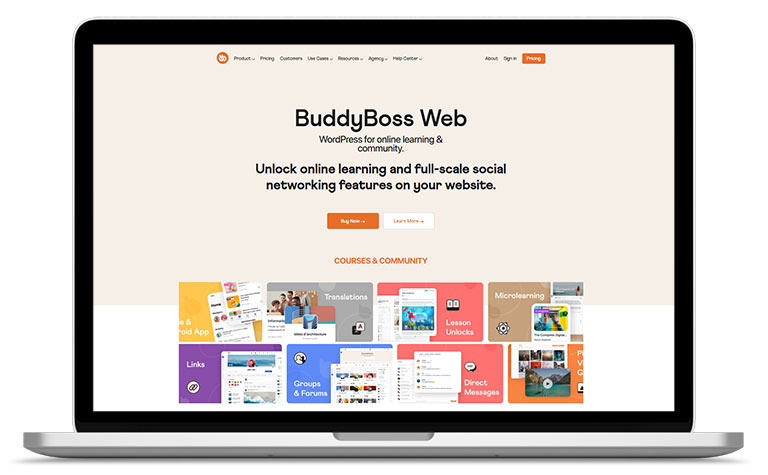
BuddyBoss: the premium platform for advanced communities
For those who want an even more advanced user experience, BuddyBoss is the ideal choice.
It is a premium platform, based on WordPress and fully integrated with BuddyPress, offering a modern, responsive and highly customizable interface.
BuddyBoss allows you to manage forums, groups, activities, membership, integration with e-learning systems (LMS) and more.
The free version offers basic functionality, while the Pro version unlocks the full potential, including integration with advanced monetization and analytics tools.
Users Ultra: advanced user and membership management
Another interesting solution is Users Ultra, a plugin that allows you to create a community with WordPress quickly and easily.
In addition to basic profile management features, Users Ultra Pro allows for the implementation of paid membership systems, differentiated access levels, and friend and follower management.
Ideal for those who want to create a social network with WordPress geared toward monetization and user segmentation.
Strategic advantages for the entrepreneur
The benefits that a business or association can gain by creating its own online community are many.
1. User retention and engagement
Creating a social network with WordPress allows you to build a loyal and active community around your brand.
Users who actively participate in groups, forums and discussions are more likely to become repeat customers and brand ambassadors, contributing to the organic growth of the platform through digital word of mouth.
2. Data collection and behavioral analysis
By running a proprietary social platform, the entrepreneur has access to valuable data on users’ habits, preferences and needs.
This information can be used to improve product and service offerings, personalize marketing strategies, and optimize the customer experience.
3. Monetization and new business opportunities
A social network built with WordPress can become a source of income through various monetization models:
- Integration of an eCommerce for the sale of products and services
- premium subscriptions
- sale of advertising space and guest posts
- partnerships and sponsorships.
By integrating with membership plugins and payment systems, it is possible to diversify revenue and increase project profitability.
How to create a social network with WordPress: operational best practices
1. Define the target audience and value proposition
Before starting to create a social network with WordPress, it is critical to identify the target audience and define the unique value proposition that the platform will offer.
Analyze competitors, identify unmet needs, and build a community around specific interests.
2. Choose the plugin best suited to your needs
Evaluate the features offered by the major plugins (BuddyPress, BuddyBoss, Users Ultra) and select the one that best meets the goals of your project.
Consider scalability, ease of customization, technical support, and integration possibilities with other digital tools.
3. Customize the design and functionality
Use WordPress themes compatible with the chosen plugin to ensure a smooth user experience consistent with brand identity.
Customize colors, fonts, icons and main pages to make the platform unique and recognizable.
4. Promote the community and stimulate engagement
Once the social network is launched, invest in digital marketing strategies to attract new users and stimulate participation.
Use newsletters, social campaigns, exclusive content and rewards to incentivize community growth and retention.
5. Monitor, optimize and innovate
Constantly analyze platform performance through analytics tools.
Gather feedback from users, identify areas for improvement, and implement new features to keep engagement and satisfaction levels high.
Creating a social network with WordPress: conclusions
Creating a social network with WordPress is a strategic choice for the entrepreneur who wants to build a proprietary community, increase customer loyalty and generate new business opportunities.
With its flexibility, low cost and wide range of available tools, WordPress allows you to transform your website into a customized, secure and scalable social platform.
Whether you want to create a social with WordPress for your company, a niche market, or a personal project, today you have all the resources at your disposal to turn your idea into a successful digital reality.
If you want to deepen your knowledge of Social Media for Business, also read these articles:
- Social Media Audit for Companies
- TikTok for Business: practical examples for your strategy
- Web and social networks: is it essential to have both?
- Does your social media marketing strategy include advertising on Instagram?
- Facebook follower analysis Company page
- Create Shop on Facebook to sell Products
- Groups on LinkedIn: Why use them for your Business