



In this article we look at the Facebook Pixel what it is, how to use it, and why it is important!
Anyone who has a business knows the value of having a presence on the web with their own site and monitoring the actions that are performed on it in the case of activated PPC (Pay per Click) campaigns.
If you are reading this article you probably typed one of these keywords into Google:
- facebook pixel code
- create facebook pixel
- create facebook pixel
- facebook pixel creation
- pixel facebook event management
- facebook pixel where can I find it
- goal pixels
Regardless of the search that brought you to our site you can now relax. You are in the right place.
But the Facebook pixel what is it?
It is a fragment of Java Script code thanks to which it is possible:
- Find out how our site visitors move from device to device by going to measure conversions across multiple devices.
- Finding the people who like your company, i.e., optimize ad placement by reaching the people who might execute the call-to-action and thus be converted from leads to customers.
- Autonomously create audience segments composed of those who have already visited our site, thus going about re-targeting, increasing interest in our products/services and creating a similar audience to those who already fall under customers.
- Optimize and measure the effectiveness of existing advertisements and to create dynamic advertisements, relevant to products that visitors to our website have already viewed, i.e., leading us to reach people who are most likely to perform actions.
- Get Insight data on the users who visit our Web site, measure the number of conversions generated by our advertisements while also calculating the return on investment.
What are conversions?
Conversions are actions that a person performs on your Web site, such as purchasing, registering, adding an item to a shopping cart, or viewing a particular page.
Virtually any page on your Web site can represent a conversion, and you can create and add the Facebook pixel code on any page on your Web site.
Conversion Monitoring…what is it for?
Using the conversion tracking pixel tool, you can create JavaScript code to add to your Web site.
This code places a 1×1 pixel, nearly invisible image on your Web site that sends a message to Facebook when someone visits your site or performs an action.
You can place these pixels on the pages you wish to monitor.
For example, if you want to track purchases, you can add the conversion tracking pixel on the payment confirmation page that people see after completing a purchase.
When a person loads the page in question, the code tells Facebook that a conversion has taken place.
Facebook then compares the conversion action with the group of people who viewed the ad or clicked on it, allowing us to provide you with useful information to determine the return on your investment.
Conversion tracking also helps you show ads to people who are likely to convert on Facebook.
Facebook pixel what is it for?
The Facebook pixel is a JavaScript code snippet on your own Web site that allows you to measure your advertising campaigns, optimize them, and define their audience.
By using the Facebook pixel, you can leverage actions performed on your Web site on different devices to create more effective Facebook advertising campaigns.
Here’s what you can do thanks to the Facebook pixel:
- Measure conversions across multiple devices: Find out how your customers switch between devices before converting.
- Optimize posting by reaching people who might perform the action: make sure your listings are seen by people who might perform the action you want, such as making a purchase or filling out a form.
- Automatically create audience segments composed of the people who visit your Web site to perform re-targeting
- Create a custom audience composed of the people who perform specific actions on your Web site, such as those who have visited a product page, added something to a shopping cart, or purchased a product.
The benefits of using the Facebook Pixel.
In recent years, digital marketers who operated professionally on Facebook have been provided with highly effective operational tools for conversion tracking and custom audience tracking: pixels.
From today it is possible to do everything we have always done, and much more, by inserting just one component the “Facebook Pixel.”
This certainly results in 3 times faster loading times, as demonstrated by Facebook developers, but not only that…substantial improvements in SEO and fewer conflicts.
Facebook pixel how to install it after iOS 14 updates
Before we get into technicalities and explanations, it is essential to say that Facebook and the other Social Channels provide so many useful marketing tools to reach our potential customer. Our Buyer Persona.
As we often say, social amplifies your communication and can help you increase customers, leads and sales.
With thearrival of iOS 14, the information tracked by the pixel is limited and a certain procedure must be followed in order for it to continue its tracking action.
Is your pixel active on your site?
The extension Facebook Pixel Helper is the most practical solution to analyze in a few moments whether it is active and what event it is tracking.
This tool provided by Facebook in addition to helping you track conversions, is used to create custom audiences (custom audiences) and to show ads to a very specific audience.
If you are a Facebook advertiser, you surely have come across the iOS 14 facebook ads issue in the last period.
You may have read notices such as:
Important changes affecting web events
Apple has announced changes with iOS 14 that will impact the way we receive and process events from tools such as the Facebook SDK and the Facebook Pixel.
In response to these changes, we have replaced the existing account attribution window with a new default ad group attribution setting of 7 days from click and 1 day from display as of January 19, 2021.
Although these changes do not affect the publication of listings, the new default attribution setting may result in a decrease in the number of indicated conversions.
Or:
Facebook aggregate event measurement now available
Aggregate event measurement is an ad performance measurement protocol that processes web events from deactivated devices to help you run effective ad campaigns while supporting customer choices about ad tracking within our Facebook platform.
All of this will and is having an impact on how we track our campaign data, and more specifically on conversion events.
In fact, in many accounts you will have come across the following error/warning while trying to set the specific goal of “conversion” campaigns:
This event has not been configured on any of your domains. In the future, ad groups that use this pixel and are optimized for adding payment information will be paused unless you change your available events in Ad Management.
Effects of Apple’s iOS 14 update on listings
With the release of iOS 14, Apple announced changes that will affect the way we receive and process conversion events from tools such as the Facebook pixel.
These changes will affect companies that advertise mobile apps, as well as those that optimize, target and create reports based on web conversion events from any of our business tools.
How it works.
Your domains will be configured with 8 events from your existing pixel, and Facebook will assign your events an initial priority based on historical importance to your business.
We will apply aggregate event measurement to events for people on devices running iOS 14 that choose the event with the highest priority to be sent every time a customer performs multiple actions during a conversion window.
Conversion data will be available for publishing iOS 14 ad campaigns and measurement reports.
Setting Facebook pixels according to the new guidelines.
- Domain verification with Facebook Business Manager
- Choice of method to verify the domain
- Authorize outbound traffic from the Facebook pixel
- Manage conversion events available to you on Facebook
- Configure web events and track user activity on your site
1. Facebook pixel installation: domain verification
The first thing to do is to go to the Facebook business manager settings.
Once in the BM settings in the left sidebar click on “Brand Safety” and then domains.
Here we need to add the domain of the site (without http/https and without www).
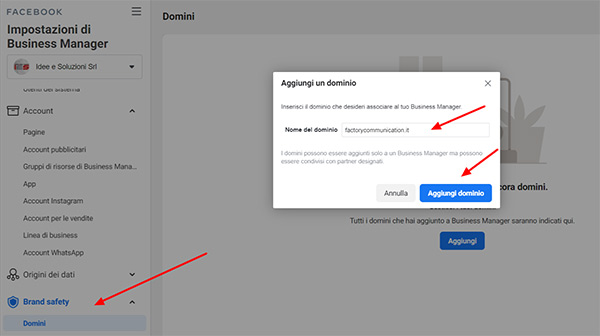
2. Choice of method to verify the domain
After adding your domain, there are 3 methods available to you to proceed with verification (very similar to Google Analytics or Google Tag Manager).
In fact you can choose from:
- Meta Tag: to be copied into the head section of your site’s home page
- Uploading the HTML file: this function is effective but varies depending on the CMS used e.g. those using HubSpot must use the meta tag or verification via DNS.
- DNS verification: you will need to enter a record within the DNS management panel (level pro)
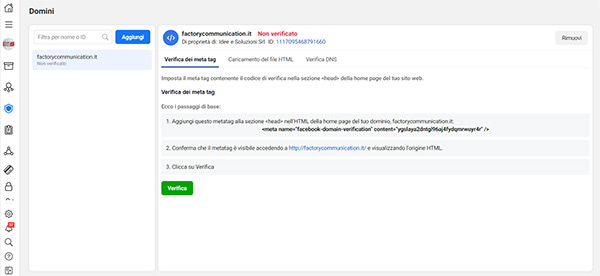
In this way we have verified our domain, that is, we have told Facebook that we have ownership of the domain to which our campaigns are or will be targeted.
Now the next step is to add resources to the domain, that is, to “tell” Facebook which page we want associated with that domain.
- So still from our BM and still on the “brand safety – domains” heading we go to the “resources” tab of our newly verified domain, click on add resources and from the window that appears we search for our page (in case we have more than one linked to the BM).
- We select the page and confirm.
- Now the last thing to do in this section is to give the page permission to be able to edit the domain links in the listings. In the “domain access” tab, select your Facebook page that appears in the list and confirm.
3. Facebook pixel management: authorize Pixel traffic.
After registering the domain, we will move on to authorizing traffic related to our domain.
To do this, you must enter the “event management” section of the pixel associated with your page/advertising account.
Once the pixel management dashboard is open, by clicking on the “settings” item we can access the specific section to edit “traffic permissions” and go to create a list of allowed or blocked items.
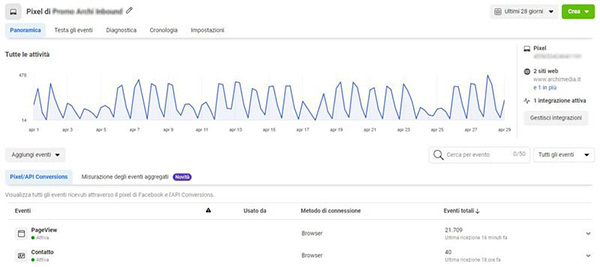
4. Manage the 8 conversion events available to you
After registering the domain, we will move on to authorizing traffic related to our domain.
The last and most important step is to define the 8 events that your pixel will continue to track.
Returning to the main page for pixel management, clicking on the “aggregate event measurement” item allows you to proceed with configuration.
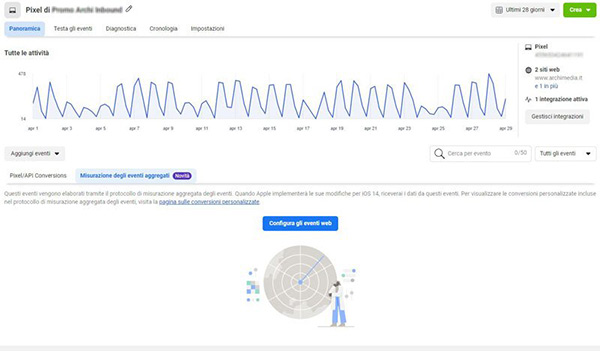
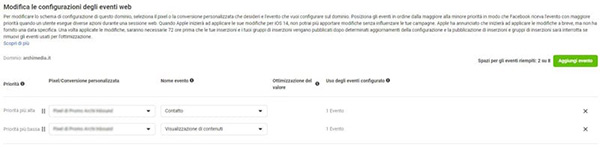
5. Configure web events
After registering the domain, we will move on to authorizing traffic related to our domain.
By clicking on “Configure Web Events” and making sure we have selected the correct domain, we can go and set up the events we want to track.
Usually those most used for a site that does not deal with online sales are contact acquisition and landing page display.
After entering events you can save the settings and continue tracking user activity on your site.
What will change for your digital marketing strategy?
This limitation on the part of iOS will surely affect the performance of Facebook ads especially for campaigns that have always used very specific custom audiences.
If you have always usedFacebook adv as an endorsement tool and not as your main marketing tool, you need not worry.
If you already have an effective lead generation strategy in place, one that moves on multiple levels and not just through Facebook campaigns you will continue to generate leads online without any problems.
The strategy of Inbound Marketing teaches just that, it shows you how not to be dependent on a single tool but to use all marketing tools synergistically with each other.
If you haven’t done so yet, download your guide now and learn how to optimize your digital strategy using Inbound methodology.
Did you find this article interesting? You can explore further by reading these articles.