


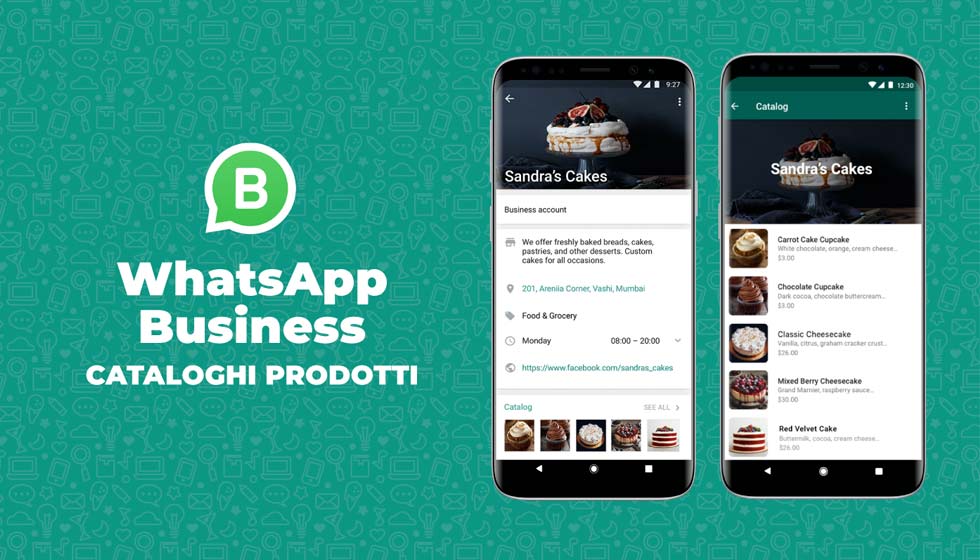
In this article we look together at what the WhatsApp catalog is, how to use it, and why it is useful to the business of Companies.
Catalog sharing allows small businesses to promote their catalog and reach more potential customers.
WhatsApp Business users can send the entire catalog to customers they are already in contact with.
They can also share links to the catalog via social media and other platforms so that more people can discover their company.
Catalog links allow companies to send messages directly to customers about their products or services.
WhatsApp catalog: what is it?
Have you heard about this interesting news yet?
Just announced and already present on some accounts, soon, allow all WhatsApp Business users to have a kind of E-commerce available, directly uploading the product catalog to WhatsApp.
Users of the WhatsApp Business application can share products and services with customers by creating a catalog that will be displayed in their business profile.
In short, a new online sales tool, especially useful for all small businesses that want to sell online, at no cost.
Of course, it goes without saying that this system has limitations, but we can say that it is an interesting starting point in a “future shop” perspective.
To us, this novelty certainly intrigued. Let’s find out together how it works.
Some technical information. Each product or service in the catalog has a unique title and optional fields:
- price
- description
- website link
- product code
With these details, customers can locate products in the catalog. A catalog can contain up to 500 items.
An updated catalog allows customers to browse a company’s range of products or services and contact it. Customers can share items in the catalog with friends or send a message to the company if they have questions.
How does the WhatsApp Catalog work?
Today, it is the turn of WhatsApp, with its product catalog that enables businesses to improve interaction with their customers at the online sales stage.
One more tool, in short, to sponsor and sell one’s products online, through WhatsApp, one of the most widely used communication tools today.
In short, WhatsApp Business account owners who have products to sell or for sale on their e-commerce can use them to do promotion on WhatsApp directly from the chat as well.
How to open the first Catalog of WhatsApp?

As already anticipated, in order to create your Product Catalog on WhatsApp, you must own a business account.
By clicking on the “More Options” button to understand the 3 dots in the upper right corner and following this path:
Settings > Activity Settings > Catalog
you will be able to access the new menu where you can finally create your first Product Catalog on WhatsApp.
If you do not see this option, update the WhatsApp Business app.
WhatsApp catalog: creation procedure
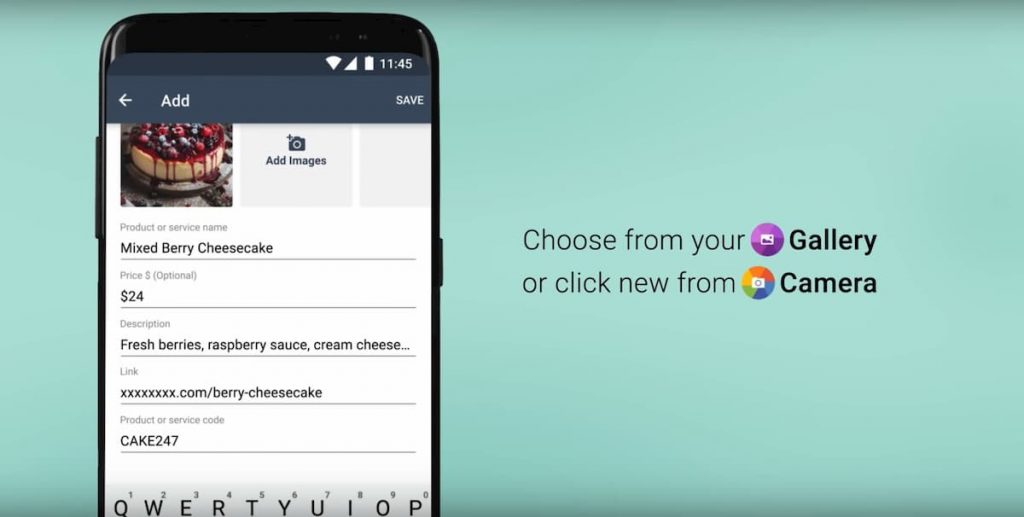
- Click on the “Add Product or Service” button.
- Next step to add the first product on the WhatsApp catalog is to click the Green colored “+” icon and add the first image of the product. You will be able to upload it either from the gallery or take a live one via your smartphone camera.
- Enter the details of the product you want to appear such as Name, and price.
- By clicking on other details, you can also enter a Description where you can give additional information such as Size, Model, product link and product code.
- Click “Save” to have your first product displayed online.
As with Facebook PPC Campaigns, the system checks and verifies that uploaded images are suitable and comply with sales policies.
WhatsApp catalog: how does it work?
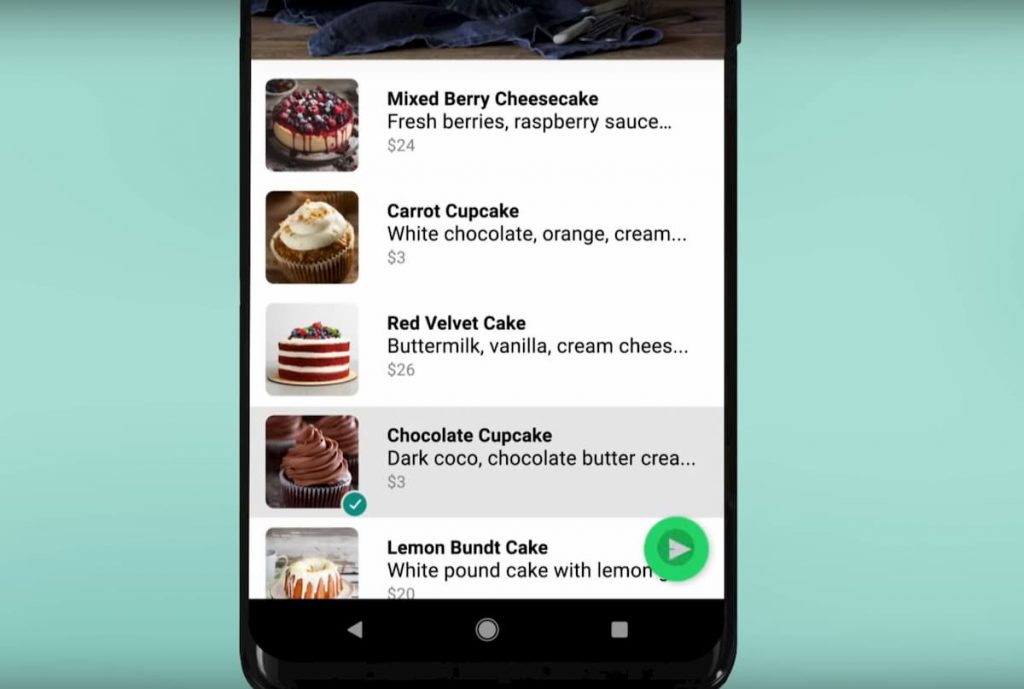
Is your product catalog ready to go?
Now you will be able to share, quickly and quickly, the products you have entered.
In this way, your customers, will be able to see at a glance your products, their price and their technical information that, otherwise, you would have to describe in every chat.
In addition, from the settings menu of the application you can share, via short link, the entire catalog so you can show all your contacts the full range of your products.
WhatsApp catalog: the advantages of use for small businesses

Multiple and intuitive advantages in using WhatsApp catalog for selling products online.
A tool that allows you to communicate with your customers in a way that is simple, intuitive, fast and above all…at no cost.
This is a tool that will most likely be refined and evolve over time.
At the moment it is undoubtedly an interesting novelty, a springboard for all small businesses that want to test the online sales market but do not have a budget available to invest.
Recall that this product obviously has nothing to do with a real e-commerce, the potential of which is far greater.
Incorporate WhatsApp into your social commerce strategy
It is well known to all that WhatsApp belongs to the Zuckerberg family like Facebook and Instagram.
Why, given also the latest addition to the catalog, not make the most of this opportunity to boost your Business performance?
To do this, it is essential to make a connection between these tools.
In the settings of your Facebook Fan Page, there is a WhatsApp section where you can enter the reference number with the country code on which you will receive a code to approve the connection.
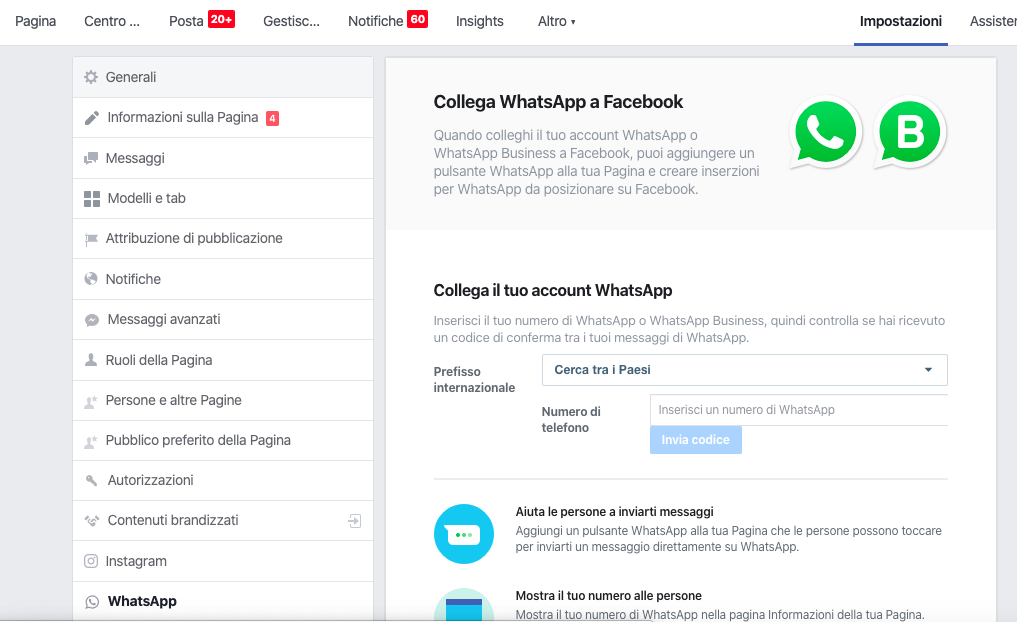
Once this step is taken it will be easy to connect the two, how?
For example, with specially created ADV campaigns.
How to use and integrate ADV Campaigns into the strategy?
In fact, by selecting the traffic goal of a Facebook campaign, it is possible to show campaign ads to people who are more likely than others to start a conversation.
In fact, when users click on the ad a chat will be opened directly on WhatsApp.
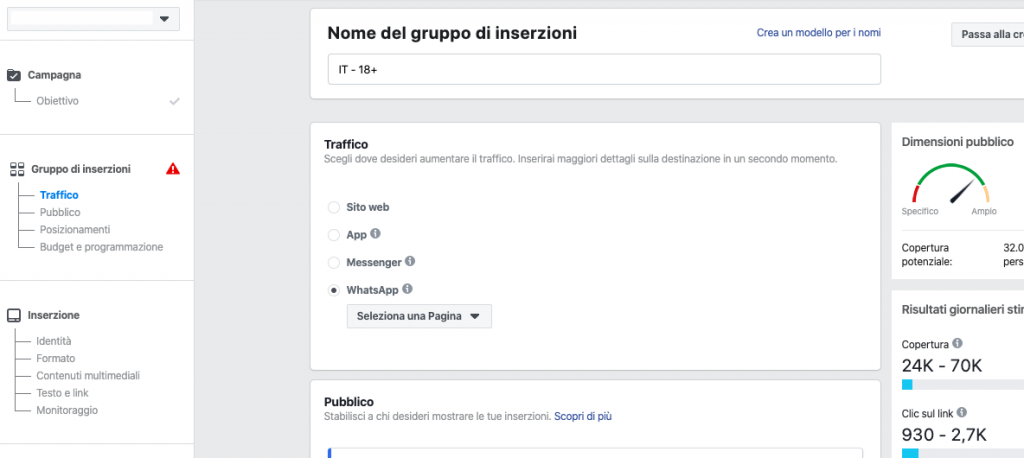
After setting up the Facebook-side campaign, it is good to devise a good strategy regarding WhatsApp Chat management as well.
This way you can make a positive experience for people who want to get in touch with your Business and take advantage of your products.
First, it is essential to set up an automatic response, such as “Hi I’m Sara, what can I help you with?”
In this way, when a potential customer starts the conversation he or she has the perception that despite not being in a physical store he or she can get the right answer right away.
In this way , even online we are able to convey our willingness to help him make the best choice for his purchase.
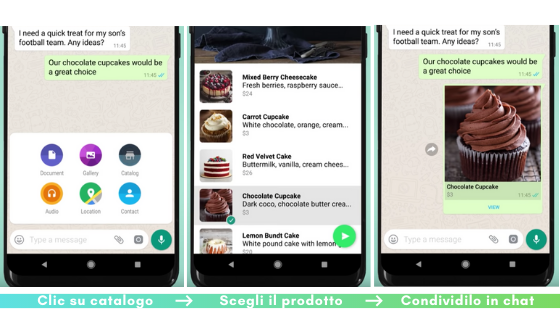
Just on the topic of assisted selling via chat, the main topic of this article, namely the catalog function of Whatsapp Business, could be useful.
What can we do if, for example, a user was interested in our products but was at the same time undecided between the items he saw on the advertisement and then asked for advice?
We could try to best understand what his needs are and share the catalog product that we think would best meet his demands.
All directly on the WhatsApp chat.
Shopping directly on WhatsApp? The revolution of the future.
JioMart is surely only the first business entity to embrace this new opportunity, many other companies will in time follow suit, increasing the simplicity and convenience in interacting with consumers.
Meta for its part will also surely want to expand this format, the Indian partnership represents a kind of test before entering into other business agreements and launching the service in other parts of the world, surely sooner or later Italian users will also have the opportunity to make acuisti via WhatsApp.
WhatsApp business catalog Benefits:
- For businesses:
- Increase sales and brand visibility.
- Improve communication with customers.
- Provide a smoother shopping experience.
- For clients:
- Find products and purchase directly in chat.
- Interact with companies in a more personal way.
- Receive real-time information and assistance.
Catalog via WhatsApp business: Advanced features
- Product labels: to categorize products and make them easier to find.
- Product links: to share products with other users.
- Virtual cart: to save selected products and complete them later.
- Shipment notifications: to inform customers of order status.
Limitations:
- The Shopping feature is only available for WhatsApp Business accounts.
- Not all products can be sold through WhatsApp.
- Payments can only be handled through external systems or WhatsApp Pay (if available).
Catalog WhatsApp business Facebook: When it is useful to activate this feature
- For small and medium-sized businesses: If you run a small or medium-sized business and want to provide a personalized shopping experience for your customers.
- Direct Selling to Consumers: If your products or services lend themselves well to direct selling, such as clothing, accessories, handicrafts, etc., then you should consider selling them directly to consumers.
- To improve customer service: Providing product information, answering questions, and closing sales directly via chat can significantly improve the customer experience.
When it may not be useful:
- For companies with a large inventory: If your company has a large inventory, it may be difficult to manage and regularly update the catalog on WhatsApp.
- Industries that require complex advice: For products or services that require lengthy advice or customization (such as real estate or financial services), direct selling via WhatsApp may not be the most effective mode.
Companies that could benefit most:
- Retailers and retail stores: Especially those that sell consumer products such as clothing, jewelry, beauty products, etc.
- Service businesses: Companies offering services such as consulting, online courses, catering, photography services, etc., can use this platform to promote and sell their services directly.
- Artisans and makers: Those who produce handcrafted items, artwork or customized products can benefit from selling directly to customers on WhatsApp.
Integrating WhatsApp’s shopping functionality into your sales strategy can be an effective way to get closer to your customers, offering them a convenient and personalized shopping experience.
However, it is important to consider whether this feature fits your business model and the type of products or services you offer.
Is it possible to integrate WhatsApp into the site?
Never forgetting that, the WhatsApp button can also be integrated within your website, the feature that allows you to integrate WhatsApp on your site in a few clicks is called “click-to-chat.”
With this feature, visitors to your site can start chatting with your business through WhatsApp in just one click.
Did this article intrigue you? Want more information on how you could start using WhatsApp for your Business? Contact us!
You can learn more about this topic by reading these articles.