


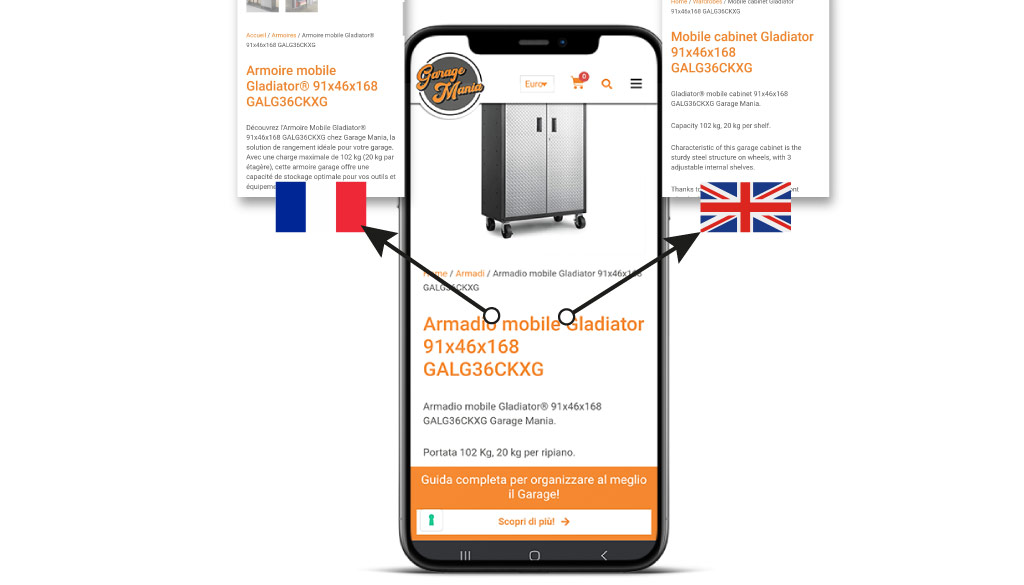
Thehreflang is a powerful tool for SEO optimization of multilingual websites.
This article explores in detail what hreflang is, how it works and how to implement it properly to improve your site’s ranking in international searches.
Hreflang tags are critical for websites and eCommerce that have similar content in multiple languages.
This attribute is useful to both search engines and users because it enables them to deliver the right content to the right person.
For example, you would like Google to show the French page in the search results for a Canadian user who is viewing a website where the primary language is English.
This is the kind of problem that hreflang aims to solve.
Hreflang what is it? What is it used for?
The hreflang is an HTML attribute that allows the target language and geographic region of a Web page to be specified.
This tag tells search engines which version of a page to show users based on their language and geographic location.
For example, if you have English, German and French versions of the same page, the hreflang tells Google which version to present to a user searching in a specific language.
This solution many times becomes indispensable when, for example, payment or shipping methods change by country and not by language.
If we go back to our previous example, if our Company works worldwide, I may need to display a French page for Canadian users, different from the French page for users living in France.
There are three common ways to implement hreflang:
- Content with regional variants such as en-gb and en-us.
- Content in different languages such as en, sp and fr.
- A combination of regional variations and different languages.
Hreflang tags are commonly used to target different markets that use the same language, for example, to distinguish between the United Kingdom and the United States or between Austria and Germany.
The SEO benefits of hreflang
What is the SEO advantage of the hreflang TAG? From an SEO perspective, you should implement it for two main reasons.
First, if you have a version of a page that you have optimized for language and user location, you certainly want users to land on that page.
Because having the correct information, in the correct language, improves the user experience therefore leads to fewer people returning to search results.
And fewer people returning to search results leads to higher rankings.
The second reason is that hreflang prevents the problem of duplicate content.
If, for example, you have an English-language product on 3 different URLs (different pages) targeting the U.S., U.K., and Australia, the difference on these pages might be as minimal as a change in pricing and currency.
Without hreflang Google might consider it duplicate content.
With hreflang, you make it very clear to the search engine that it is (almost) the same content, just optimized for different people.
Let’s take a practical example by analyzing the HTML code of the Italian Apple website that responds to the url https://www.apple.com/it/
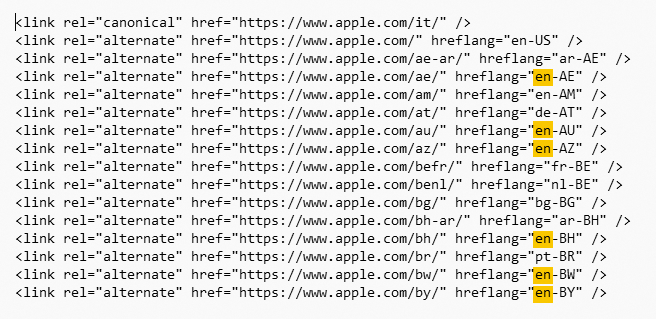
The first thing we can notice is that, through the rel=”canonical” attribute, the webmaster signals the page specifically for the Italian market.
In the following lines you can see how the tag is used to specify language and country.
In yellow I have highlighted the English language pages declined in the different countries.
In summary, we can say that the correct implementation of hreflang offers several benefits for SEO:
- Improves user experience by directing visitors to the most appropriate version of the content
- Reduces bounce rate and increases dwell time on the site
- Prevents duplicate content problems between versions in different languages
- Help Google understand the structure of your multilingual site.
How hreflang SEO works
When a user performs a search, Google follows this process:
- Determine which URL you want to place in the results.
- Check if that URL has hreflang annotations.
- Presents the most appropriate URL to the user based on their language and location.
When to use hreflang
Now that you have learned what hreflang is and how it works, you can decide how and when to use it.
We recommend that you implement hreflang if:
- You have the same content in multiple languages
- You have content targeted to different geographic regions but in the same language
N.B. The hreflang can be used both within the same domain and between different domains.
Hreflang SEO practical example
A word of advice when using hreflang: don’t be too specific!
Let’s take a practical example. Your website has 3 three types of pages:
- Regular content in German language
- German-language content specific to Switzerland
- German-language content specific to Austria.
You might choose to implement them using three hreflang attributes in this way:
- de-de, which addresses German speakers in Germany
- de-ch, aimed at German speakers in Switzerland
- de-at, addressed to German speakers in Austria
However, if someone does a search in German in Belgium, which of the 3 results should Google show?
In this case, the first page would probably be the best.
To ensure that any user searching in German that does not match either de-at or de-ch gets the best default value, it would be appropriate we should change that hreflang attribute to de only.
In many cases, specifying only language is a smart thing to do.
The order in which the search engine sees the links does not matter; it will always try to match from the most specific to the least specific.
Technical implementation of hreflang
There are 3 main methods for implementing hreflang.
1. Link tags in HTML
The first method of implementing hreflang that we’re going to talk about is the hreflang HTML link element. And you do that by adding code like this to the section of each page:
<link rel=“alternate” href=“https://www.esempio.com/” hreflang=“en” />
<link rel=“alternate” href=“https://www.esempio.com/en-gb/” hreflang=“en-gb” />
<link rel=“alternate” href=“https://www.esempio.com/en-au/” hreflang=“en-au” />
Caution
The necessary interconnection between all language variations can lead to complex implementations that slow down the Web site.
For example, with twenty languages, each page would require twenty HTML link elements, adding about 1.5 KB of data to be downloaded with each upload, unnecessary for most users.
In addition, the CMS would have to perform multiple database queries to generate these links.
This approach, designed primarily for search engines, is not advisable for large sites because of the excessive computational(crawl budget) and network load involved.
2. HTTP hreflang headers.
The second method of implementing hreflang is via HTTP headers.
HTTP headers are suitable for all non-HTML content that you might want to optimize, such as PDF files. Link elements work well for HTML documents, but not for other types of content, because you can’t include them.
That’s where HTTP headers come in and should look like this:
Links: <https://es.esempio.com/document.pdf; rel=”alternate”; hreflang=”es”,
<https://en.esempio.com/document.pdf; rel=”alternate”; hreflang=”en”,
<https://de.esempio.com/document.pdf; rel=”alternate”; hreflang=”de”
Warning
Having many HTTP headers is similar to the link element problem in your : adds a lot of overhead to each request.
3. Sitemap hreflang
The third option for implementing hreflang is to use XML sitemap markup.
Use the xhtml:link attribute in XML sitemaps to add the annotation to each URL.
It works in much the same way as you would on a page with elements.
If you thought the link elements were long, the XML sitemap implementation is worse.
To illustrate, this is the markup needed for one URL with two other languages:
<url>
<loc>https://www.esempio.com/uk/</loc>
<xhtml:link rel=“alternate” hreflang=”en” href=“https://www.esempiocom/” />
<xhtml:link rel=“alternate” hreflang=”en-au” href=“https://www.esempio.com/au/” />
<xhtml:link rel=“alternate” hreflang=”en-gb” href=“https://www.esempio.com/uk/” />
</url>
Warning
You can see that it has a self-referential URL as a third URL, which specifies what the specific en-gb URL is for and defines two other languages. Now, both different URLs should also be in the sitemap.
If you have this particular need please contact us for more information.
The advantage of an XML sitemap implementation is simple: your regular users will not be bothered by this markup.
You don’t end up adding extra page weight and it doesn’t require many database calls at page load to generate this markup, plus it’s easier to edit an XML sitemap than to edit all the pages on a site.
hreflang WordPress
If your website or eCommerce was developed with WordPress and WooCommerce you can use Yoast SEO hreflang and WPML to easily implement and manage hreflang tags.
Technical implementation
Regardless of the type of implementation chosen, there are three basic rules, to which we add others below.
1. Valid hreflang attributes
The hreflang attribute must contain a value that consists of the language, which can be combined with a region.
The language attribute should be a two-letter code in ISO 639-1 format, while the region is optional and should be in ISO 3166-1 Alpha 2 format.
Use this list from Wikipedia to verify that you are using the correct region and language codes.
Be careful always verify the region code, because using the wrong one is one of the most common problems.
Once you’ve defined the implementation method, there are a couple of other technical considerations you should keep in mind before you start implementing hreflang. f6f6f6
hreflang x-predefined
Let’s start by saying that the user’s language depends on the language set in his Browser, x-default is a special hreflang attribute value that specifies where a user should be directed if none of the languages you have set in the other hreflang links match his browser settings.
You should find a string like this:
Useful tools for implementing and controlling the hreflang tag
What we’ve seen so far is definitely very technical, and maybe you’re thinking “gosh” it’s hard” this thing!
You may be wondering what you need to do to check if your site has no hreflang tags.
Don’t be discouraged, I will now point out a couple of tools that will make your life easier.
If you want to do some testing you can use a hreflang tag generator.
If, on the other hand, you want to check the validity of the hreflang tags on your page or in your XML sitemaps, you can use these 2 tools:
- hreflang Tags Testing Tool from Dentsu
- Chrome Hreflang Tag Checker extension that you can find in the Chrome Web Store.
The extension reads the hreflang tags on a page and analyzes them to assess whether they reference your current URL.

Meta Hreflang url maintenance
Once you have created your working hreflang configuration, it is critical to perform periodic checks to ensure that it is still working properly.
Remember to perform these two essential steps:
- When a page is deleted, check that its counterparts have been updated.
- When a page is redirected, it changes the hreflang URLs on its counterparts.
If you would like to explore these issues further, I recommend that you also read the Google Search Central page for this purpose.
Html lang SEO conclusions
Implementing hreflang is a complex but essential process for SEO optimization of multilingual sites.
By following best practices and using the appropriate tools, you can significantly improve your website’s international visibility and provide a better experience for your global users.
Remember that hreflang is only one element of a complete international SEO strategy.
SEO development for Ecommerce: related articles
I recommend you also read these articles:
- International SEO for a multilingual strategy
- SEO Consulting for WooCommerce
- Creating an e-commerce site to sell online: a guide for Entrepreneurs
- Ultimate SEO checklist for Your E-commerce!
- E-commerce seo optimization: what to do?
- SEO consultant for e-commerce
- SEO consultant for companies: how he can help you
- WooCommerce vs Shopify with a look at SEO
- Opening an eCommerce store: our 12-point checklist