


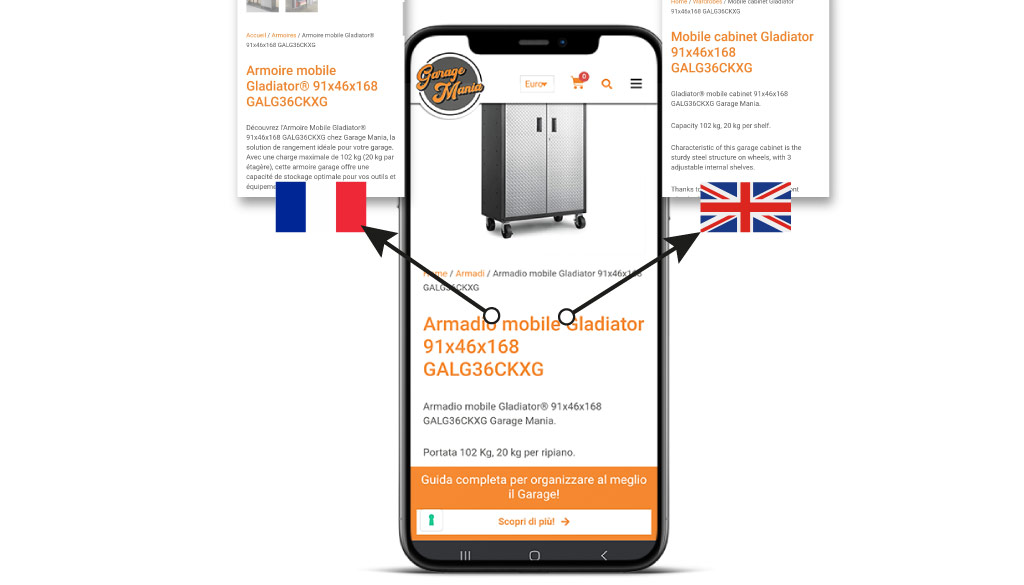
Se gestisci un sito o un eCommerce in più lingue, prima o poi ti sei imbattuto nell’attributo hreflang. È il modo con cui dici a Google: «questa pagina esiste anche in inglese, in tedesco, in francese — mostra quella giusta alla persona giusta».
Most guides on hreflang stop at the theory. This one takes a different approach: how to verify that your site’s hreflang tags are actually there and working.
Because, in our experience, the problem is almost never not knowing what hreflang is. The problem is thinking you’ve implemented it when you haven’t.
We went through this ourselves, right here on this site, in July 2026: 1,619 pages in two languages, the plugin configured correctly for years, and the hreflang tags had disappeared from the without anyone noticing. We’ll tell you how we discovered it and how to fix it.
What Is the hreflang Tag and What Is It Used For?
The hreflang attribute is a tag that tells a search engine the language and, if applicable, the geographic region for which a web page is intended. It serves two purposes:
- Show the right version to the right user. Anyone searching in German from Germany should be directed to the German page, not the Italian one.
- Prevent translations from being treated as duplicate content. If you have the same product page in English on three different URLs for the United States, the United Kingdom, and Australia, the differences may be minor—such as currency, shipping, or sizes. Without hreflang, Google might treat them as duplicates and choose only one.
With hreflang, you explicitly state that this is the same content, optimized for different audiences.
A concrete example of when it’s really needed: a company that sells in France and French-speaking Canada.
Same language, but completely different payment methods, currencies, and shipping times. We need two pages, and we need a way to tell Google which one to show to whom.
Hreflang and the lang attribute are not the same thing
This is a common misunderstanding. The `lang` attribute on the HTML ` <` tag> specifies the language in which the page is written: it is used by browsers, screen readers, and foraccessibility purposes.
The hreflang attribute, on the other hand, links different pages to one another.
Both are necessary and cannot replace each other. If you’re looking for information on HTML lang and SEO, keep this distinction in mind: the lang attribute alone doesn’t solve anything from a multilingual perspective.
How to Check If Your Website Has hreflang Tags
This is the part that’s missing from most guides, and it’s the best place to start.
Before you start studying syntax, take a look at what’s already on your website: you’ll often find a surprise waiting for you.
The Manual Check, in Thirty Seconds
Open any page on your site and press Ctrl+U (Cmd+Option+U on a Mac) to view the source code. Then press Ctrl+F and search for “hreflang.”
What you need to find inside “ is a series of lines that look like this:
<link rel=”alternate” hreflang=”it” href=”https://www.esempio.it/pagina/” />
<link rel=”alternate” hreflang=”en” href=”https://www.esempio.it/en/page/” />
<link rel=”alternate” hreflang=”x-default” href=”https://www.esempio.it/pagina/” />
Three elements to check: they are <link rel=”alternate”>, they are located in the<head>, and the URLs point to the translation of that specific page.
The Language Selector Trap
That’s where the problem lies, and it happened to us, too.
Your site’s language selector—the IT/EN flags in the menu—generates links that also contain the hreflang attribute. With WPML, they look like this:
These are not SEO hreflang tags. These are navigation links. They lead to the home page for each language, not to the corresponding version of the page you’re currently viewing, and Google doesn’t use them to link the translations together.
The result is misleading: you press Ctrl+F, find the word “hreflang” two or three times, conclude that “they’re there,” and move on. But there’s nothing there.
How to tell them apart at a glance: True hreflang tags start with ` <` and have `link rel=”alternate”`, and are located in the `<` section of the “ tag: `>`. Those using the selector start with ` <` and have `a href`, and are located in the ` <` section of the “ tag: `>`, often with a class such as `wpml-ls-link` or similar.
Tools for the check
If manually checking seems too tedious, there are tools that can do the work for you:
- hreflang Tags Testing Tool by Dentsu — paste a URL and it tells you what it finds, both on the page and in the XML sitemap.
- Hreflang Tag Checker — Chrome extension. It reads the hreflang tags on the page you’re visiting and verifies that they correctly reference each other. It’s the fastest way to check on the fly.
- hreflang Tag Generator by Aleyda Solis — useful during implementation to generate the correct markup without making coding errors.
- Screaming Frog — has a tab dedicated to hreflang tags. It’s the right choice when you need to check an entire site rather than just a single page.
Why You Can No Longer Find the hreflang Report in Search Console
If you’re looking for hreflang errors in Google Search Console, stop right there: they’re gone.
The International Targeting report, which since 2014 had been flagging hreflang errors across the entire site and allowed users to set a target country, was marked as deprecated by Google on August 24, 2022, and removed on September 22, 2022.
Google explained that manual country targeting had little value for the ecosystem, and confirmed that it continues to support and use hreflang tags.
In practical terms: Google still uses your hreflang tags, but it no longer tells you if they’re incorrect. The responsibility for checking them now lies entirely with you.
You still have the Search Console URL inspection tool for individual pages and a crawler for the entire site.
Many guides out there—even recent ones—still refer to that report. If you find one that does, you know it’s out of date.
Check the entire site, not just a single page
Checking a sample page will tell you whether the system works in general.
It doesn’t tell you if it works everywhere, and the problems tend to crop up precisely in special cases: archives, taxonomies, partially translated pages, and content published in only one language.
On this site, we addressed the issue using a crawler that extracts the hreflang tags from each page’s and stores them.
The result across 1,619 pages: 4,854 hreflang annotations, three values (it, en, x-default), complete coverage.
The only three anomalies were all valid — a page to be deleted, an archive available only in Italian, and a glossary entry available only in English.
Questo tipo di verifica sistematica è parte di quello che facciamo in un audit SEO tecnico: non «gli hreflang ci sono», ma «gli hreflang ci sono su tutte le pagine, puntano a URL validi e si rimandano a vicenda».
The Correct Syntax for hreflang
The basic form of an hreflang tag is as follows:
Three attributes, all of which are required:
- rel=”alternate” — indicates that this is an alternative version
- hreflang — the language code, possibly followed by the country code
- href — the full, absolute URL of the alternative version
Three rules with no exceptions:
- Reciprocity. If page A links to B, B must link back to A. If the backlink is missing, Google ignores the entire entry. This is by far the most common mistake.
- Self-referentiality. Each page must include an hreflang attribute that points to itself. It may seem redundant, but it is required.
- Absolute and canonical URLs. No relative paths, no URLs that result in redirects or 404 errors. The URL in the hreflang attribute must match the one specified in the rel=”canonical” attribute of that page.
This last point deserves attention: hreflang and canonical tags must tell the same story.
If the Italian page has a canonical tag pointing to the English version and, at the same time, an hreflang tag that identifies it as Italian, you’re sending two conflicting signals. The canonical tag for each page must point to itself.
Language and Country Codes: Which Ones to Use and Which Ones to Avoid
The value of the hreflang attribute consists of a required language code and an optional country code:
- Language: two letters, ISO 639-1 format. Examples: it, en, de, fr, es.
- Country: two letters, ISO 3166-1 Alpha-2 format. Examples: IT, GB, US, CH.
They are written with a hyphen: en-GB, de-AT, es-MX.
Be careful of codes that seem correct but aren’t. Spanish is “es,” not “sp.”
British English is en-GB, not en-UK (UK is not an ISO code). Japanese is ja, not jp. An invalid code does not generate a visible error: the annotation is simply ignored, without any message.
Two other lesser-known rules: You can’t specify just the country —`hreflang=”us”` doesn’t mean “United States”; it would be interpreted as a non-existent language code. And there are no codes for continents: you can’t target “Europe.”
The default value for x
x-default is a special value that specifies where to direct a user when none of the declared languages match their settings:
It is typically used for the language selection page, or for the main or international version of the site.
It’s not required, but it’s strongly recommended: without it, a user searching in a language you haven’t specified will be left to Google’s discretion.
A note on terminology: “x-default” must be written exactly as shown, in English. It is a literal value in the code, not a term to be translated.
Don’t be too specific
Here’s a tip that comes in handy more often than you might expect: Use the country code only if you actually have different content for that country.
Imagine a website with three German-language versions: Germany, Switzerland, and Austria. It’s tempting to specify de-DE, de-CH, and de-AT. But what happens to someone searching in German from Belgium? None of the three matches.
If the “general” German version works for all German speakers not covered by the other cases, simply declare it as “de.” Search engines always match from the most specific to the least specific, so searchers from Switzerland will continue to receive “de-CH,” and everyone else will get a sensible result.
In most cases, specifying only the language is the most robust choice.
The Three Ways to Implement hreflang
Google officially supports three collocations. They are equally valid: you must choose one and use only that one, because contradictory statements in different places create conflicts.
1. Link tags in the HTML head section
The most common method and the easiest to verify. Add the tags ` ` to the ` ` of each page:
<link rel=”alternate” hreflang=”it” href=”https://www.esempio.it/pagina/” />
<link rel=”alternate” hreflang=”en” href=”https://www.esempio.it/en/page/” />
<link rel=”alternate” hreflang=”fr” href=”https://www.esempio.it/fr/page/” />
<link rel=”alternate” hreflang=”x-default” href=”https://www.esempio.it/pagina/” />
The limitation: each page must list all languages. With twenty languages, that means twenty lines per page—about 1.5 KB more per page load—and the same number of database queries that the CMS must execute to generate them.
On very large websites, this becomes a real cost in terms of performance and crawl budget.
Up to four or five languages, however, is the best choice: it’s the easiest to manage, and every analysis tool can handle it.
2. HTTP Headers
This is used for content that isn’t HTML and where you therefore can’t insert a tag: PDFs, documents, and images.
Links: <https://www.esempio.it/documento.pdf>; rel=”alternate”; hreflang=”it”,
<https://www.esempio.it/en/document.pdf>; rel=”alternate”; hreflang=”en”
It has the same performance issue as the previous method, but this time it affects every single HTTP request.
3. XML Sitemap
Notes are added to the sitemap using the xhtml:link element. For a single URL with two alternative languages:
<url>
<loc>https://www.esempio.it/pagina/</loc>
<xhtml:link rel=”alternate” hreflang=”it” href=”https://www.esempio.it/pagina/” />
<xhtml:link rel=”alternate” hreflang=”en” href=”https://www.esempio.it/en/page/” />
</url>
The advantage is that you don’t slow down your pages and you only need to edit a single file instead of the entire site. The downside is verifiability: hreflang tags in sitemaps aren’t visible when viewing the page, many tools don’t check them, and if you change how you manage sitemaps in the future, you risk losing them without realizing it.
That is exactly why, for a site of normal size, we recommend the<head>: what you see is what you get.
Hreflang on WordPress: WPML and Polylang
On WordPress, you don’t have to enter hreflang tags manually: the multilingual plugin generates them for you. The two most popular plugins are WPML and Polylang, and both automatically generate them for every translated piece of content.
“Automatically,” however, doesn’t mean “forever.”
What Can Happen with WPML (Our Experience)
In July 2026, while checking our website, we found that was missing the hreflang tag. WPML was configured correctly, the translations were linked, and there were no errors anywhere.
The reason: Starting with WPML SEO 2.2.2, the default behavior has changed. Hreflang tags are now generated in the XML sitemaps instead of in the<head>, for a good reason—to lighten the load on the<head> on sites with many languages and many pages.
Technically, it’s not an error: as we’ve seen, the sitemap is a valid location. But in practice, this means your hreflang tags become invisible to almost all analytics tools, browser extensions, and anyone checking them visually.
And if a plugin update goes a little haywire, you won’t even notice.
How to include them in the section:
- Go to WPML → Languages (in English: Languages)
- Scroll down to the “SEO Options” section
- Enable “Display alternative languages in the HEAD section”
- Save
If the “Position of hreflang link” option also appears, leave it at the default value. If your theme or another plugin generates incorrect language links, the “Later in the head section” setting resolves the conflict: this is Plan B, not the first choice.
Polylang
Polylang automatically adds hreflang tags to the by default and does not require any special configuration.
The checks to be performed are the same: ensure that the translations are actually linked to one another in the Polylang panel, and that content published in only one language does not generate orphaned entries.
The step that almost everyone forgets: the cache
You enabled the option, refreshed the page, pressed Ctrl+U, and nothing changed. Panic.
It’s not the plugin—it’s the cache. Whether you’re using WP Rocket, your hosting provider’s cache, or a CDN in front of it, the site continues to serve the static copy generated before the change—the one without the `hreflang` attribute. Until you clear the cache, the change won’t take effect.
- WP Rocket: Settings → Clear and Preload the Cache
- Also clear the hosting cache (Kinsta, SiteGround, Aruba—whatever you use)
- If you have a CDN, clear that as well
A general rule that applies far beyond hreflang: After any changes to the<head> — hreflang, structured data, meta tags — clear your cache before checking. Otherwise, you’re looking at the past and drawing the wrong conclusions.
The Most Common Mistakes with hreflang
Based on our experience with multilingual projects, in order of frequency:
- Lack of reciprocity. The Italian page links to the English one, but the English page does not link back. Google ignores the entire entry. This typically happens when a translation is created later or accidentally unlinked in the CMS.
- The self-referential element is missing. Each page must also declare itself. It may seem pointless, but it isn’t.
- Incorrect codes. “sp” for Spanish, “en-UK” for the United Kingdom, “jp” for Japanese. All incorrect, all silent.
- URLs that do not return a 200 response. Hreflang tags pointing to pages that have been redirected, return a 404 error, or are blocked by “noindex.” The tag points to nowhere.
- Conflict with the canonical file. Hreflang and canonical tags indicate different things. The canonical tag takes precedence, and the work done on hreflang tags is wasted.
- “x-default”is missing . This isn’t a formal error, but it leaves all users who don’t speak one of the declared languages unaccounted for.
- Filing tax returns in multiple locations at the same time. The head section and sitemap together—perhaps generated by two different plugins that don’t communicate with each other. This is the worst-case scenario, because it appears that there is more coverage when, in reality, there is a conflict.
- Overlooked maintenance. You delete a page but don’t update its counterparts; you move a URL, but the hreflang tags for the other languages continue to point to the old address.
On this last point: hreflang tags aren’t a one-time task.
Whenever you delete or redirect a page, its counterparts in other languages must be updated. On a site that publishes content regularly, discrepancies are inevitable without periodic checks.
Hreflang and International SEO: When It’s Needed and When It Isn’t
You need hreflang if:
- You have the same content in multiple languages
- Do you have content in the same language but intended for different countries (prices, currency, shipping, regulations)?
- Do you have a language selection page on the site’s homepage?
You don’t need it if:
- The website is available in only one language
- You’ve only translated a few isolated pages without a consistent multilingual structure
- The versions contain different content; they are not translations of the same content.
It’s worth clarifying that hreflang is not a ranking factor. It does not improve a page’s ranking.
It ensures that, for the same position, the correct version is displayed. This is a matter of technical maintenance, not growth.
This also means that hreflang tags alone are not enough to handle an international project.
Sono un tassello di una strategia SEO internazionale che comprende la struttura degli URL, la ricerca di parole chiave per ciascun mercato — che non è la traduzione delle keyword italiane — e contenuti scritti per quel pubblico, non tradotti meccanicamente.
We always emphasize this last point to our clients: machine translation published without review produces pages that are grammatically correct but strategically useless, because they fail to take into account how people actually search in that language.
Se stai valutando un’espansione internazionale, il lavoro di un’agenzia SEO internazionale comincia proprio da lì.
Frequently asked questions
What are hreflang tags?
Hreflang tags are annotations that tell search engines the language and, if applicable, the target country of a web page.
They are included in the HTML ` `, in HTTP headers, or in the XML sitemap, and are used to match each language version of a piece of content with the right audience, preventing translations from being treated as duplicate content.
What is the hreflang tag?
It is an HTML tag in the form that tells Google the language and, optionally, the country for which a page is intended.
Its purpose is to show users the correct version of the content and prevent duplicate content issues on multilingual sites.
What is the correct way to write the hreflang tag?
The syntax is ` `.
The attribute value is a two-letter ISO 639-1 language code (it, en, de), possibly followed by a hyphen and an ISO 3166-1 Alpha-2 country code (en-GB, fr-CA). The URL must be absolute and canonical.
What is the purpose of hreflang in SEO?
It serves two purposes: to show each user the version of the page in their language and tailored to their market, thereby improving the user experience; and to prevent very similar versions in different languages or markets from being interpreted as duplicate content.
It’s not a ranking factor: it doesn’t improve your ranking; it just ensures the right page is displayed.
How do you implement hreflang on WordPress with WPML or Polylang?
Both plugins automatically generate hreflang tags for translated content.
With WPML, however, you must check the “Display alternative languages in the HEAD section” option in WPML → Languages → SEO Options: starting with version 2.2.2 of WPML SEO, the default behavior places the hreflang tags in the XML sitemaps instead of in the<head>. You must clear the cache after every change.
What does the message “Your site does not have hreflang tags” mean?
This is a warning generated by tools such as Screaming Frog or Semrush when no hreflang tags are found on a multilingual site.
Before you panic, check where the tool is looking for them: if the hreflang tags are in the XML sitemap instead of in the, some tools will flag them as missing even though they are present and valid.
How can you check if hreflang tags are implemented correctly?
For a single page: Press Ctrl+U and search for , or use the Chrome extension Hreflang Tag Checker.
You’ll need a crawler like Screaming Frog for the entire site. Please note: The International Targeting report in Google Search Console, which used to flag hreflang errors, was removed in September 2022.
What is the difference between hreflang tags for language and for country?
hreflang=”en” targets all English-speaking users, regardless of their location. hreflang=”en-GB” specifically targets users searching in English from the United Kingdom.
Use the country code only if you have content that is truly different for that market: if you don’t, the language code alone is more effective and reaches more users.
Do hreflang tags also work on Bing?
Yes, Bing supports hreflang tags, although historically it has also taken other signals into account when determining a page’s language.
Yandex also supports them. However, the correct implementation for Google remains valid for other search engines as well.
In summary
Hreflang tags are a technical task, not a strategic one: they don’t increase traffic; they simply prevent traffic from ending up on the wrong page.
However, it’s one of those jobs where you pay the price when it’s not done, and one that quietly deteriorates over time.
Three things to take away:
- Check this before you start studying. Use Ctrl+U to see what’s already on your site, being careful not to confuse the actual hreflang tags with the language selector links.
- Choose a single location, and if the site supports only a few languages, choose the<head>: that’s the one you can control.
- Reschedule the checkup. Any page that is deleted or moved can break an hreflang pair, and as of September 2022, Google no longer notifies you of this.
Se hai un sito multilingua e non sai in che stato siano i tuoi hreflang, è esattamente il genere di verifica che facciamo in apertura di ogni audit SEO tecnico.
Se invece stai valutando un percorso più ampio, la nostra consulenza SEO per aziende parte sempre da qui: capire cosa c’è, prima di decidere cosa aggiungere.
For more information, see the official documentation: Localized versions of the pages on Google Search Central.
SEO development for Ecommerce: related articles
I recommend you also read these articles:
- SEO Internazionale per una strategia multilingua
- SEO Consulting for WooCommerce
- Creating an e-commerce site to sell online: a guide for Entrepreneurs
- Ultimate SEO checklist for Your E-commerce!
- E-commerce seo optimization: what to do?
- E-commerce SEO Consultant
- Consulente SEO per aziende: come può aiutarti
- WooCommerce vs Shopify with a look at SEO
- Opening an eCommerce store: our 12-point checklist