



In this article we look at how to develop the Facebook buyer persona with Insights.
We have, often, told you about the importance of defining your Buyer Persona, to define and choose the customers you want to relate to.
Key element inincreasing the Business of your company or business and an indispensable figure in aneffective Inbound Marketing.
Buyer personas are nothing more than representations of one’s ideal customers.
Knowing how to define them helps you understand who your current customers are, as well as identify potential ones, so that you can create winning communication that is in line with their expectations.
Unless your business is aimed at a very narrow niche (1 or 2 ideal customer types), you can go as far as to identify as many as 20 buyer personas with different characteristics from each other.
To create them, one must never use imagination; rather, one must have complete data to analyze that can be obtained through market research or direct interviews with consumers of the company’s products or services.
Create your buyer personas to increase leads, customers and sales
Know your audience, is the first axiom of the World Wide Web.
If your goal is to improve the performance of your online business, then get more valuable visitors and leads, then it’s time to take pen and paper and create your typical customer. Ready?
We at Factory like to twist the order of things (and articles) so, today, let’s start right off by saying what buyer personas are NOT:
- They are NOT real, concrete figures
- They are NOT affected and influenced by today’s technology
- They are NOT market fractions
- They are NOT professional roles
Buyer personas are mental representations, verisimilar figures, that we compose in our minds to precisely define our typical customer.
They represent the most important, if not indispensable, stage when we design any marketing campaign, of any product or service.
What then are Facebook buyer personas?
Buyer personas are, according to Hubspot, semi-fictional representations of the ideal customer based on market research and real data on existing customers.
The parameters to be considered on buyer personas are:
- common habits and behaviors
- Widely shared visions, dreams, goals
- personal history: biographical and socio-demographic data
It is essential to analyze and study the buying behaviors of our typical customer. Where do I start to create my buyer personas?
Here are some tips:
- Define your target type and prospect
- Ask your audience what they like with face-to-face interviews or focus groups, via Skype or Google Hangouts. Here are a few useful tools: Google Form, SurveyMonkey and SurveyGyzmo.
A little tip: Always record the conversations–with the client’s permission, of course–that way you can return to the most salient concepts of the interview. - Get the most out of the forms on the site to retrieve as much information (personal data) as possible. Try to think of a nice, clear landing page.
- Analyze the data of your buyer personas
Once you have gathered all this information and analyzed the surface data of our audience, you will have to try your hand at building a story around the final sketch.
Buyer Persona Facebook: try to consider:
- Demographic, historical social data
- Digital journey, that is, the typical day
- Modes of interaction: where it searches and how it acquires information
- Critical and weak points around the product or service
We now have all the elements we need to design our custom audiences, remember, however, that creating our custom audiences also involvesanalyzing social media data.
How to Create Buyer Persona with Facebook
Certainly launching into market research requires significant budgets that not all companies can support.
In case there are spending limitations, it is good to know that there is a much cheaper alternative: Facebook.
So take Facebook insights into account: thanks to this fantastic tool you can get demographic data and data on the buying behaviors of your page’s fans.
If you are completely unfamiliar with Facebook Ads and want to know more, hurry up and read our guide.
To create your buyer personas you will need every little detail that makes them up such as:
- Geographical location
- Age
- Sex
- Employment
- Company they work for
- Marital status
- Interests
- Purchasing habits
- … and more.
Nothing can be left to chance, and every piece, no matter how small, is critical to completing the puzzle.
Whenever you go to outline an ideal buyer profile, you need to make sure you have the personal information, aspirations, motivations for why they buy your product, and know the right ways to reach your potential customer.
You’re probably wondering how to find such specific details to create buyer personas.
The answer is simple: by making use of a tool that we all use in our daily lives, namely Facebook.
When you create a personal profile on Facebook, you share a multitude of information with the world.
Through the Business Manager, specifically with the Audience Insights option, you will have the ability to get hold of multiple pieces of information about users, which you can use to target your advertising campaigns effectively.
To access Audience Insights, all you have to do is go into the Business Manager, open the “All Tools” item, and click on the item for the Audience Analysis feature.
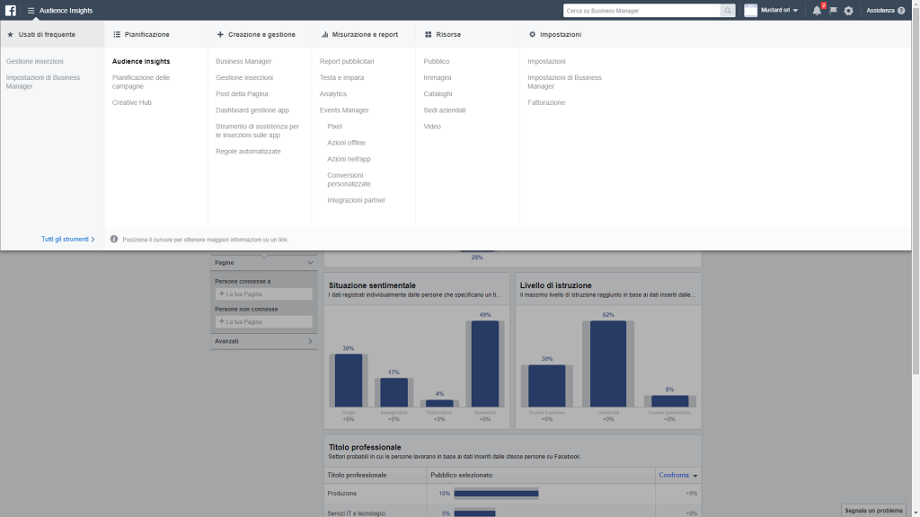
From here you can create a custom audience and view all the details about your audience.
To get more accurate data you can also segment the data, using many different filters, the same ones you use when you go to create an ad.
How to create a custom audience in Facebook
To avoid being in the situation of guessing at a few details about buyer personas (which could disrupt all the work) it is good to start with a customized audience, perhaps starting right from an email list.
Typically, lists are made up of people who have already shown interest in your products or services, so they are the most effective way to outline the traits of your ideal customers.
You can download your list as a CSV file and upload it to Facebook.
Do you have a profiled e-mail database of your customers? Hundreds of subscribers to your newsletter? Start with them.
Manually upload (in csv or excel format) a file containing this data, copy-paste into the interface, or automatically synchronize and import lists from MailUp, Mailchimp, BaaZCRM, or HubSpot to feed Facebook your email list.
The system will make a match between the data you entered and the e-mails with which users are subscribed to Zuckerberg’s Social, to find the highest number of matches.
You can enter up to 15 “identifiers” (fields) in the file, from name to phone number to ZIP code and date of birth.
The more data you provide to Facebook, the more likely you are to find users within the platform.
As soon as the system has concluded its search, the green light and the figure indicating the number of users contained in your custom audience will appear , ready to be used in targeting in the ad groups of your Facebook Ads campaign.
After accomplishing this task, Facebook itself will analyze the data you enter to find your lead profiles and create customized audiences.
Please note: A CSV file containing a list of at least 1,000 people is required to obtain an accurate result.
Practical side, to accomplish this operation you will have to access the Business Manager >> Resources >> Public.
From here you will need to select the Create Audience option and choose the Custom Audience item.
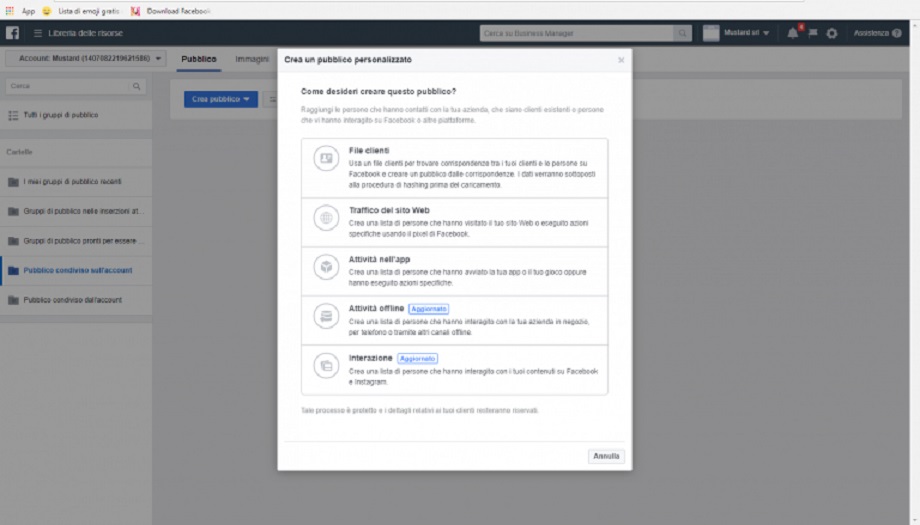
Now you will need to select the first option: Client Files, proceed to upload your CSV file, and follow the instructions to complete the process.
Please note: It can take up to 72 hours before Audience Insights data are available.
Analyze the data obtained in Facebook
Now that you have obtained a customized audience based on your existing leads and customers, you can begin to analyze the data to delineate the traits of your buyer personas.
Go back to the Audience Insights page in Ads Manager. Click on the “Custom Audience” section on the left and select the one created through the CSV file you uploaded.
This will show you all the demographics related to your custom audience.
To narrow your audience by country, age, relationship, job and education there are the different filters you can apply.
This function is very useful to avoid confusion that can undermine the work of identifying one’s typical clients.
All you have to do at this point is create a file where you can pin down the interests and habits of your ideal client, as well as more strictly demographic data.
By going through the various tabs you can learn other details, such as the devices they use to navigate (very useful information in communication campaigns).
Create Buyer Persona Facebook
Once you have identified the key data about your entered customers, you can begin to create a profile to organize all the information in one location.
Depending on your industry and type of business, you will need to go out and create one or more ideal buyers.
You can create your Buyer Personas from scratch by putting together manually obtained data, use standard templates, or rely on online tools.
Complete the profiles of your Buyer Personas.
As you may have guessed, having a comprehensive, targeted mailing list plays a key role in developing buyer personas through Audience Insights.
If you have not yet activated it for your business, know that it is never too late to create one (beware of the new regulations introduced by the GDPR).
Having an active newsletter is not only a great way to do research-it will also help you grow the number of leads and potential customers.
N.B. if you want to find out how to make the most of your newsletters, to increase sales and turnover I recommend you read this article: Want to increase your users’ loyalty? Send out your newsletters with HubSpot
In any case, to complete the profile of your buyer personas, Facebook alone will not be enough.
To do a sure-fire job, we recommend including data obtained fromanalyzing your website and other social platforms on which your company has a presence.
This way you will be able to get the profiles right, so that you can set your business communication to the needs of your customers.
Help yourself and control the actions of your Buyer Personas thanks to the Facebook Pixel! Try it to believe!
Did you find this article interesting? You can explore further by reading these articles.