



Today I want to talk to you, in detail, about the importance of image seo or more simply the proper indexing of the photos we upload to our website.
Photos, fall as much as any element of the site, into the SEO strategy.
Every company wants its site to be placed among the top results of the SERP of Google.
To achieve this important goal, it is essential to use various “tricks” and strategies that are called SEO acronym for Search Engine Optimization and that allow us to improve the ranking factor of our site.
Why implement an SEO strategy?
SEO Strategy allows you to:
- Significantly increase the indexing of your content
- Increase your company’s visibility on search engines
- Acquire new contacts and potential customers
- Increase your eCommerce sales
- Launch your start up or new product
SEO strategy is not only about textual content, but also:
- Images
- HTML code optimization
- Website loading speed
- Hosting service
- Using the HTTPS protocol, which certifies that your site is secure
SEO strategy is a set of techniques and practices, which allows websites to be properly optimized and positioned on search engines.
It is based, fundamentally, on the value of content. Or rather on valuable content.
From a technical point of view, to do good SEO, it is important to insert the right keywords, insert links etc..
The element that remains, fortunately, strategic and relevant is the value of content.
Thanks to SEO Image Positioning, you improve your company’s indexing on search engines
You will have happened more than once to read articles, where the first 3 or 4 lines apparently make no sense.
Some words or pieces of sentences, are copied over and over again.
Title and subtitle say exactly the same thing, with slightly different words.
This is a typical example of extreme SEO. Where the one who writes, is more concerned with keyword insertion, than with the value of the message he is sending.
My advice is to avoid such a practice. It is not rewarding for the user, who immediately stops reading. Neither is it for the search engines.
When we abuse keywords (keyword stuffing), we only get penalized. It is a strategy that does not pay.
As I often say, Google can either be our best ally or our worst enemy.
Before we get into the technicalities I would like to say that, the most important element, always remains the content.
That is, what you decide to publish on your website, blog, or e-commerce.
Users using Google are looking for answers: the hotel for their next trip, the nearest restaurant, the cheapest lawnmower etc.
Google’s goal is to provide the most comprehensive and relevant response to searches made by users.
This is why Google’s algorithms are constantly evolving and also heavily useartificial intelligence to understand the value of the content you have published.
Therefore, content must be valuable, complete, comprehensive, useful to the user, etc.
If you want to increase the visibility of your website and have decided to do so through SEO copywriting (publishing content) then it is essential that you also implement an SEO strategy.
Why it is critical to do image SEO to rank your eCommerce on Google
The next part of the article we will look together at all aspects related to the implementation of SEO positioning of images on search engines.
Because so many users, when searching for a product online, do so directly in Google Images.
Otherwise, even if we search directly from the search field, Google presents us, always, with related images.
It is a great tool for positioning our content on the web.
First let’s see together why to carry out this activity and do it with a nice example.
Love, for my birthday, I would like to have a little purse that matches my shoes, the pink ones, that you gave me last week.
There it is, she didn’t ask you for a black handbag, no one to match the pink shoes. You inquire, you ask and the ideal is a pink handbag. But her tastes are very particular so you decide to do a Google search. But how?
And this is where the Factory Communication team, made up of 80 percent of the fairer sex, coincidentally pink quotas :-), gets into action with some simple tips.
Some times working in aMarketing and Communication Agency and constantly using different Web & Social tools can have its advantage.
And that’s how I asked my colleague Valeria, who holds the position of Senior Account at the Agency, for a hand in explaining how to use Google Images to conduct searches.
If your customers use Google Images, it is critical that your product is also visible
In this nice example we see in detail a possible Google search made by Laura a young woman interested in buying a pink handbag.
First, Laura enters the word “handbag” into Google and then selects the “Images” option.

Laura wants to be sure of her choice, so she decided to see photos of handbags that have a higher resolution.
The Google Images search engine allows us to view the size of the image so that we can immediately select the one that is right for us.
Simply turn on the “Show size” option in “other tools.”

Laura wants to be super sure of her choice, so she selects the filter that allows her to see the large images.
Filter “size” and then “greater than,” so we can’t miss any details.
“women love details….. things that boys often miss…”

How to find the handbag in the color Laura likes?
“Pink shoes ? Pink handbag both….”
Simply select the “color” filter and magically our friend Google Images will immediately show us handbags in our favorite color.
Wow fantastic….

But why stop here, Laura still has so many options.
Thanks to the “Type” filter , it is possible to see only handbags with a design.
Or you can use the “Now” filter to see only the latest items–just to stay on top of fashion.
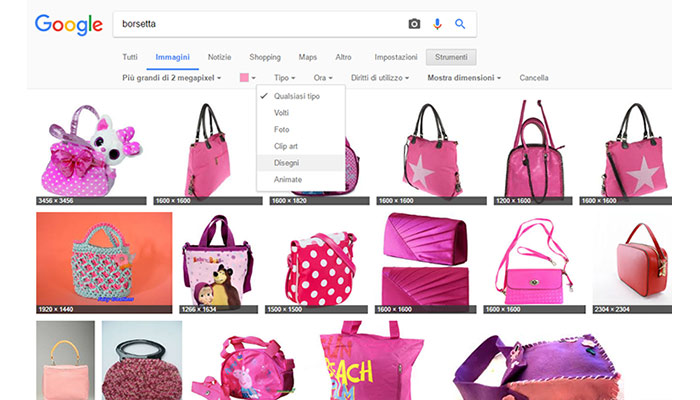
As we have seen in this example, if your Company sells pink handbags on its e-commerce, it is essential to include the appropriate SEO descriptions in the photos. Otherwise, you risk losing Business opportunities.
SEO images for your website ranking
It is important to say that Google search is not only for text content, but also for images.
Users are constantly searching for photos and images on Google for a variety of reasons.
It is therefore essential to be found by users to increase the visibility of our products, or services.
In this guide we will look together at how to optimize images from an SEO perspective, for your own website.
Unfortunately, some times this activity is underestimated but it is extremely important.
We will see together how:
- Resize and optimize images before uploading
- Rename seo images
- Optimize the image from the SEO point of view after uploading
If you want to find out your website’s optimization score, you can use the free Google PageSpeed Insight service (external link)
Regarding image management, there are 5 basic elements:
- Name and weight of uploaded file
- Image title
- Alternative Text
- Description
- Caption
And now let’s see in detail how to implement image SEO.
Step 1. SEO image positioning and web accessibility
A powerful component of a marketing strategy to increase the performance and engagement of your website is web accessibility.
It is very likely that some of your competitors have not added this aspect to their web strategy, thus offering you a potential advantage.
But what exactly isweb accessibility?
We can define Web accessibility as the set of techniques and procedures that enable content published on the Web to be usable by people who are affected by temporary and other disabilities, and who therefore use assistive technologies.
People with disabilities experience difficulties in navigating certain sites because, these sites have not been developed with their needs in mind and therefore present “architectural computer barriers.”
A practical example is non-sales people using special software (screen reader) that interprets the content of pages.
In an SEO Search Engine Positioning strategy, it is critical to also consider web accessibility for 2 important factors:
- We help users with disabilities interpret our site correctly = they may become our happy customers
- Together with the Core Web Vitals (CWV) are factors that contribute to the positioning signals
In this article you will find useful information to better optimize the images you are about to upload to your website.
Step 2. Why resize and optimize images before uploading
This is probably not the first article you read about SEO Strategy and Image Optimization for SEO.
You must have heard so many times about User Experience. That is, the experience of the unte who visits your site.
There are three fundamental aspects of user experience:
A. Site optimization
To be usable by all devices: Desktop, Tablet and Mobile (we don’t know how the user decides to view our site)
B. Navigation optimization
Each piece of content must be reachable as the least number of clicks. Technically this is referred to as crawling depth.
C. Speed of page display
Users are increasingly in a hurry. If a page is not visible in two maximum 3 seconds, we risk users abandoning our page, without having read it.
All three of these factors are crucial, because if the user abandons the site, without having read any content, all our content marketing and SEO work is undone.
For this reason, optimizing an image before it is uploaded is extremely critical.
Especially if you have made an article, or an image-rich e-commerce.
It is true, having high-quality images on one’s website is nice and allows us to showcase our products and services in the best way possible.
My advice is to find the right balance between size and search engine optimization.
It is enough to comply with some small rules that we will now look at together.
Item 3. Never upload an image that is larger than the size of the page that contains it
The Factory Keywords site is structured to have an optimized display on both Desktops, Tablets and Smart-phones.
To do this, we resized the images so that they were optimized on all devices.
Let’s look at an example from the “SEO Services“
The Desktop version of our site is made to be displayed for 1920 pixels wide resolution. Removing the scroll sidebar space leaves approximately 1900 pixels.
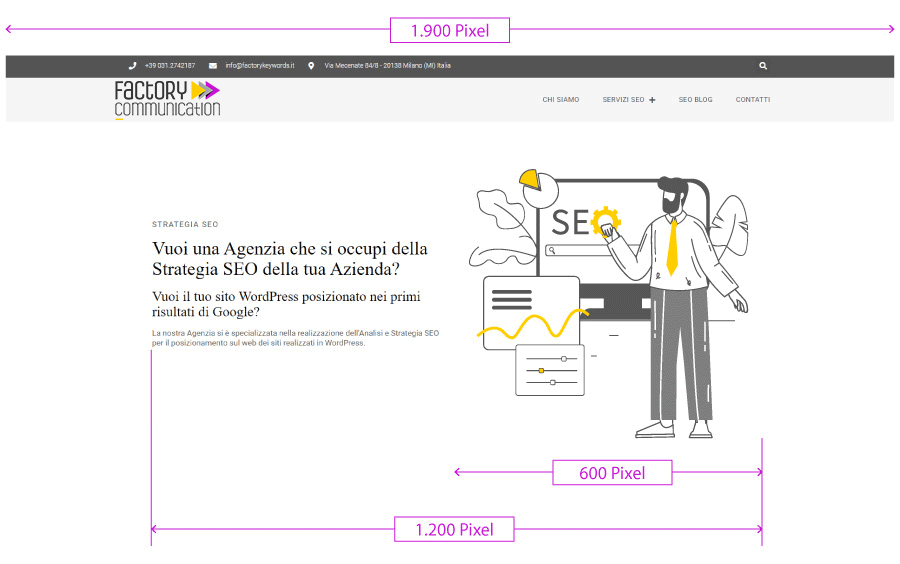
The structure of the page has a central body of 1,200 pixels, and the image placed on the right side occupies 50% of the entire section, which is 600 Pixels.
In this specific case, the image inserted on the “SEO Services” page was saved in .SVG format and has a weight of 34Kb.
When to use SVG format?
The .SVG format being a vector-type ti file, has no dimensions in width or height, because it can fit in the space that contains it.
If you need to upload floor plans, tables, logos and can transform them into vectors, we recommend that you always use the .svg type file.
The size of the image depends, clearly, on the layout of your site.
If a page contains several images I recommend optimizing them as much as possible.
If you need to view the image with a larger size you can enable the option of Opening the image larger on click.
Respecting the maximum size of an image relative to the container is an extremely important factor.
If you decide to do advanced SEO optimization of your site, I recommend installing the free Google Search Console service (external link) that notifies you of all optimization issues.
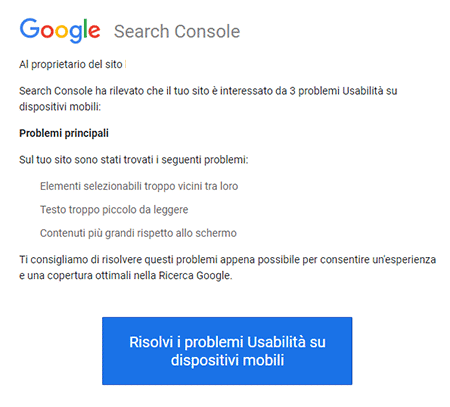
You may receive an email that contains a message like the one you see on the side, related to problems detected on our site.
Well yes, SEO positioning of a website is a long and demanding activity and takes quite a lot of time.
Not only in the content creation phase of your site, but also later in the verification and analysis phase by Google.
Step 4. SEO image positioning: optimize size and weight
As we saw in the previous point, it is essential to take into consideration the structure that makes up the web pages of your website when defining the maximum size of images.
Clearly you may have decided to make one, or more, pages with large images.
In this case, if possible, I recommend that you never exceed the size of 1200 pixels in width and 900 pixels in height, except in the case where, the image is part of a full-screen slider.
In addition to the size factor there is also the “weight” factor of an image quantified in KB i.e. Kilo Byte.
How heavy should the image uploaded in an article be?
If we say that an image weighs 70.4 KB, it means that its weight is 70,400 Bytes.
A high KB size greatly affects the loading of the image by the browser, which in turn affects the loading of web pages on the site, especially on mobile devices.
The slower the loading, the worse the user experience (user experience) will be, which may even lead to abandonment of the page before it is read.
For this reason, it is essential to find the right relationship between image quality and KB weight (upload speed). Technically, it is said that it is important to compress images to reduce their weight in bytes.
My advice is never to exceed a weight of 75/80 KB per single image. Especially when you plan to include more than one in an article.
It is also keep inconsideration the position of our image. If it is one of the first elements that is downloaded from the Browser it could become a blocking element.
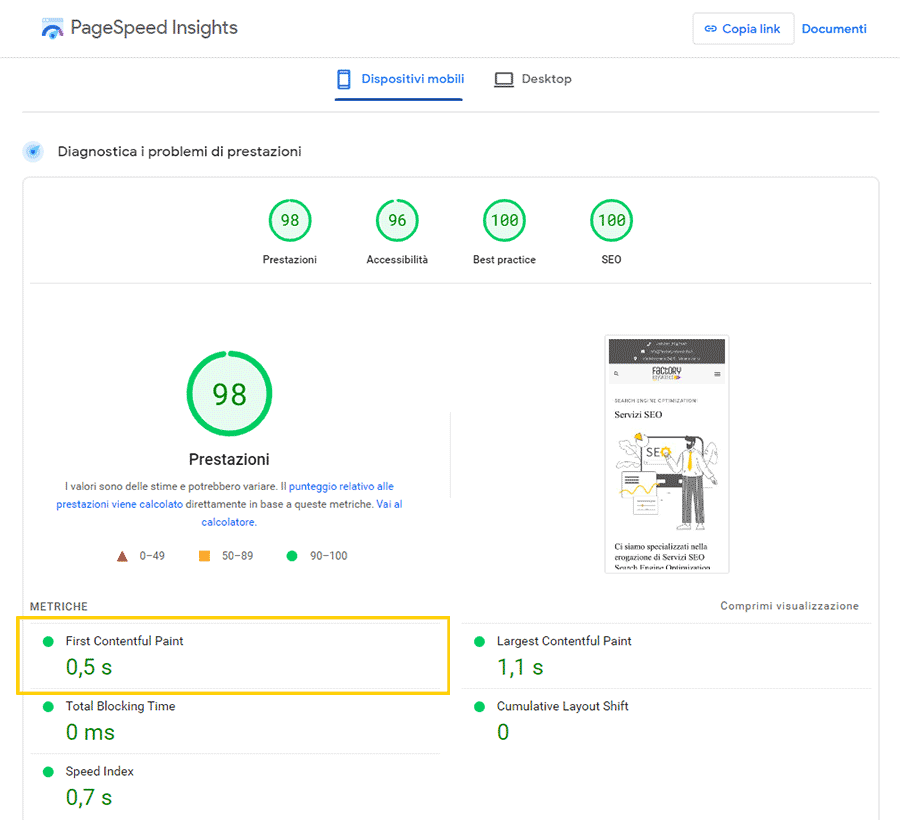
As you can see in the image below, the download speed of the first content(first contentful paint) one of the elements that is analyzed by Google to measure the performance of a web page.
If one of the first items downloaded is an image, it is critical to optimize its weight and size, so it is downloaded quickly and is not considered a blocking item by the search engine.
Step 5. How to name SEO images.
We have arrived at the technical insights of this article, which also turn out to be the most interesting ones regarding SEO optimization of images.
Search engines scan the Web using special systems called spiders.
To do a corect SEO of images, it is essential to call the photo or image we want to upload in the correct way.
Basically, before uploading the image we have to rename it, using, without overdoing it, the right keywords.
Try Googling photo0001.jpg (the typical camera name). You will find a million photos.
How do I distinguish them, look for the one I need?
If we are advertising a bottle of prosecco, it certainly makes more sense to rename the file by inserting the name of the winery and the name of the bottle: “prosecco-arzana-cantina-astoria.jpg”
This way we are telling, to Google, what our photograph is about.
If you have not done so, don’t worry. There are the other fields that allow us to explain in detail the content of the image.
Therefore, to perform SEO ranking of our site, it is important to understand how images are viewed by search engine spiders.
These software programs are designed to read HTML code, not to “interpret” photographs.
Probably soon, thanks to artificial intelligence, this blockage will also be permanently passed.
Despite this, because from an SEO and user experience perspective, images are important, it is critical to be aware of every single aspect of the search engine-image relationship.
To remedy this, modern CMS (Content Management System) such as WordPress use special fields to add the most information to the image and make it, thus, more interesting to search engines.
If you use WordPress for your Web site, Blog or E-commerce you can manage lots of SEO information related to the images you upload.
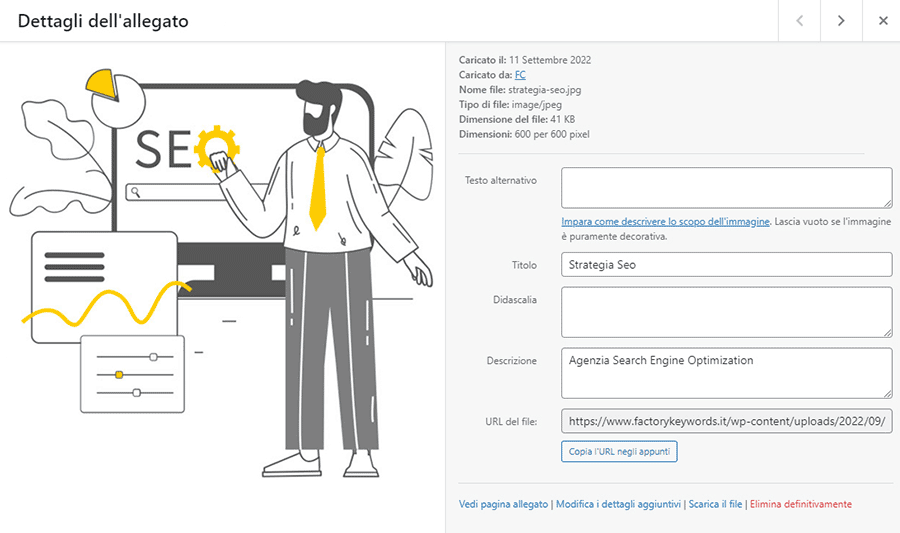
What you see below is the screenshot that appears when you click on an image in your website’s media. As you can see the WordPress image seo is very clear and detailed.
Assigning the correct file name to an image is a decidedly important step.
It means providing more information to Google that describes the content of our image.
For example, the image included in our “SEO Strategy” Page has the following characteristics:
- File name “strategy-seo.jpg”
- Title: SEO Strategy
- Description: Search Engine Optimization Agency
- Alternative text: empty field
As you can see, the inserted texts can be traced back to the main keyword.
Step 6. SEO image positioning. Technical information
Let’s look at the various fields in detail:
- Uploaded on: September 11, 2022
- Uploaded by: FC (username)
- File name: strategy-seo.jpg
- File type: image/jpeg
- File size: 41 KB
- Size: 600 by 600 pixels
-
Alternative text of an image(seo image alt attribute).
It is the most important element, because it is the information that the Google spider reads to understand what the image represents. For this reason, this text string must be optimized, without exaggeration, so that Google can understand exactly what the content of the image is.
It is important to fill it out in case we provide useful information to the user (technical data, descriptions, routes, tables etc).
If the image, as in this case, is purely decorative, it is recommended to leave the field blank. -
Title: “SEO Strategy” The title of the image represents the TITLE tag.
It is visible when you hover, with the mouse pointer, over the image.
As far as SEO is concerned, it does not have much influence, but it is extremely useful for the user to understand what an image represents. - Caption: in this case it is blank but if text is inserted it can be made visible below the image
- Description: You can use this field to enter alternative and/or long-tail Keywords
- File URL: In which folder your image is located.
As you can see from the large list of fields, the information that can be associated with a single image is really a lot.
Step 7. What image formats can I use on the Web?
I point out the top 5 formats you can use on the web:
- jpeg
- gif
- png
- webp
- SVG
I will not go into the technicalities and differences of the various formats.
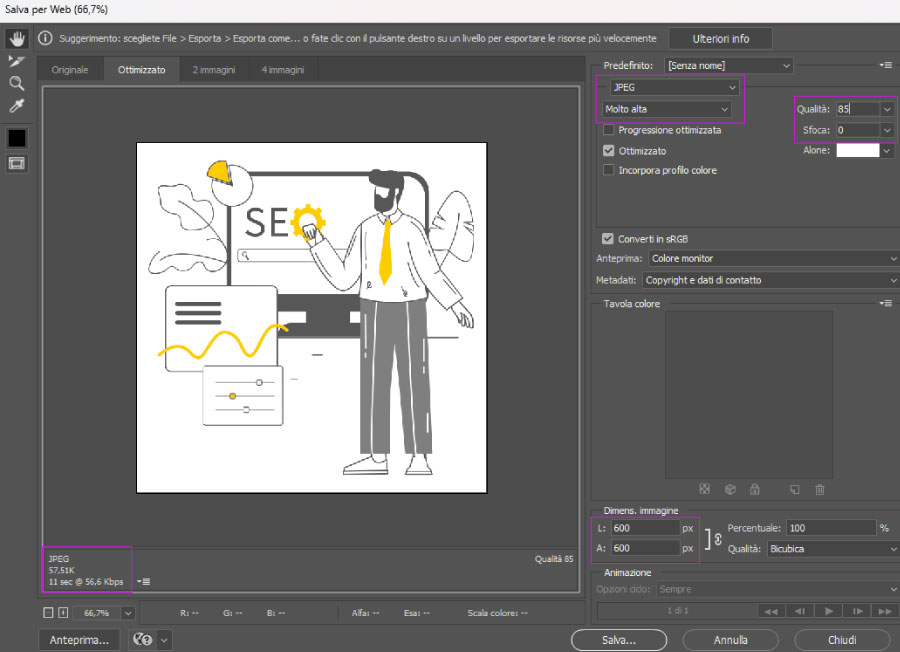
If you have a photo editing program like Photoshop when you save an image that you want to upload to your site simply use the File/Export/Save for Web function.
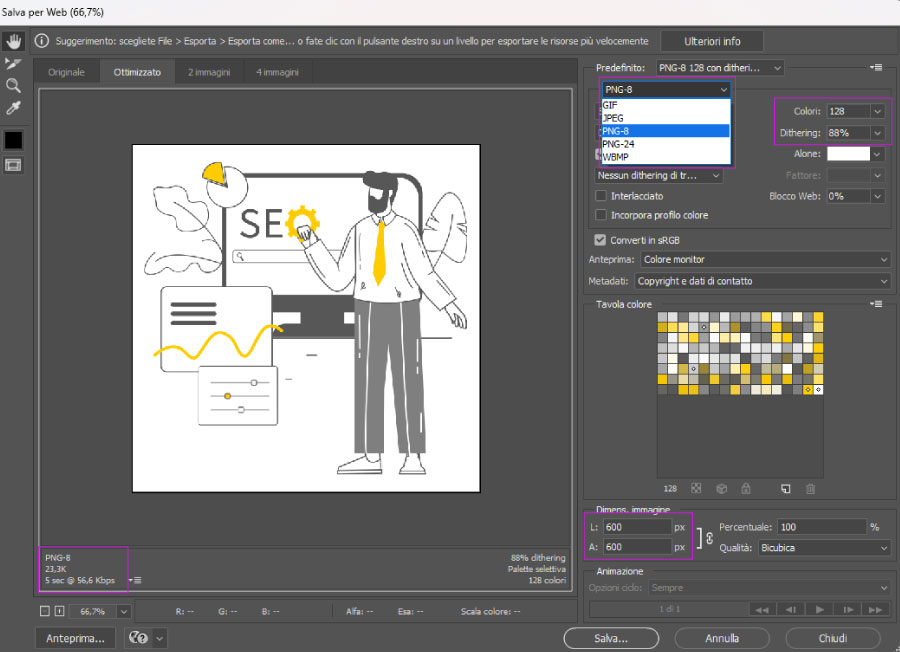
Currently, the webp format is one of the most optimized but also one of the least used due to compatibility issues with some browsers.
Step 8. Image SEO optimization: conclusions
We are now in the final stages, so I would like to give a quick recap of the most important points.
- SEO strategy is critical but I know much more so than content. As Bill Gates said back in 1996, “content is king.”
- There is no point in investing time to optimize the SEO ranking of an ugly image that does not communicate.
- Before uploading an image to our site we check the file name. Let’s make sure it contains the keywords useful for its indexing
- We always check the size of the image in pixels and the weight in KB. A heavy photo can increase the page loading time with the risk of discouraging the user.
- Once the image is uploaded we invest a little time to fill in Alternative Text, Title, Caption and Description
I hope you found this article interesting.
If you need further insights please leave a comment.
I will be happy to respond to your inquiries.
SEP techniques: related articles
If you want to do SEO of your website and eCommerce, also read these articles:
- SEO Consulting for WooCommerce
- SEO consultant for companies: how he can help you
- Ultimate SEO checklist for Your E-commerce!
- E-commerce seo optimization: what to do?
- Abandoned WooCommerce carts: Which Plugins to best manage them!
- SEO consultant for e-commerce
- WooCommerce vs Shopify with a look at SEO
- Opening an eCommerce store: our 12-point checklist
- International SEO for a multilingual strategy
- SEO product tab: optimization for WooCommerce