


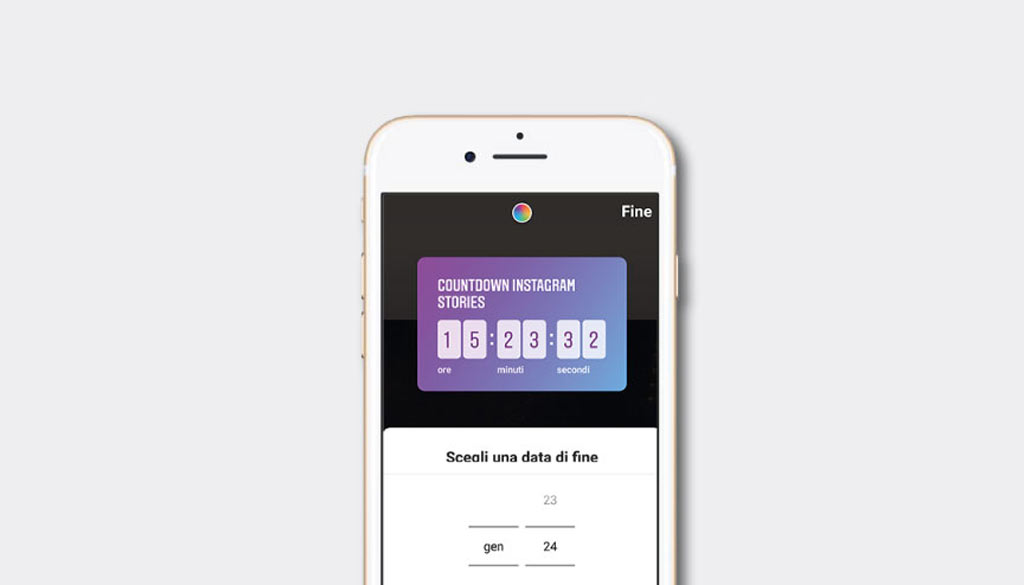
In this article we look at 4 ideas for promoting timed events or offers using Instagram Countdown in Stories and in your Social Media Strategy.
For the past few weeks, a new feature has appeared within the Stories section: the Instagram countdown.
If you are wondering how it can help you promote your business, read on.
In this article you will learn how to set up your Instagram Stories countdown and we will suggest four ideas for using it in your strategy.
1. But let’s proceed in order: Countdown Instagram what is it?
Instagram is now known not only for sharing beautiful photos, but also as a tool for creating funny Stories.
But when it comes to promoting events and time offers, most people turn to Facebook because it has more dedicated features.
TheInstagram countdown sticker will now give you the ability to set a reminder for up to a year after the publication date so that your audience can receive notifications.
Combining this together with other functions such as Swipe Up and other buttons CTA (call to action), you can better manage newsletter subscriptions, sales, and more.
Once your Stories are posted with the relevant sticker, anyone viewing it can trigger a reminder.
In addition, a very important function for testing brand loyalty, users can in turn share the countdown within their Stories, expanding its reach within their network.
“When someone activates the reminder on one of your Instagram countdowns you will see it within your notifications, so you understand who is really interested in your event.”
Finally, when the countdown sees its end, those who have subscribed to the notifications will be notified.
At the deadline, if the Stories is still posted, users will see the clock at zero and thus know that their time is up.
2. How to add your Instagram Stories countdown sticker
The Instagram countdown sticker is available to most registered users of the platform.
By uploading a Stories it will be enough to tap on the stickers and select the countdown one.
Having done this you can customize it by giving it a name, a date and an end time, and change its color.
“Pro-tip: The event name can span two lines of text or average 40 characters. The number of characters depends on spacing, so keep attention!”
When you have finished making changes to your Instagram countdown, tap Done to add the sticker to your Stories. Here you can then resize it to suit your needs.
3. Four inspirations for using Instagram countdown for your business
Like many additional features to Instagram, only your imagination can limit how you use countdown.
Below are some ideas from which to take inspiration for using the countdown in your Stories.
Countdown to live broadcast
If within your Instagram strategy you have planned Live broadcasts you can use the countdown to tell your followers when the next live broadcast will be.
When the timer expires, those who have activated the reminder will be notified of the deadline, ensuring you have a good chance of attracting more users to your live broadcast.
Promote the launch of webinars and courses
If you are planning to launch events such as webinars and courses with discounts for those who register by a certain date, share them on Instagram with the countdown.
This will encourage your users to sign up before the deadline. Of course, in this case, the countdown should end the moment the promotions end.
Promote live events
Not everything happens online, which is why you could use Instagram countdown to promote live events such as concerts, classroom courses and more.
In this case, don’t forget to include details about the location, venue and time.
Share contest or flash sales
Contests and flash sales have very tight time limits. You can reinforce the urgency of this time limit precisely by using the sticker.
When you start your flash sale or online sweepstakes, post a Stories indicating the end of the event.
This will let your users know that they have a hyper-limited time to participate.
4. Instagram countdown: one of the most useful stickers on the platform
The countdown sticker offers great value to businesses, enabling them to use Instagram Stories effectively to increase conversions.
Instagram countdown: in numbers
And now let’s look at some statistics inherent in the use of the Countdown Instagram feature.
- 62% of users said they were more interested in a brand after seeing it in an Instagram Story. This suggests that interactive elements such as countdowns can effectively increase interest in a brand.
- About 4 million businesses use ads in Instagram Stories on a monthly basis. Countdowns are often used in these ads to create a sense of urgency.
- Stories with interactive elements such as countdowns have a 15-25% lower abandonment rate than static Stories.
- Seventy percent of Instagram users watch Stories on a daily basis. This provides ample opportunity to reach the audience with countdowns.
- 35% of consumers prefer short Stories with a narrative that mixes photos, video and text. Countdowns fit well into this format.
- Using interactive elements such as countdowns in Stories can increase engagement rates by up to 80 percent.
- 25% of users swipe up on links in Brand Stories. Countdowns can be used to direct users to landing pages.
- Stories with countdowns have an average completion rate of 70 percent, compared to 50 percent for Stories without interactive elements.
- These statistics indicate that countdowns on Instagram, when used strategically, can be very effective in increasing user engagement and interest in brands and their initiatives.
Sources of statistics:
- Social Media Examiner
- Elfsight Blog
- WebFx Blog
What do you think about it? Are you already using Countdown Instagram Stories?
Do you want to learn more about Instagram? Don’t miss the following articles: