



In this article, let’s look at how to improve the User Experience website or e-commerce, to make them more responsive, useful and effective.
The goal is to make them usable by our users wherever and whenever they want, especially on mobile devices.
A user who quickly and immediately finds the information he or she is looking for is more likely to turn into a contact or customer.
If you arrived at this article you probably typed one of these keywords:
- user experience definition
- what is user experience
- improve user experience
- user experience design what is
AsInbound Marketing teaches us, the key ingredient for ethical and effective business is the relationships we establish with our users, contacts and customers.
To make them happy, satisfied, and make them trust us.
User Experience what is
User experience (UX), translated as “user experience,” is a term used to define the relationship between a person and a product, service or system.
In other words, UX design is everything a user experiences when interacting with something, whether it is a website, an app, software, or a physical device.
Then we can optimize the web design our site and our valuable content to deliver a winning, high-performing User Experience.
Especially in view with Google’s continuous updates, it is important that our site is perfectly in tune with the search engine’s guidelines.
The usability of a website is not only related to the graphic appearance, or the structure of the pages, but also to many technical factors that can affect its proper functioning.
Let’s see together what they are.
1. Improving Website User Experience: Page Error 404
Do you want to improve the User Experience of your website? One of the first things you need to deal with are 404 (page not found) errors, a frustrating user experience.
Suppose we are in the car, and we are traveling to our favorite vacation destination.
The trip goes well, but at one point we are forced to cut it short due to some road works.
What a frustration isn’t it? Not to use other terms, you mean.
That’s it. The same feeling is felt by a user when they browse our site, and they are faced with a Page Error 404.
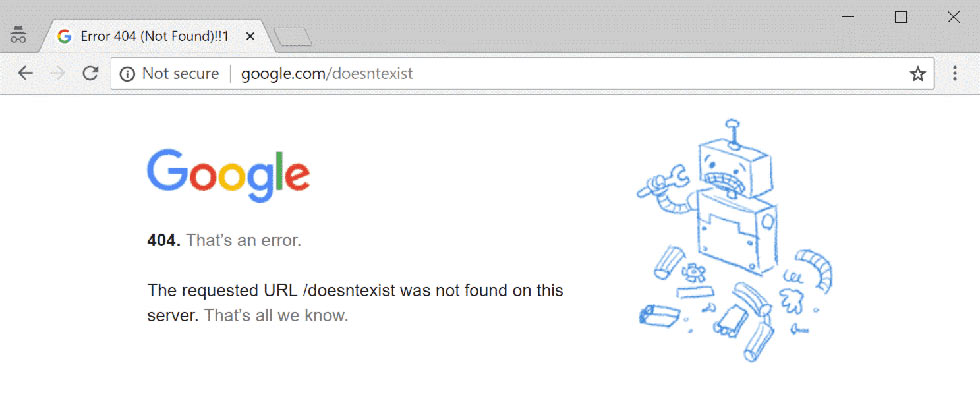
“But how? Just when I thought I had found what I was looking for!”
“But how? Just now when there’s 1 kilometer to go!”
To avoid user frustration, and thus a bad experience on our site, we need to find and fix Page Error 404s.
Let’s see together how to do it.
1.1 How to correct Page Error 404?
They usually begin something like this, “404 – Page not found.”
Not only can this error page cause the user to abandon our site. But we will also be penalized by the search engines themselves.
So immediate action is needed. To improve the User Experience of our site, and to prevent our Marketing and Communication Strategy from being compromised.
1.2 What is a Page Error 404 caused by?
A Page Error 404 can have multiple causes:
Page deleted
The error page may appear if a particular page on our site is deleted.
In this case, it is good to delete the links that direct to that page, and direct them to another, existing section of our site.
Domain transfer
In case we have changed our domain, it is necessary to redirect the URLs to the current domain. Otherwise an error page will appear, upon clicking the link corresponding to the URL.
Changing the URL
If we change the name of a directory, automatically its referral URL will be changed. So if we do not implement a redirection, a Page Error 404 will appear.
Although there is no conclusive evidence that error pages compromise our search engine rankings, it is better not to risk it.
Eliminating this disruptive element is very important. Not only because the user will tend to leave our site, perhaps heading to one of our competitors. But also because the search engine may assign us a “low score,” in terms of ranking.
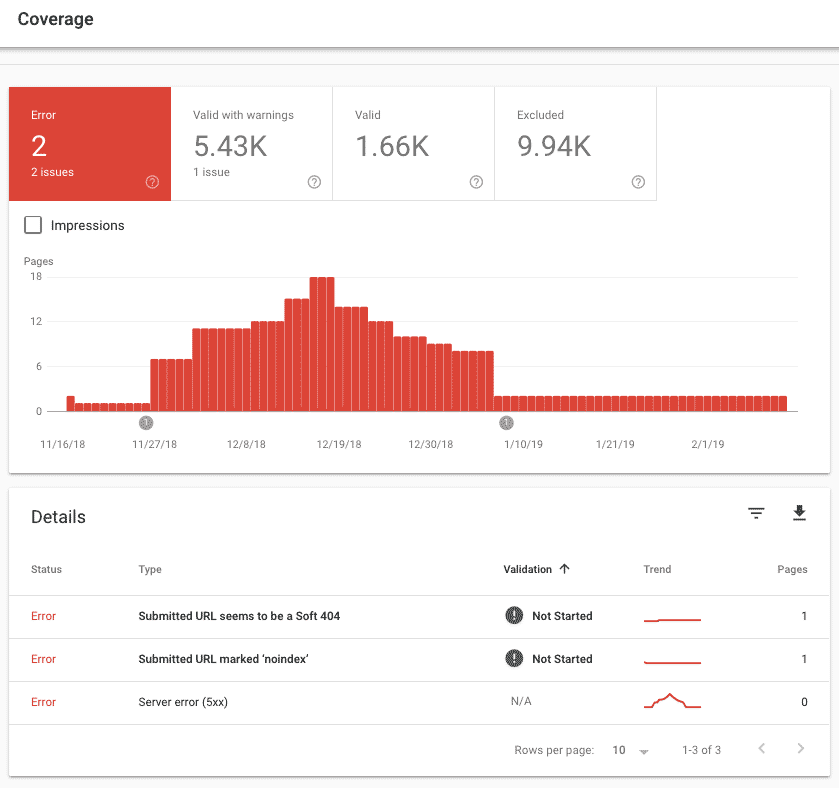
A very useful tool for identifying error pages on our site, is Google Search Console.
2. 301 and 302 redirects
Redirects help us improve the SEO optimization of our site. And we use them the moment we want a URL to be redirected to another URL when we access the browser.
Suppose that, during our car journey, we find ourselves at a dead end.
We have not arrived at our destination, and the feeling is that we “took a wrong turn.”
We find this feeling in the user, frustrated that clicking on a particular URL did not find what he was looking for.
Result: a very bad user experience.
2.1 Redirect 301 versus 302. What’s the difference?
Basically, the major difference between a 301 and 302 redirect is the duration of the redirects.
In fact, as we can see from the table, 301 is permanent, while 302 is temporary.
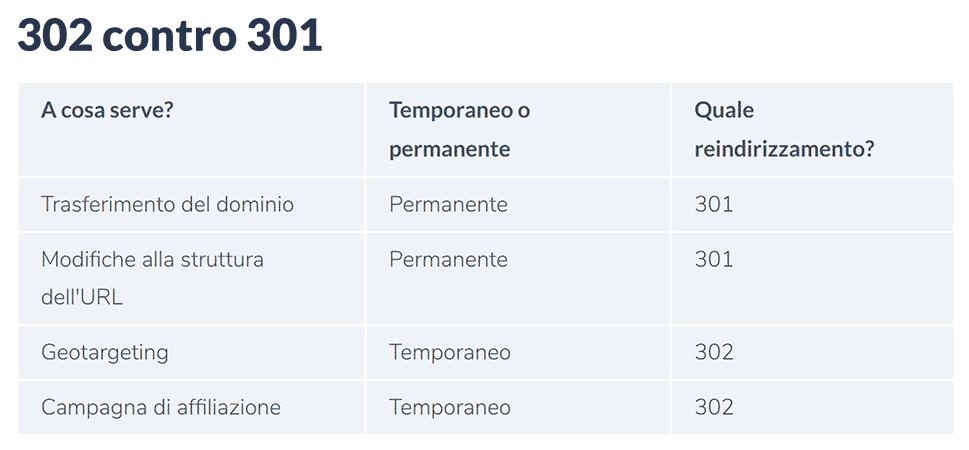
In addition, we must remember that 301 redirects are indexed because they are included directly in Google’s cache. While as for 302 redirects, the redirect destinations are not stored.
But one thing they have in common: they both convey the ranking of the referring page.
In conclusion, we can say that 301 redirects are very effective in helping us eliminate “duplicate” content on our site. Also because they are permanent changes.
By contributing to page ranking, they allow our site to continue to circulate on the web, without interruption. So do 302 redirects.
As for 302 redirects on the other hand, we recommend them in case of:
- Seasonal products. For example, if we have an e-commerce, we can use them to redirect “old” products to “seasonal” products.
- Testing. If we want to test a new version of our website, or of a specific campaign. Since it is a temporary redirect, we will have plenty of time to decide whether to choose the second version, or stay focused on the initial one.
3. Loading times
A site that takes a long time to load unnerves the user. And he will most likely abandon the slow site, going to look for the information he wants from a competitor.
Absolutely to be avoided!
We need to improve the User Experience, not damage it!
This is the case with so-called “smart starts.” When they do not turn out to be such.
Our journey to our well-deserved vacation is going well, when at one point we find an endless traffic jam of cars, stopped, lined up.
Punctually when we are only a few kilometers away from our destination.
The feeling we get in those moments is the same as the feeling the user gets when faced with a long loading of our site.
He can’t wait to get out of the traffic jam.
The loading time of our website is very important. Not only because it provides a positive user experience, but also because Google uses it as a yardstick, to evaluate us.
In fact, search engines often use the speed at which a site opens, to assess its quality. And so they will offer more visibility to sites that perform better, in this respect.
Also, let’s not forget about Google scanning.
A slow site, will be scanned much less by the search engine, compared to a website with a fast loading speed. So the faster a site demonstrates loading speed, the more often Google will scan it, making the content within it more relevant in Google’s index.
3.1 How to measure the download speed of a page?
By “Load Time” and “Page Speed,” we mean the same thing. That is, the time span between calling up the website, and fully displaying it in the browser.
And whatever term we want to use, we will measure it exactly as we do time: in seconds.
However, we can divide the loading time of our website, into 4 parts:
- Time to First Byte (TTFB): the time elapsed between the website being called up, and the first byte loaded by the server.
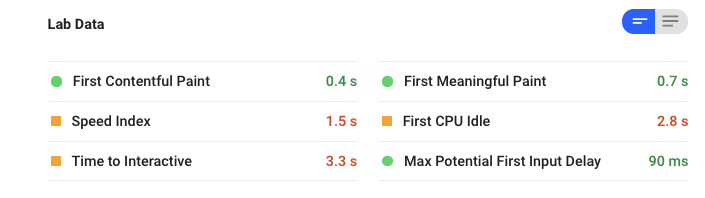
- First Contentful Paint (FCP): the time when a particular element is first displayed by the browser.
- First Signful Paint (FMP): the moment when the user perceives the site as fully loaded.
- Time to Interactive (TTI): the time when the website is to be considered ready for user input
There are several tools for measuring the speed of a page. And they can also help us to optimize our site, making it perform better in terms of loading times.
Page Speed Insights
It is a Google tool that can measure the loading times of websites. However, while it is a Google tool, it is not highly reliable.
It helps us by giving a score from 0 to 100 to our site, making a distinction between mobile and desktop scores. In addition, the colors (red to green) can help us better understand the severity of the problems detected.
Google Analytics
By analyzing our website with Analytics, we can find loading time statistics in the “Behavior” and “Website Speed” sections.
In the case of e-commerce, we can also check how the speed of a page affects conversions.
Google Search Console
With Google Search Console, we can find the analysis of our site load times directly in the menu.
We click on “Tools and Reports,” and then “Scan Statistics.”
These statistics show how many kilobytes are downloaded, and how long it takes Googlebot to download your site (in milliseconds).
WebPageTest.org
With this tool we can check the loading time from different browsers. We also have the possibility to simulate a loading from different countries, and check the speed.
Whichloadfaster.co
Using Whichloadsfaster.co we can compare the loading time between two different sites. With websitespeedranker.com, on the other hand, we can compare up to 4 sites simultaneously. The operation of both tools is similar.
Always keep in mind that a website, to be considered fast, should load in less than two seconds. Obviously, the shorter the loading time, the better the user experience will be.
3.2 How to optimize the download speed of a page?
To improve the User Experience of our site, we can use some “tricks of the trade” to better optimize the loading of our web pages.
Let’s look at the main ones:
We pay attention to HTTPS
The SSL certificate was initially seen as an obstacle to upload speed. Precisely because it must be verified, and then an encrypted connection established.
This is not the case today, however, because SSL certificates are considered a security standard, so the search engine rewards sites that have them. Thus going on to improve user experience and SEO ranking.
We optimize our server
When the connection to the server is established, the request is processed and the requested files (so-called scripts) are provided.
If a page takes a long time to load, it may be because of server overload. And this can happen because of an error in hosting, or because the server has to respond to too many requests at once.
We use server cache storage
If we have content that is frequently requested, we can store it in the server cache. This way, we will prevent requests from being handled multiple times.
We can use this “trick” for users who view many products or services, or read several of our articles. Because in this case, they would go to multiple pages together.
We use browser cache storage
We can also opt to store elements of our site in the browser cache, instead of the server. In this case, all pages of the site will not have to be loaded again, when a new URL is accessed.
Browser caching can be enabled by many CMSs via plug-ins or extensions.
Examples of possible plug-ins for browser caching with WordPress
We use GZip compression
The smaller the files are, the faster they can be downloaded. And this also applies to website code.
Exactly as with files, codes can also be compressed by having the codes inside them decompressed directly in the browser.
Compressing images
Web sites are often accompanied by images.
A good way to make our site faster is just to reduce the size of this kind of content.
Useful tools for optimizing our images, before uploading them to the site, are kraken.io, PNGGauntlet and tinypng.
Of course, there are many other ways to optimize the speed of our website. Here we wanted to list the most commonly used methods, and tools.
Always remember, however, that in order to provide a good user experience, we need to put ourselves in the user’s shoes, and make their browsing experience as easy and smooth as possible.
4. Indexing the Sitemap
Sitemap is a list in XML format of all the subpages of a website. As if it were a kind of table of contents.
The XML Sitemap is not visible to the user because it is a file embedded in the site structure.
It is important to create an XML Sitemap so that Google, and other search engines, can crawl our site. It can also help us with our SEO strategy, because the Sitemap shows in a structured way all the news about our web presence.
Below is an example of an XML Sitemap.
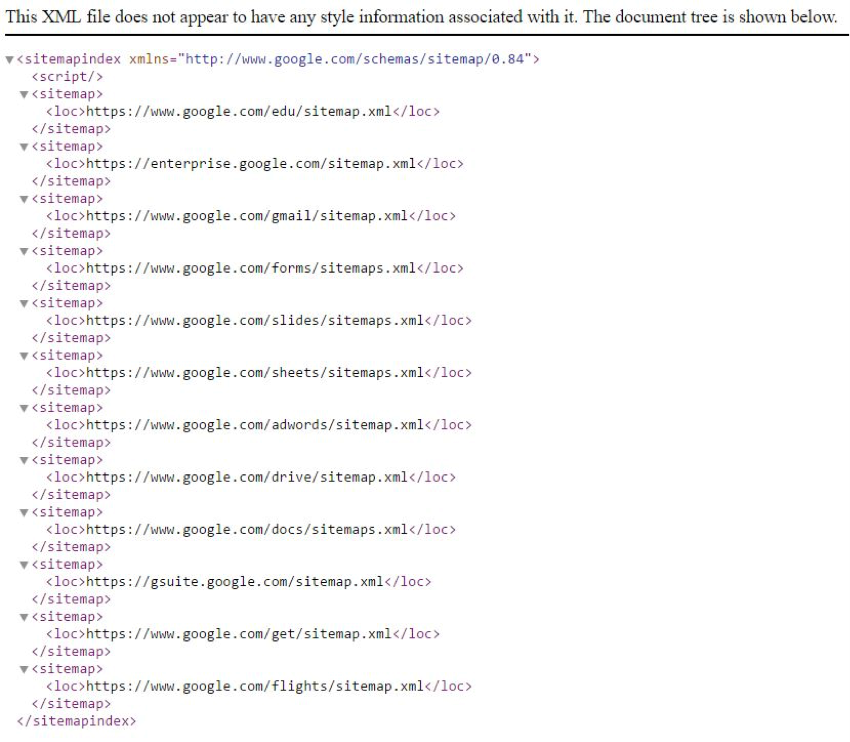
Whereas, as for HTML sitemaps, they are visible to the user. And generally we find them in the lower area of the site.
This has the function of making it easier to navigate our website.
Of course, it is not mandatory, but it is very useful for the user. Especially when our site has a lot of content, which cannot be visible at the same time on one page.
With an HTML Sitemap, the user can then click on the topic he or she is most interested in.
Below we find the HTML Sitemap for Asos.

In addition, we can also create sitemaps for the images and videos on our site. Which lately are very useful in terms of ranking.
With a well-designed XML Sitemap, we can make it easier for search engines to index our content.
As we said, creating an XML Sitemap is not indispensable, but it can bring many benefits to improve ranking and User Experience. And since it requires very little effort, it is well worth it.
5. Optimization for Social Media
Is our site smartphone-friendly? Does it marry properly with social channels?
These are just some of the questions we can ask ourselves as to whether our site can also be accessed through social media such as Facebook, YouTube, Instagram, or Pinterest
To date, social networks are used all over the world, both for business and leisure. So it is necessary to ride the wave of this ever-expanding phenomenon and not be caught unprepared.
5.1 Let’s focus on the Open Graph
Open Graph is a social network protocol used to determine how a specific URL is displayed when shared on social networks.
Its operation is very simple, as it consists of small codes (OG tags), which have the function of specifying how all the elements we are interested in will be displayed in social feeds. Such as title, preview image, description, etc.
Open Graph is currently used on Facebook, LinkedIn, and Pinterest. As for Twitter, on the other hand, the social uses customized meta-tags, called Twitter Cards. But they have exactly the same function.
A well-researched and organized preview of our content allows us to improve the CTR (Click Through Rate) of our social posts. And that means greater visibility and engagement.
5.1.4 og: image: like the title, this is also one of the most important tags
Images are a key element, especially on social networks. So it is advisable to take a few extra minutes to set up a custom image, and avoid having a default, generic image displayed. The quality of our post depends on it.

6. Usability and user experience
In this case we mean by the concept of usability we mean the broader term, that is, the possibility of your website being used by 100% of users. If you want to achieve this important result then you must also take into consideration the aspect of Web Accessibility.
When we talk about accessibility and usability of websites we refer to the creation of content and design of websites that take into account the user experience realized by all users, including those with disabilities.
This not only improves the user experience for a wider audience but can also significantly increase the visibility and ranking (organic placement on the SERP) of your site in search engines.
Web site accessibility is not just a legal requirement (Stanca Law), but an opportunity to make your e-commerce site more inclusive and perform better.
Now we are ready to improve the User Experience website
As we have seen, even though our company is officially “closed for vacation,” communication with our customers, and potential customers, must not stop.
So let’s take advantage of the summer break to improve the experience of the user who comes in contact with us, through our website, social profiles, etc.
To boost interaction with our stakeholders, we need to communicate the right message, to the right person, at the right time. Just as the Inbound Marketing philosophy teaches us.
Did you find this article interesting? You can explore further by reading these articles.