


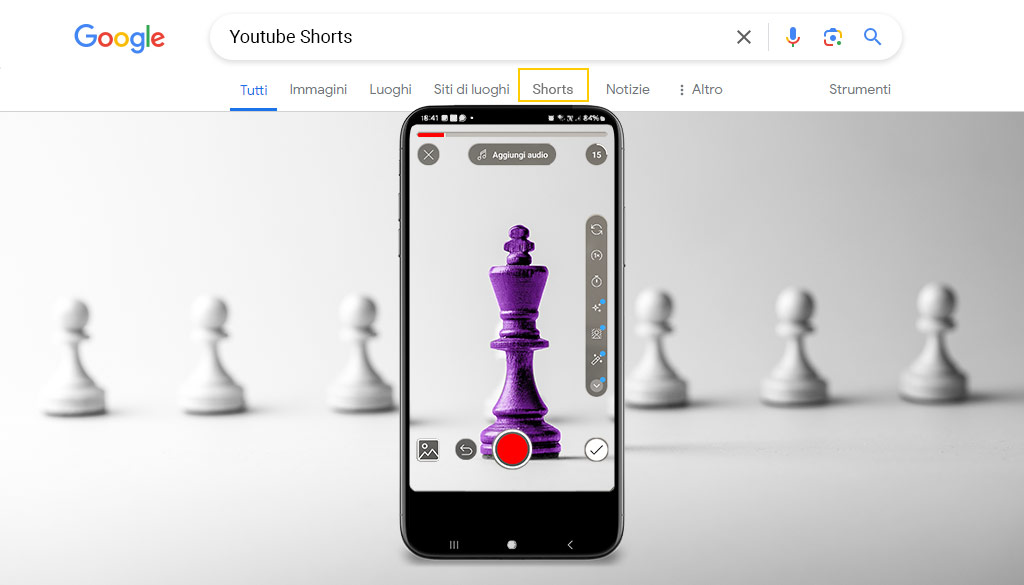
Google tests a new filter to use on the search engine to search for short videos: YouTube Shorts, TikTok and Instagram Reels.
If you are an influencer, or your company invests in web marketing strategies, this could be important news.
For Google, keeping users on its search engine is crucial because it remains the primary source of revenue. This is why the slogan(payoff) “If you want to find it, Google it” is critical for the company.
Until now, Google’s attempts to ride the short video success train have mostly been limited to YouTube shorts.
Now the company is taking note of the important role of this format in information distribution as well.
For this reason, users may soon see the new short video filter appear that allows users to easily find short videos from platforms such as YouTube video shorts, TikTok, and Instagram Reels.
The results are shown in a two-column grid format with a vertical orientation.
An official date for full release has not yet been announced.
The feature is currently being tested and may be available gradually over the next few months.
YouTube Shorts Google: What are they?
YouTube Shorts is one of the platform’s newest features and allows users to create and publish short films.
From a Business perspective, Companies and Creators (influencers) have the opportunity to connect with a new audience segment, using only a smartphone and the Shorts camera in the YouTube app.
Influencers have the opportunity to attract new audiences, while Brands can advertise their products and services with the goal of gaining new customers.
The announcement comes as YouTube Shorts has surpassed two billion monthly registered users and 70 billion daily views globally, with a 100 percent increase in views on connected TVs in the first nine months of 2023.
YouTube short video creation tools make it easy to create videos in the short format lasting up to 60 seconds
The short video format was popularized by applications such as Snapchat, TikTok and was quickly imitated by Instagram Reels and YouTube Shorts.
It is not yet clear what the behavior of the filter will be on the desktop version.
Now many creators have focused exclusively on creating short-form content.
They are mobile-oriented, and most platforms encourage users to shoot in portrait mode, making the viewing experience suboptimal on widescreen devices such as laptop monitors.
The success of short videos on YouTube also lies in its ability to adapt to different platforms. Although it is optimized for mobile, Google is exploring ways to also integrate Shorts into the desktop interface and on devices such as smart TVs.
To help brands create more effective Shorts ads, Google has expanded its “ABCD” framework for video advertising success to include specific guidance for short formats.
What is Google’s “ABCD” framework?
Let’s find out directly on the Think With Google guide:
What do ads that produce results on YouTube have in common? This question inspired a collaboration with Ipsos and the involvement of two independent research firms, Nielsen and Kantar, to find an answer.
We examined 17,000 ads to understand the keys to advertising success. On this basis, we created four guiding principles for marketers, which we summarize in the acronym ABCD (Attention, Branding, Connection, Direction; Attention, Branding, Connection, Direct Directions).
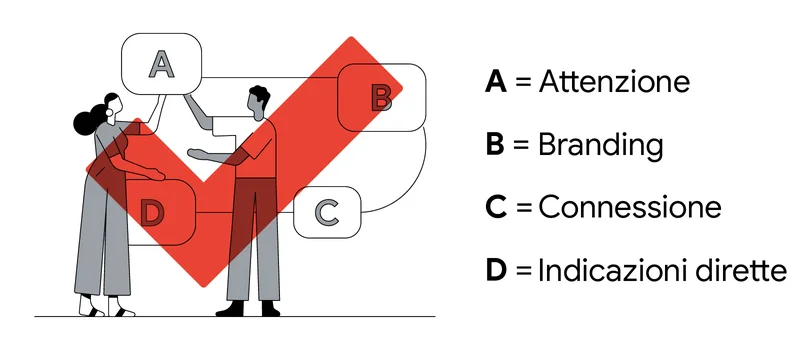
Kantar research has shown that applying these ABCD principles can increase the likelihood of short-term sales by 30 percent and long-term brand impact by 17 percent.
ABCD key principles for effective YouTube Shorts ads, as outlined by Google:
- Focus: “Attract and hold attention with an engaging story.” Creative tactics such as jumping directly into the action, supporting with audio/text overlays, and using bright, high-contrast images.
- Branding: “Show the brand right away.” Integrate the brand from the beginning, reinforce it with audio mentions, and maintain a strong brand presence.
- Connection: “Helping people think or feel something.” Humanize with relatable talents, focus on a clear message, and use engaging storytelling techniques such as humor or surprise.
- Direction, “Ask them to act.” Include a clear call to action, enhanced by voiceovers that reinforce the desired action.
How to Upload a YouTube Shorts
YouTube Shorts is the YouTube feature that allows you to create and share short, vertical videos with a maximum length of 60 seconds. Here’s how to upload a Short from both smartphones and computers.
From Smartphone (Android/iOS)
- Open the YouTube app and log in to your YouTube account.
- Tap the [+] button at the bottom center of the main screen.
- Select Create a Short.
- Allow access to camera and microphone if required.
- Press the Rec button (red dot) to record the video, or select a video already on the device via the box in the lower left corner.
- You can change the duration (up to 60 seconds) and use tools such as timers, speed, text, filters, and music (if you use music from the YouTube catalog, the limit drops to 15 seconds)352.
- Tap Next, add a title (enter the hashtag
#shortsfor more visibility), choose visibility (Public, Unlisted, Private), select audience (for children or not) and other options. - Tap Upload Short to publish
From Computer (PC/Mac)
- Go to YouTube Studio and log in
- In the upper right-hand corner, click Create and then Upload Video.
- Select the video file from your computer.
- The video must be vertical (9:16 or square format) and a maximum duration of 60 seconds for it to be recognized as Short.
- Enter title, description (insert hashtag
#shorts), thumbnail, choose visibility and set audience. - Complete the other details and click Save or Publish to upload the Short.
Summary Table
| Device | Main steps | Maximum Duration | Video Format |
|---|---|---|---|
| Smartphone | YouTube App → [+] → Create a Short → Record/Load → Edit → Upload Short | 60 sec (15 sec with YouTube music) | Vertical Videos (9:16) |
| PC/Mac | YouTube Studio → Create → Upload video → Select file → Insert details → Save/Publish | 60 sec | Vertical Videos (9:16) |
By following these steps you can easily publish your YouTube Shorts and reach a new audience with short, engaging content.
YouTube Shorts Google: Benefits for companies
- Short videos can be a powerful marketing tool for businesses.
- They allow you to reach a wider audience and increase engagement.
- They can be used to promote products, services or simply to create brand awareness.
- Short videos are especially effective for younger generations, who tend to consume content in this format.
- Shorts remain visible on the channel, not disappear after 24 hours like stories on other platforms.
- You can add effects, animated text, filters and music through the built-in tools.
- If you upload an existing video, make sure it meets the duration and format requirements.
- The use of copyrighted music is allowed only within the limits provided by the platform
Want to learn more about these topics also read:
- YouTube AI: what changes for users, creators and companies
- YouTube video ranking: what it is and how it works
- B2B video marketing: 4 ideas for your strategy!
- Influencer Marketing Trends 2024: what you need to know!
- Visual storytelling: what is your story?
- How to Increase Your Company’s YouTube Visibility
- B2B video marketing: 4 ideas for your strategy!
- SEO on YouTube: how to optimize your channel for search