



In this article we look at how to increase conversions and commerce of your PPC Campaigns using HubSpot CRM!
Today I want to tell you about some extremely useful HubSpot features that allow you to increase online sales and boost your Business.
If you arrived at this article, you probably typed one of these keywords into Google:
- conversion rate in e commerce
- ecommerce conversion rate optimization
- increase ecommerce customers
From Entrepreneur to Entrepreneur, we both know that one of our priorities is to acquire new Customers and increase sales.
Then we define Marketing and Communication Strategies to increase the number of contacts and potential customers.
SEO strategies, Content Marketing, Social Media activities, ADV Campaigns, DEM (Direct Email Marketing) Dispatch, are just some of the activities we budget and implement every day.
However, one of the most complicated activities is to monitor the conversion rate of each activity we perform.
- How effective are the campaigns we implement?
- How many contacts, customers, and sales did the money I invested generate?
- Am I investing my Budget correctly?
How to improve the conversion and commerce rate of our Campaigns
Generally thanks to tracking systems, e.g. Google Analytics, we know how many users visit our site.
We are aware that only a small part turns into a real contact and all other users remain anonymous.
Generally, we get the conversion from general user to contact when:
- A user fills out the form
- Click on an email address or phone number on the site (if we have decided to track these actions)
- Subscribes to the Newsletter
- Contact us via Chat (if present on the site)
- Contact us via WhatsApp (if on site)
As you can see, the opportunities to be contacted are many. The “sine qua non” is to have integrated all of these services into our website.
Generally, especially when we had our website developed in WordPress, all the above services are integrated with third-party plugins.
Don’t worry, it is a normal procedure, which unfortunately generates chaos and dispersion of information.
- Newsletter subscribers end up in the database of systems such as Mail Up, Sendinblue etc.
- Data from people who contact us via forms generally arrive via email
- People who contact us via chat end up in the relevant application
- And last but not least, those who contact us via WhatsApp stay with us on the relevant application.
You will agree with me that these are definitely scattershot procedures and difficult to control.
Ideally, we should have a single container, or rather a single Database, that collects and catalogs all these contacts.
You are probably wondering how to do this? How is it possible to collect all the information coming in from different channels? The answer is to integrate the HubSpot CRM into your website.
If you’re thinking this whole rigmarole is to sell you HubSpot, don’t worry. There is also a free version.
To get a good e commerce conversion rate, you need to analyze the data
My goal is to inform you that, thanks to HubSpot, you can collect all the data generated by your website and much more:
- Data collected through contact forms
- Newsletter subscribers
- Contacts made through chats, chatbots and WhatsApp
- Users who have contacted you through Messenger of your Facebook Page
- Users who have contacted you through Linkedin
Not only that. If you have developed your e-commerce with WooCommerce, HubSpot tracks users who:
- They registered in your e-commerce
- They made a purchase
- They have abandoned the shopping cart. N.B. This feature is critical to avoid losing Business.
Thanks to Hubspot you have multiple advantages:
- A single container where master records are saved and catalogued
- Avoid duplication of information and contacts
- You can manage customer relationships. You can plan, manage, and save: tasks, meetings, phone calls, business requests, purchases, and much more.
- You can send customized newsletters, based on the specific needs and requests of each individual user: Subscriber, Prospect, Lead, Customer, and Ambassador
Let’s look at how Hubspot can help us increase the average conversion rate of our ADV Campaigns
Now let’s find out together how to greatly increase the conversion rate of PPC Campaigns, made with Facebook, Instagram, Google ADS, Linkedin, through the use of HubSpot CRM.
The following is a brief primer on the different types of PPC Campaigns, enabling us to understand which ones to choose in order to more easily achieve the goal we have set for ourselves.
In fact, each campaign works differently and follows specific metrics and techniques that can determine its performance.
PPC Campaigns, especially those made with Google ADS, are one of the most effective and efficient tools to intercept our potential Customer in the market. They work on the keywords users use on Google to perform a search.
When a Customer searches for a product of his interest on Google, he does so by typing in some specific keywords. And it is thanks to ADS Campaigns that we are able to intercept his search, showing him our ad.
Facebook and Instagram Campaigns, differ in being visual and display ads. They do not specifically intercept user demand and can be made by setting profiling based on certain parameters such as: geolocation, user interests, age, gender, etc…
Campaigns made with Google ADS, on average cost much more than those made with Facebook and Instagram.
The latter, however, generate high traffic to the site or e-commerce and a low conversion rate.
Thanks to HubSpot you can increase the conversion rate in e commerce of your PPC Campaigns!
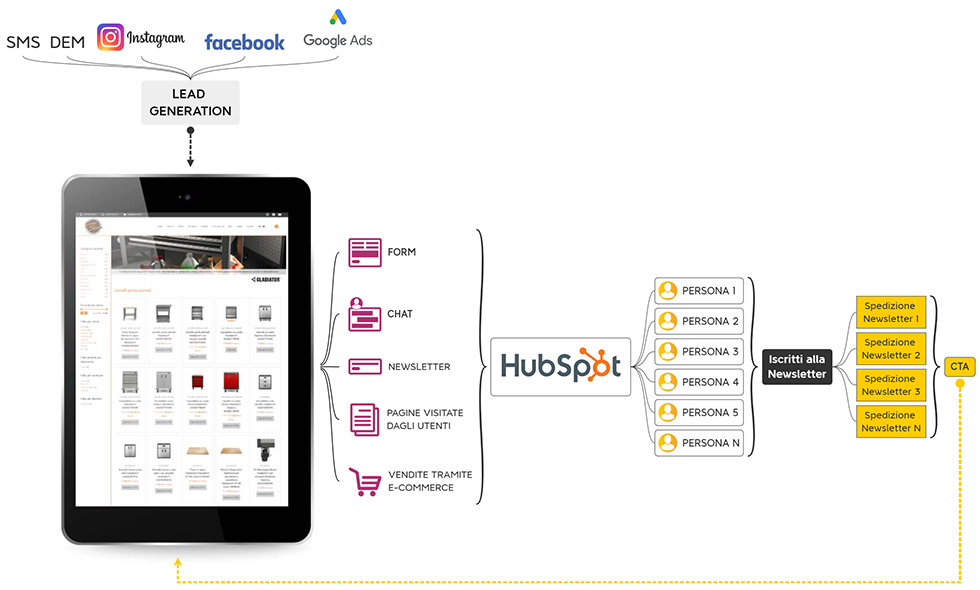
Increasing the conversions of your PPC Campaigns means increasing sales, increasing the number of users potentially interested in your products… to achieve the ultimate, but certainly not least, goal of increasing your revenue.
When we run a PPC Campaign we basically intercept people potentially interested in the sponsored topic.
Users who show interest in the ad they see on Google, Facebook and Instagram are likely to reach our website, as they are potentially interested in the products.
To increase online store sales, an effective upstream strategy must be structured.
Your strategy can focus on different goals, for example:
- Targeting users to a single product;
- Bring users to view a product family;
- Show users a specific group of products that you want to push at that specific time “Try our wine tasting. Promo valid until ….”
How to use HubSpot to increase conversions and commerce
Now let’s look together at some useful implementations you can make to increase your company’s online sales or e-commerce.
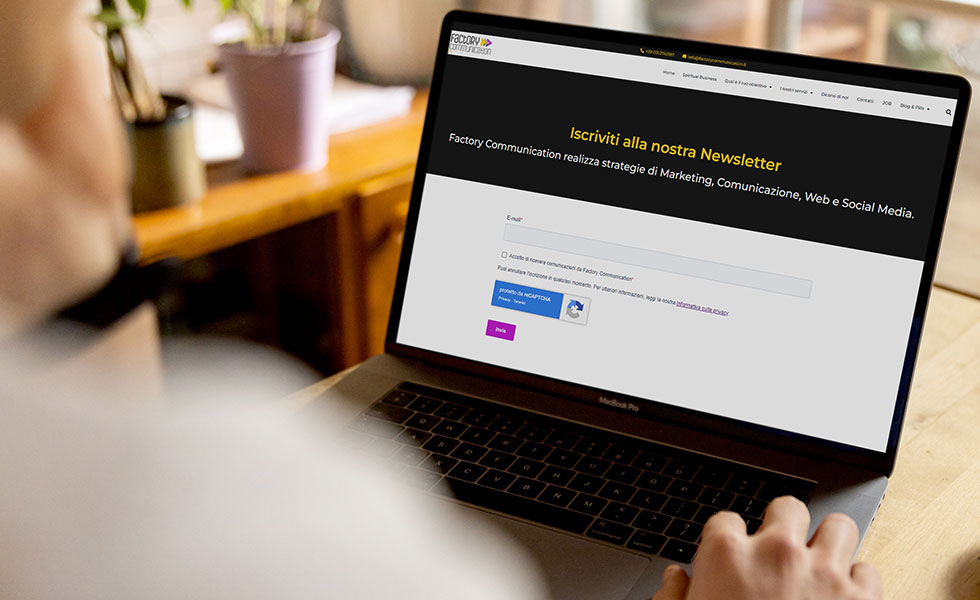
Profile your target audience with HubSpot’s newsletter subscription form
The first level of user acquisition is newsletter subscription. Why?
Subscription to the newsletter does not imply a request for information and does not explicitly imply on our part a request for a sale.
It can, therefore, be more easily done by a user who shows interest in our brand but does not want to expose himself too much.
The user by filling out the registration form releases his first name, last name, email address and, for example, the name of his company.
All of this data is very valuable information that flows into the HubSpot CRM, and is then saved in the reference database.
Not only that, user profiling thanks to HubSpot is increasingly comprehensive. Careful reading of the data allows us to understand which pages of the site our user has visited, or, for which products and services they have shown interest.
Warning. Here many of you may think that the same profiling and information can be provided by Google Analytics.
Not really, Google Analytics shows the pages visited by a user but, for example, does not detect whether those pages were visited by Mario Rossi rather than Paolo Bianchi. This is a very important aspect and should not be underestimated.
Thanks to the implementation of HubSpot, therefore, I begin to understand the degree of interest shown by users in my products and can then, for example, periodically send out through newsletters useful information, news, promotions about the products for which they have shown interest.
You can increase ecommerce customers with Marketing Automation
In addition, with the HubSpot Professional version, I can implement a strategy that makes use of the Marketing Automation, periodically sending a series of non-strictly commercial information related to those specific products.
Let’s take a practical example: if our e-commerce sells typical Apulian products, we can send with HubSpot Starter the recipes that can be prepared using those products, while with HubSpot Professional a recipe for each individual product.
And, if a user, for example, opens a single recipe, after a couple of days I can send them a new recipe that differs from the previous one but allows them to use the same ingredients and products.
This process allows us to establish and maintain over time, a relationship of trust with our users.
The worst thing is to send a promotion right away, while it is much more performing to send useful information about our products: for example, to specify that they are natural, gluten-free, organic, made in Italy… after which it could be very useful and interesting to explain how to use these products to make a recipe or your dish of the day.
In this way I create a lasting relationship with the Customer that can be maintained over time. Our user does not forget about us over time and, for example, the day he decides to buy typical Apulian products to make his recipe of the day, he will remember us and be inclined to return to our site to make his purchase.
Set up and integrate HubSpot chat
Another very important tool is the chat on the site that allows, for example, a user to contact us to ask about a product, a shipment, or a payment.
All this data is collected in the HubSpot CRM, allows us to further profile the user and integrate the information to manage, to the best of our ability, our sales funnel.

To increase online sales, you need to recover abandoned shopping carts
Another big goal, thanks to the connection between HubSpot and WooCommerce, is that thanks to HubSpot you can manage abandoned carts.
Abandoned carts, as we know, generate a large loss in percentage of revenue.
One of the possible strategies that can be implemented is to send a notification via HubSpot asking the user if they need to speak with support or be guided to purchase their products.
In this case, the user can see a summary of the products they have dropped into the cart and find a button to complete their purchase.
In order to incentivize a new purchase, we can also offer him a timed discount on the purchase of a new related product (e.g., if you purchase this new product online within 24 hours, you have a 50% discount).
Thanks to HubSpot you can find out which Companies visit your website or eCommerce
Generally thanks to tracking systems such as Google Analytics, we know how many users visit our site.
We are aware that only a small part turns into a real contact, and all other users remain anonymous.
Thanks to HubSpot, we can also display the names of Companies that have visited our website, even if they have not contacted us.
Clearly, in order to take advantage of this powerful feature, we must first integrate HubSpot into our website.
If you’ve already integrated HubSpot follow this short guide to find out which company visited your site.
I’ll anticipate that the “Prospect” feature we’re going to analyze now is not found in the menu.
Just type Prospect in the search field.

Now let us analyze together the information automatically detected by HubSpot.
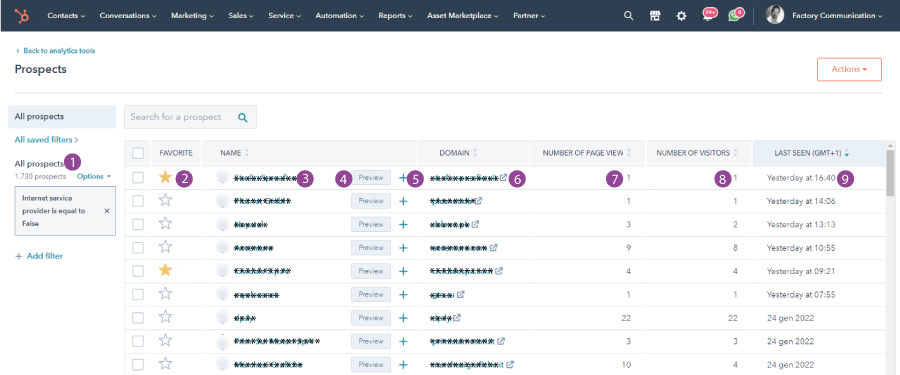
Below is information you can view and activities you can perform on contacts:
- Number of Companies (Prospects) that have visited your website
- Companies of interest to you. You can highlight them by clicking on the little star that will turn yellow.
- Company Name
- Preview Function. Opens a HubSpot window in which some information of the contact and the source of the contact is displayed: ADV Campaigns, Social, Organic, Direct etc.
- With the + button you can add the Company’s data directly into your Companies on HubSpot
- Link to the Company’s website
- Number of site pages viewed by the user
- Number of visitors from the same Company
- Date of the last visit made by the user
You will agree with me that the information gathered by HubSpot is so much and extremely useful.
You can share the information gathered with your sales department and activate actions to convert these “visitors” into many new Leads and Customers.
Some important notes:
HubSpot detects all Companies that use a static IP for their Internet connection.
Among the different visitors you will also detect many companies that have visited your site to propose services to you. For example, we consistently detect visits from companies that sell connectivity.
To keep from going crazy, I recommend that you put the Companies in order by clicking on the sorting arrow of “NUMBER OF VISITORS.”
As you will be able to see, if this number is high, most of the time these are commercial companies.
Are you planning your Business Strategy and want to find out how to increase ecommerce customers?
Book a free consultation to find out how HubSpot can help you streamline business processes and increase your Business. Book a Free Meeting!
Read these articles: