



Breadcrumb literally means breadcrumbs, like the ones used in Tom Thumb’s fable to find their way back.
Breadcrumbs, also known as “navigation paths,” are an important user interface element on Web pages that help users understand and navigate the structure of the site.
These are small textual traces, often placed at the top of a web page. They show the path the user took to get to the current page, or indicate the page’s position within the site hierarchy.
In web design and even more so in SEO Strategy, breadcrumbs help user experience.
In fact, they allow the user to always know which current page he or she is on and to visualize the path he or she took to get there, starting from the home page.
Basically, breadcrumbs help users not to get lost among the pages, categories and subcategories of your website.
You can recognize a website with this structure by looking at the top of the website page.
In the image below we have highlighted with a yellow arrow the breadcrumbs found in the articles on the Factory Communication Blog.

As you can see, you find a string of text showing the navigation path, with hyperlinks containing internal links to other web pages.
Besides being a useful feature for users they help Googlebot better determine the hierarchical structure of your website.
In fact, if you try to use the breadcrumb featured in our articles, you can see that each element is a real link (internal hyperlinks), and the path describes the hierarchical structure:
- Home(starting point)
- Marketing SEO(article category)
- Breadcrumbs: What they are and what they are for!(Article title)
Choosing this structure is very useful, for example, in e-commerce, or in blogs, especially when article hierarchies are extremely complex and multi-layered.
Type of breadcrumbs
There are 3 different types:
- Based on hierarchy or position (the one given in our example)
- Attribute-based breadcrumb: is generally used on e-commerce to show which attributes were used by the user
- User history: these are moto useful and similar to browser history in that they show the user what other pages on the site he or she has visited.
Breadcrumbs: what are they for?
They serve several key functions:
- Improved navigation: Provide users with an easy way to go back to previously visited pages or to understand the structure of the site without having to use the browser’s “Back” button.
- User orientation: They help users understand where they are within the site, especially in complex Web sites with multiple levels of navigation.
- Reduced bounce rate: By facilitating navigation, they can encourage users to explore the site more thoroughly instead of leaving after visiting only one page.
Breadcrumbs: why are they important?
From an SEO and usability perspective, they are very important for several reasons:
- Improved usability: By making the site easier to navigate, they improve the user experience, which is a key factor considered by search engine algorithms.
- Data structuring: They can help structure your site’s data so that search engines can better understand and index the content.
- Internal links: Provide natural internal links to relevant pages within your site. They can help distribute page authority and improve ranking in search results.
- Appearance in search results: Search engines, such as Google, sometimes include breadcrumbs in search results, making your pages more attractive and informative to searchers.
In summary, breadcrumbs not only improve usability and user experience, but are also beneficial to the Search Engine Optimization.
They help websites gain greater visibility in search engines and make it easier for users to navigate.
How to check Breadcrumbs with Google Search Console
Some times it may happen, for example, that Google Search console does not detect breadcrumbs of your content or products.
If you have Google Search Console installed on your website or eCommerce simply go to the relevant section, as you can see from this image.
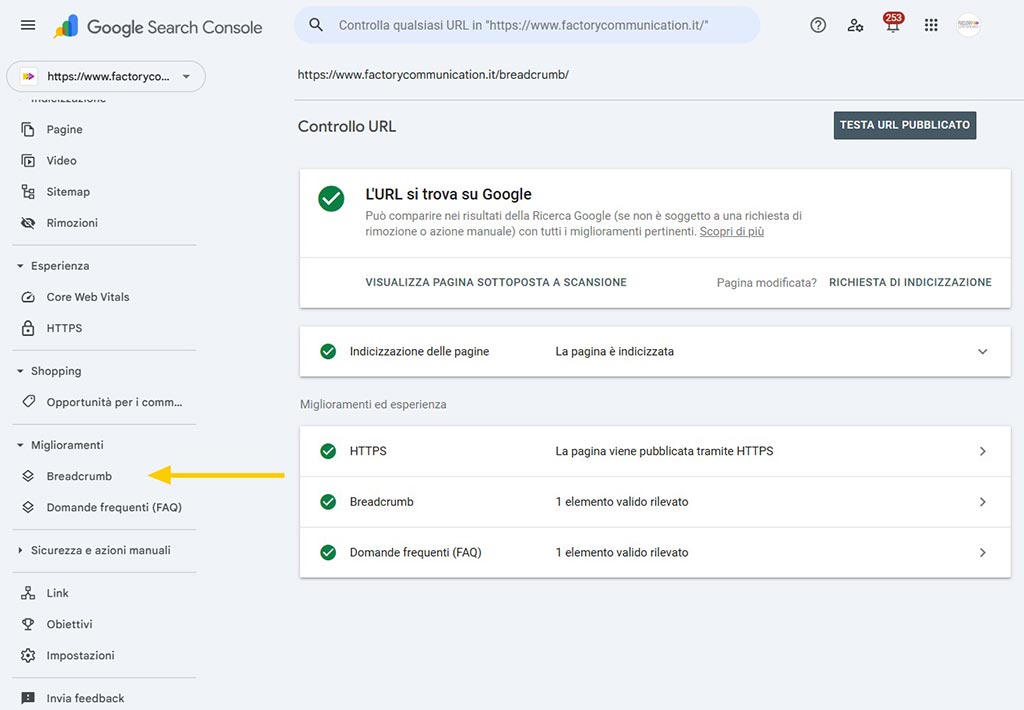
If you haven’t done so yet, I recommend that you make it worthwhile because it is an essential tool for monitoring the health and SEO ranking of your website.
When breadcrumbs are not correctly detected this can occur due to some factors such as:
- The code for the example page does not show clear JSON-LD/HTML markup of type BreadcrumbList that conforms to Google guidelines (with itemListElement, ListItem, position, name, item).
- Google considers breadcrumbs to be an “optional” feature: even if you display breadcrumb-like navigation on screen, if the relevant pattern is not present or inconsistent, in Search Console the “Breadcrumbs” section may remain empty for many URLs.
- Different implementations between templates (some posts use a layout with breadcrumbs and markup, others do not), so GSC shows only the subset of URLs where the markup is actually present and valid.
- Caches or plugins that “dirty” or duplicate the schema (Google, in case of a conflict, may ignore the markup and not count those breadcrumbs in the report).
How to check whether breadcrumbs are set correctly
As a first step, I recommend that you analyze the information present in the crawl of your page performed with Google Search Console.
Below you will find the Breadcrumb section of Google Search Console related to this article and more specifically https://www.factorycommunication.it/breadcrumb/
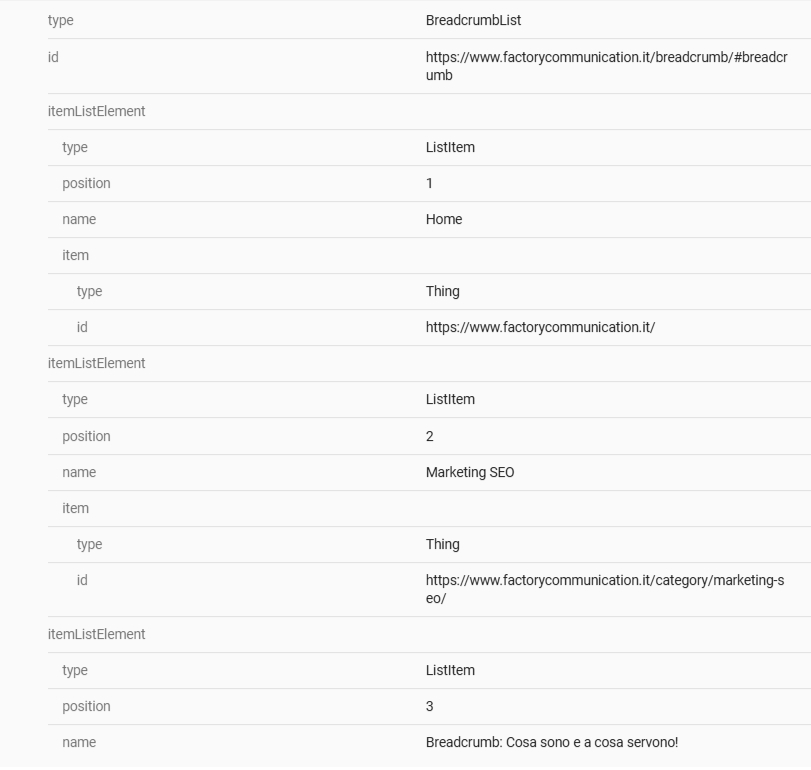
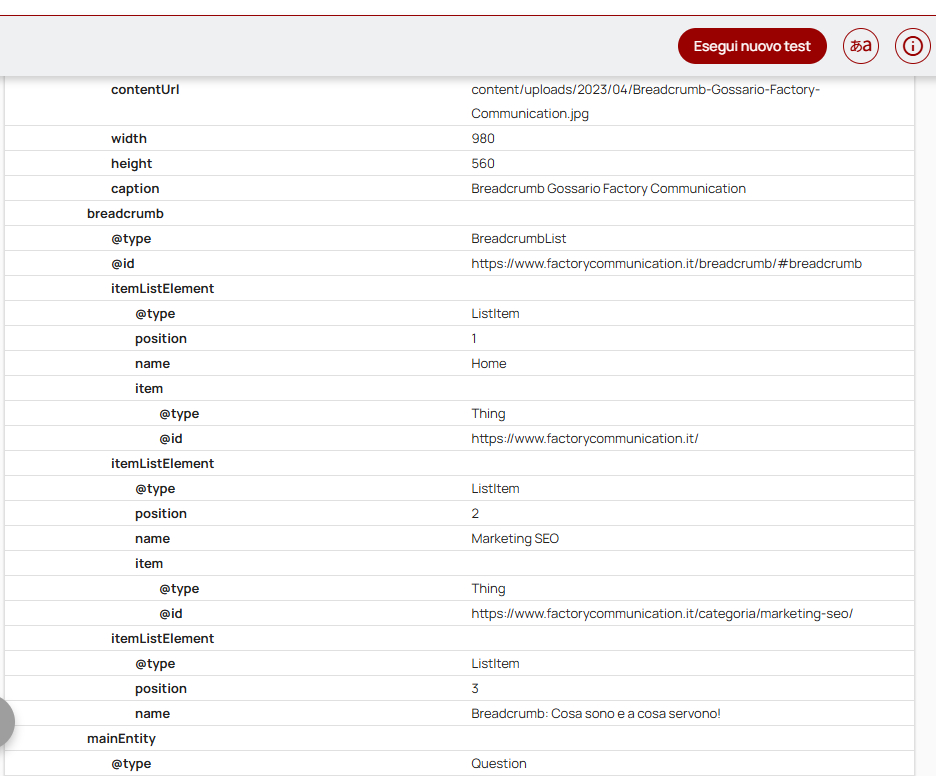
If the information is not visible, or not correct I recommend you run a test with the “Validator schema.org” toolto see if there is a BreadcrumbList, how many ListItems it detects, and if there are any errors/warnings.
Below you see the breadcrumb section of the scan analysis result of this article.
Google updates and behavior
- Even with proper schema, GSC may take days or weeks to show breadcrumbs in the report and does not guarantee that they will always show up in snippets in SERP.
- Some SERP interface variations (especially on mobile) can cause breadcrumbs to “disappear” even if the markup is okay, without this being a critical SEO issue.
Breadcrumb: FAQ
Breadcrumbs are a navigation element that shows the path to the current page within the website structure. They function as a kind of digital “breadcrumbs,” allowing users to understand where they are and easily return to previous pages.
They offer several benefits:
– They improve site navigability
– They reduce the number of clicks needed to return to previous pages
– They help users understand the structure of the site
– They can improve search engine rankings (SEO)
There are mainly 3 types:
– Hierarchy-based: show the position of the page in the site structure
– History-based: show the user’s navigation path
– Attribute-based: used to show the metadata of the current page
Yes they can have a positive impact on SEO. They help search engines understand site structure and can improve the display of search results. In addition, Google can use structured breadcrumb data to show clearer navigation paths on search result pages.
If you are interested in SEO Strategies and Search Engine Optimization activities, you can also read these articles: