


Starting today, Linkedin Stories are off the ground. Some interesting insights on how to use them in your Social Media Strategy to improve engagement.
After a break-in period and launching a few weeks ago in other countries, the new Stories feature on Linkedin is also landing in Italy.
This morning we too, intrigued, immediately smartphone in hand…to test this new feature, the same one already present on other social platforms such as Instagram, Facebook and Snapchat.
As of today, in fact, as many as 14 million Italian users have the ability to share personal content, with photos and videos lasting up to 20 seconds, using theLinkedin app from mobile.

Linkedin Stories: what they are and how they come about
Now, a question arises. How come a platform as formal and professional as Linkedin, decided to introduce a more informal and ephemeral tool, such as Linkedin Stories?
An authoritative source, namely Linkedin’s senior director of product management-Pete Davies-provides us with a comprehensive rationale:
For more than a year, we have been testing stories in a professional context, such as that of our platform. We believe it can be a tool for sharing user content in a lighter way. Stories encourage conversations and stimulate engagement, so much so that a recent study showed that major influencers since 2016 are posting a third less on their feeds.
In sum, it is inferred that videos accompanied by effects and short texts, with a 24-hour duration, greatly increase the engagement rate, even and especially in formal and professional settings.
But not only that.
The arrival of Stories is veteran of a very particular historical and social period. Linkedin from a pure business tool is growing more and more, both in terms of the number of users and the level of interactions, becoming for all intents and purposes a “social space” that can increasingly shorten distances.
Also complicit is the rise of smart working and, therefore, changing relationships among colleagues. Just think that Microsoft’s platform has seen year-over-year growth of 55 percent in conversations between users and 60 percent in content creation.
LinkedIn Stories Format
And now let’s look at the size and Format LinkedIn Stories
Story videos must meet the following characteristics:
- Resolution: 1,080 x 1920 pixels
- Frequency (number of frames per second): 30 FPS
- Pixel format: square (square pixels)
- Video recording format: H264, MP4
- Appearance of the video 9:16 (width x height)
- Duration: 20 sec
Story images on Linkedin have the following characteristics:
- Resolution in pixels: 1,080 x 1920
- Image type: PNG, JPG format
- Appearance of images: 9:16 (width x height)
The good news is that if you create images for stories on Instagram you can reuse them for Stories on LinkedIn as well.
LinkedIn Stories: 5 ways to use them in your Marketing Strategy
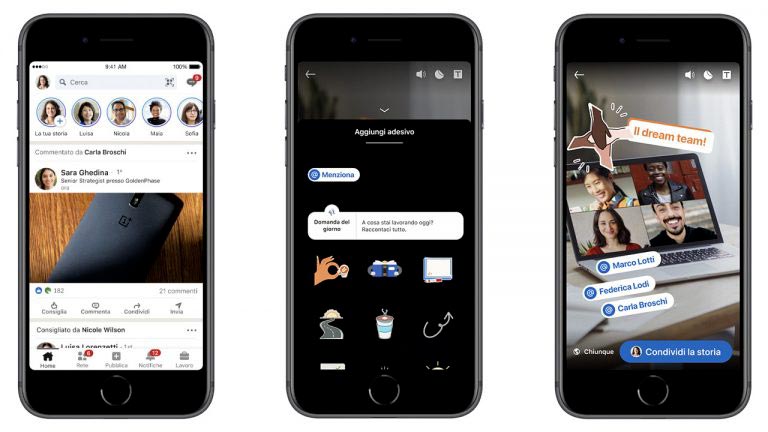
Let’s try now, to hypothesize, some simple and effective ways to integrate this new feature within your Social Media Strategy.
1. Professional Pills
Small suggestions inherent to your core business, in a fast, easy and attractive communication format.
They can be, for example, the advice of a marketing manager, or that of an HR professional but also that of a production manager. The important thing is that they are simple, light-hearted and affordable content. And, trivially, interesting to a follower of the company or a possible candidate.
2. Corporate Faq
The classic “Questions and Answers” section, in a more fun and interactive format. Useful, for example, for giving answers about a new product or service, about a selection process, about the company in general, etc… Of course, there are so many areas and fields…the important thing is to always stay focused on your core business and what a user would like to hear about, what they would like to be helped with or simply advised on.
3. Live Moments
We do not underestimate sharing clips of special moments. For example, the launch of a webinar, an award ceremony, a small recognition, office life, smart working life, etc… A new way to shorten the distance, attract new followers and retain historical ones, making everyone a little more involved in what is happening.
4. Live Preview
Whether it is planning a recruiting day or career day, opening a new position, starting a social recruiting campaign, starting a contest, in all these cases creating a Stories can be a good way to increase curiosity, attract candidates, drive expectations, start a countdown.
A light and fun way to share something new with a format that doesn’t require you to be a video maker!
5. Live Job Opportunity
Why not use this medium to tell the story of a job opportunity? Integrating the job description with video storytelling of a position’s most important features could not only attract more applicants but also give back to Story viewers some information about the company’s DNA, communication style, and culture.
6. V-Blog Story
Turn your Blog on Linkedin into a V-Blog Story. You can start by transforming and adapting some text posts if, for example, you have guides in your blog where you explain in various steps. An example? Such is the case with Harvard Business Review, which adapts the content of guide-step-by-step style posts to the Story format.
Posting a story on LinkedIn. Some useful technicalities
- Both individual profiles and page administrators on Linkedin can create Stories using their mobile app. Currently, in fact, Stories creation is limited to the mobile version.
- LinkedIn users can view Stories using the mobile app. Stories from both profiles you are connected with and pages you follow can be viewed. The creators of Stories (profiles or pages) appear with a circular frame at the top of the app’s homepage (somewhat like what happens with Instagram).
- The maximum length of videos that can be uploaded to Linkedin is 20 seconds.
- Stories are visible for 24 hours, although users can save frames to view later.
- Users can share Stories with other members through private messages. Users can also send messages to the creator of the Story directly from the individual frame, as long as the latter is a first-degree link. It is also not currently possible to send messages to a Linkedin page through its Story.
- The creator of Stories can see the profiles that have viewed the content. The name and headline of those viewing the Story are displayed, unless they have changed the viewing options in their settings.
- The Story cannot be changed once it is published.
The insights and ideas for testing this new feature are really many.
We just have to try, never forgetting that dash of creativity that, however, does not deviate too much from the nature of this social network: its professionalism(Personal Branding).
Linkedin Stories: FAQ
Here are five frequently asked questions (FAQs) about how and why to use stories on LinkedIn.
Stories on LinkedIn are a new feature that allows users to share visual content, such as photos and videos, that remain visible for 24 hours. These stories can only be created through LinkedIn’s mobile app and are not accessible from desktop. The goal is to encourage more informal and immediate interaction with one’s professional network.
LinkedIn has introduced stories to increase engagement rates among users, drawing inspiration from platforms such as Instagram and Snapchat. The idea is to encourage lighter conversations and stimulate interaction, allowing users to share content in real time and build professional connections more dynamically.
Stories on LinkedIn are a useful tool for personal branding. They allow users to share professional experiences, insights and relevant content in a “snackable” format. This temporary format helps keep users’ attention and position yourself as an expert in your field
Want to learn more about how to grow your Business? Don’t miss these articles from our website:
- Facebook Shops: free eCommerce arrives on Facebook
- Lead Generation on Linkedin with Linkmatch for HubSpot
- WhatsApp catalog: what it is and how this sales tool works
- How to spy on your competitors’ ads on Facebook
- Creating a company page on LinkedIn for your Business
- 7 good reasons to use Linkedin in your social media strategy
- Groups on LinkedIn: Why use them for your Business
- Linkedin 2026: strategies for building a personal brand that generates leads