



In the digital age, search engine optimization (SEO) is critical to the success of any online business.
If you run an e-commerce business, you have probably already heard about the importance of SEO Strategy.
Perhaps you’ve even made a few sporadic attempts to improve your site’s ranking. But SEO is not a one-time activity; it requires constant effort and a well-defined strategy.
That is why we have a dedicated team specializing in SEO Consulting for e-commerce.
By regularly implementing effective SEO practices in your Marketing Strategy, you can significantly increase organic traffic to your website.
Over time, this can translate into a steady stream of interested visitors without the need to continually invest in paid advertising.
These are just some of the questions we are asked every day:
- Where should I start?
- What are the most important elements to focus on?
- Should I devote myself to creating new content for the blog or updating existing content?
- How important are images and titles?
- How should I handle broken links?
To help you navigate the complex world of SEO, we have created this comprehensive checklist.
By following these 26 essential points, you can give clear and specific direction to your website optimization efforts, maximizing the effectiveness of the time you spend on SEO.
1. Create and maintain a list of keywords.
The heart of any effective SEO strategy is a solid keyword base. Without content that responds to user searches, your site will remain invisible in search results.
Here are some suggestions for getting started with your keyword research:
- Do some initial brainstorming based on your knowledge of the field
- Watch for autocomplete suggestions from Google and other search engines
- Analyze your product names and related categories
- Think about the problems your products or services solve
- Use tools such as Google Keyword Planner, Google ADS, SEMrush or Ubersuggest to expand your keyword list
Remember to update this list regularly, as search trends can change over time.
If you don’t know how to manage keywords I recommend first reading this article: Keyword Research.
2. Seo checklist: set up Google Search Console.
Google Search Console is a free, must-have tool for monitoring your site’s performance in Google search results. It allows you to:
- See how users find your site
- Analyze traffic to individual pages
- Monitor ranking for specific keywords
- Identify indexing or user experience problems
- Duplicate pages where Google chose a different canonical page than the one specified by the user.
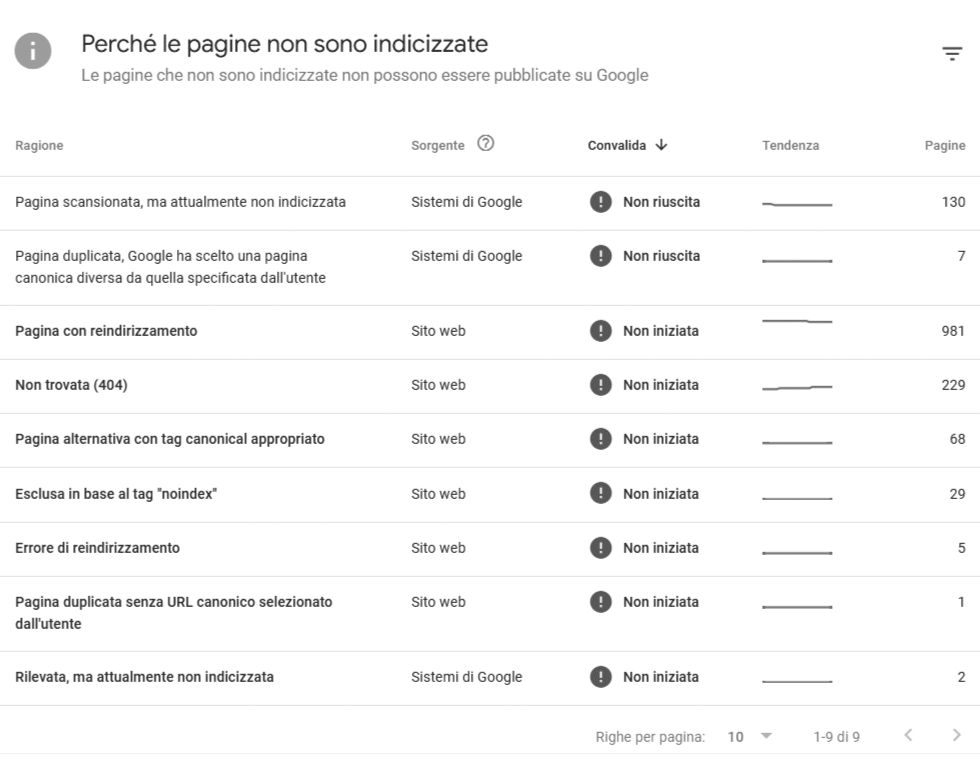
In addition, thanks to Google Search Console, it is possible to check indexing and user experience problems such as page:
- Duplicate
- With redirection
- Not found (404)
- Excluded based on the “noindex” tag
- Which presents a redirection error
- Duplicate without user-selected canonical URL
- Detected, but currently not indexed
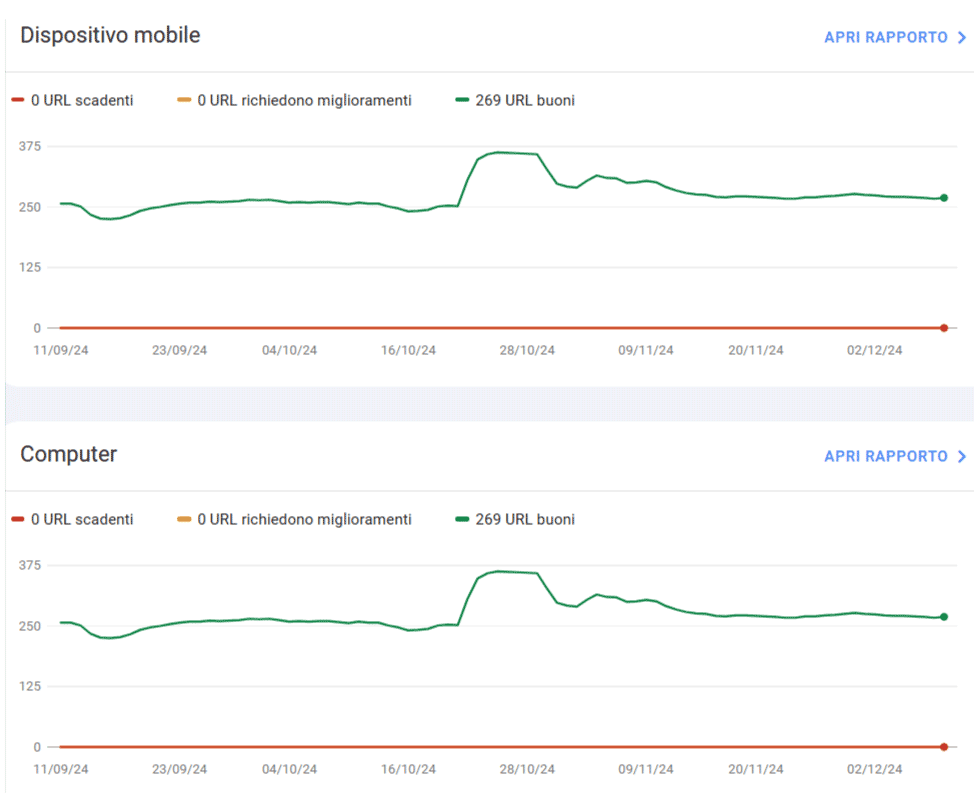
Core Web Vitals
In Google Search Console there is a very important section named Core Web Vitals.
Core Web Vitals are a set of metrics introduced by Google to evaluate the user experience on a web page. They focus on three key aspects:
- Largest Contentful Paint (LCP): measures how fast a page’s main content loads. The goal is to have an LCP of less than 2.5 seconds.
- Interaction to Next Paint (INP): evaluates page interactivity by measuring the time between user interaction and visual browser response.
- Cumulative Layout Shift (CLS): quantifies the visual stability of the page by measuring unexpected layout shifts.
Caution it is extremely important to check all the items on the check list because they could negatively impact the online ranking of your website or eCommerce.
3. Set up Bing Webmaster Tools
While Google dominates the search engine market, do not overlook Bing. Bing Webmaster Tools offers similar functionality to Google Search Console, but for Microsoft’s search engine. Configuring it will help you to:
- Understanding how your site performs on Bing
- Identify any Bing-specific problems
- Optimize for a different user segment
4. Create and submit an XML sitemap
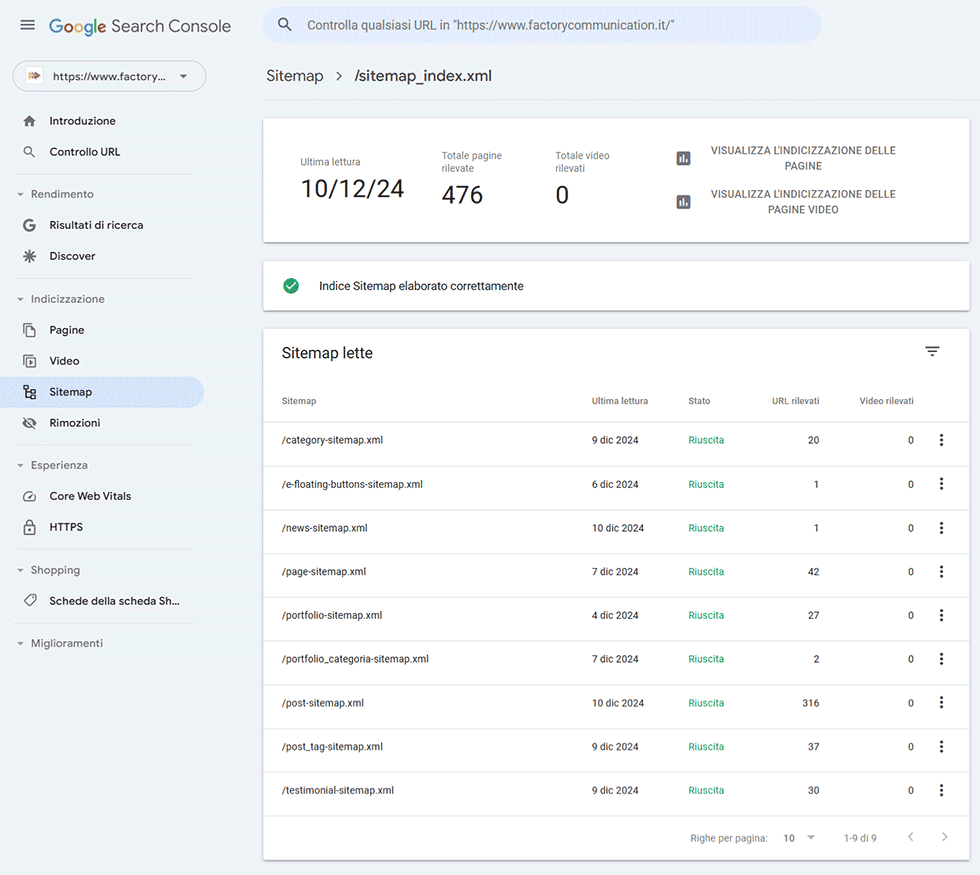
An XML sitemap is like a road map for search engines, helping them navigate and index your site more effectively. To create and submit a sitemap:
- Use an SEO plugin such as Yoast or RankMath to automatically generate the sitemap
- Verify that it includes all important pages on your site
- Submit it via Google Search Console and Bing Webmaster Tools
- Update it regularly, especially when adding new pages
5. SEO check list: install an SSL certificate
A Secure Sockets Layer (SSL) certificate is essential for the security of your site and positively affects SEO. Here’s why it’s important:
- Encrypts data transmitted between the user’s browser and your server
- Improve users’ trust in your site
- It is a ranking factor for Google, which favors secure sites
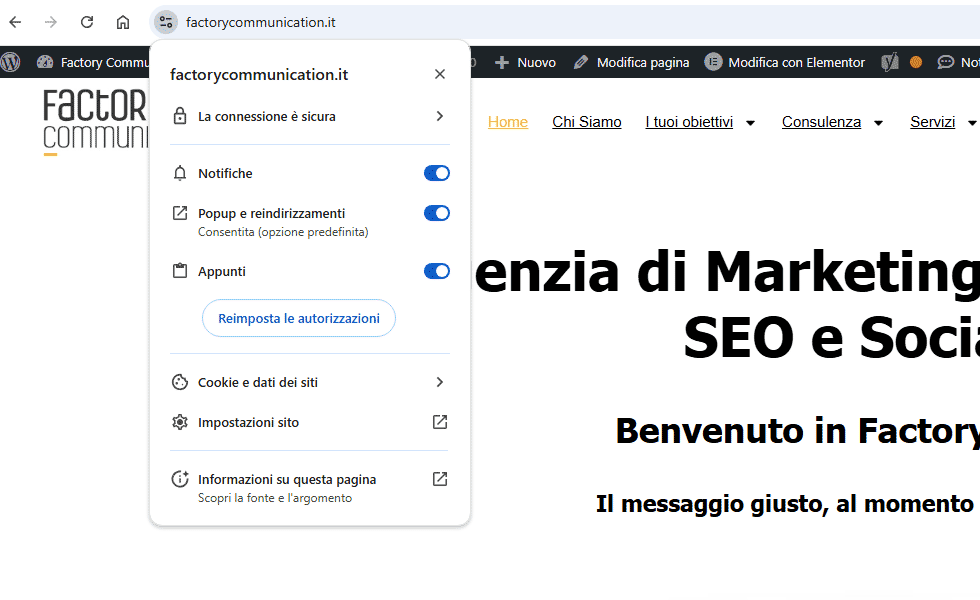
If your site does not yet have an SSL certificate, contact your web host to install it as soon as possible.
Now let’s look at some basic points related to structuring and managing your product sheet (page seo checklist).
6. Enter the name of the product in Title H1
The H1 title is one of the most important elements for on-page SEO. To optimize it:
- Use only one H1 per page
- Include the exact name of the product
- Keep it concise but descriptive
- Make sure it is visually prominent on the page
7. Use related terms in H2 subtitles
H2 subheadings help structure the content of the page and provide opportunities to insert related keywords. Here’s how to use them effectively:
- Use H2 to divide the product description into logical sections
- Include variations of major keywords
- Keep the subtitles informative and relevant to the content below
8. Optimize the URL of the product page
The page URL is another important element for SEO. Follow these best practices:
- Include the product name or main keyword
- Keep the URL short and descriptive
- Uses hyphens (-) to separate words
- Avoid unnecessary words such as “the,” “the,” “and,” etc.
9. Add a FAQ section if appropriate
A well-structured FAQ section can significantly improve the SEO of your product page:
- Answers common questions from customers
- Provides an opportunity to naturally insert additional keywords
- May appear in search results as a featured snippet
- Enhances user experience by providing useful information
10. Seo checklist: optimize product images.
Images are not only important for potential buyers, but also for SEO. Here’s how to optimize them:
- Use high quality images that clearly show the product
- Compress images to improve page loading speed
- Add an alternative (alt text) descriptive text that includes the keyword
- Use descriptive file names, separating words with hyphens
Want to find out how to optimize your e-commerce images? Read our SEO images guide : our 8-point checklist.
11. SEO check list: optimize meta titles
The meta title appears as a clickable title in search results. To optimize it:
- Keep it within 60 characters
- Include the main keyword at the beginning
- Uses catchy language that entices people to click
- Include brand name if relevant and there is space
12. Create effective meta descriptions
The meta description appears below the title in search results. Here’s how to make it effective:
- Keep it within 155-160 characters
- Include the main keyword and relevant variations
- Provide a concise but informative summary of the page content
- Use a call-to-action that invites the user to click
13. SEO checklist: implement Schema markup.
Schema markup is code that helps search engines better understand the content of your page. There are several markups for product pages, here are the main ones:
- “Product” to provide details such as price and availability
- “Review” to highlight customer reviews
- “HowTo” when you want to allow Google to show an advanced result for illustrative guides for products sold on your site
- “breadcrumb List” to show the navigation structure of the site
- “FAQPage” to communicate the presence of a list of frequently asked questions (FAQ)
- “priceType” will allow merchants to more easily specify discounted prices (this is part of the September 2024 core updates).
If you want to better manage product markup and your eCommerce is built with WordPress and WooCommerce you can use specific plugins such as SchemaPro or Yoast_SEO.
Find more information in this article: Schema.org what it is and why it is critical for SEO.
14. Optimize text still for internal links
Internal links help search engines understand the structure of your site and distribute authority among pages. To optimize them:
- Use relevant keywords as anchor text
- Varies the text still for links pointing to the same page
- Make sure the links are relevant and useful to the user
- Avoid using generic phrases such as “click here” as an anchor text
15. Eliminate duplicate content
Duplicate content can confuse search engines and dilute your page’s authority. To avoid them:
- Use unique descriptions for each product, even if they are similar
- Implements canonical tags to indicate preferred version of similar pages
- Avoid copying descriptions from producers; rewrite them in your own words
- Use the noindex tag for utility pages such as shopping carts or wishlists
Caution: if your eCommerce is connected to an external ERP
Before continuing with our Checklist, it is essential that you do a check of all the automatically generated content on your ERP-connected eCommerce.
From our experience, descriptions and product names are entered into the ERP, which then takes care of generating your eCommerce content.
In many cases we have found that these automated procedures do not bother to check the quality of the content created, generating lots of duplicate H1 titles, TAG titles and Description.
Manage periodically Run a weekly analysis of your content with platforms such as SEMRush.
16. Improves page loading speed
Loading speed is an important ranking factor. Here’s how to improve it:
- Optimize and compress images
- Minimizes CSS, JavaScript and HTML
- Use browser cache
- Reduce redirects
- Use a Content Delivery Network (CDN)
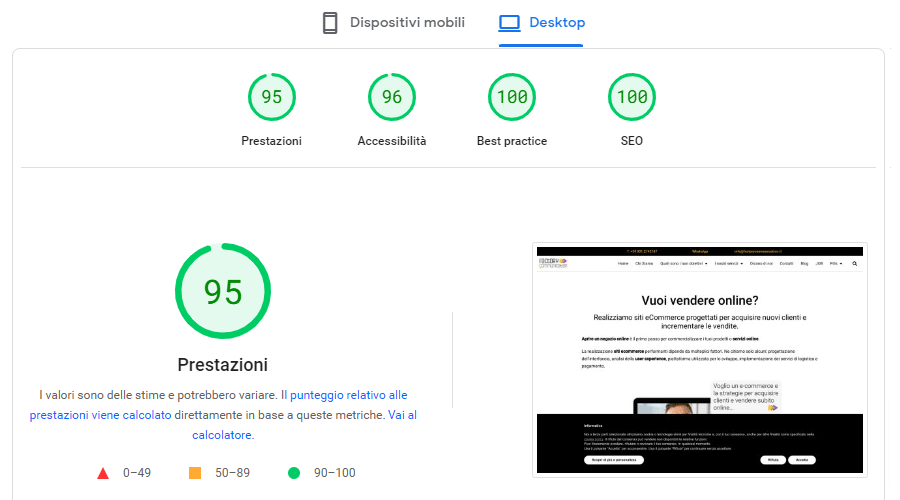
To see the health of your eCommerce perform a scan with Google PageSpeed Insight now.
17. Optimize for mobile
With the increase in searches from mobile devices, mobile optimization is essential:
- Use responsive design that fits all screens
- Make sure buttons and links are easy to click on small screens
- Check the readability of text on mobile devices
- Tests loading speed on mobile connections
18. SEO checklist: create quality content
High-quality content is critical for SEO:
- Write detailed and unique descriptions for each product
- Include technical specifications, dimensions, and other relevant details
- Add informative content such as user guides or maintenance tips
- Update content regularly to keep it fresh and relevant
We have dedicated a section of our site that talks about SEO Copywriting.
19. Optimize for voice search
As voice searches increase, consider these strategies:
- Uses natural, conversational language
- Answer specific questions in your FAQ section
- Optimizes for long sentences and specific queries
- Ensure that local information is accurate and up-to-date
20. Implement a Link Building Strategy.
Quality backlinks are still an important ranking factor:
- Create shareable content such as infographics or detailed guides
- Participate in collaborations with industry influencers or bloggers
- Leverage PR opportunities to get mentions from news sites
- Monitor and claim unlinked mentions of your brand
We have dedicated a section of our site that talks about quality backlinks.
21. Use social media to support SEO
While social media does not directly affect ranking, it can indirectly support SEO:
- Share your content regularly on social media
- Encourage customers to share your products
- Use relevant hashtags to increase visibility
- Interact with your community to increase engagement
22. SEO checklist: monitor and analyze performance
Constant monitoring is essential to improve your SEO strategy:
- Use Google Analytics to track traffic and user behavior
- Monitor positioning for your target keywords
- Analyze which pages perform best and why
- Identifies opportunities for improvement based on data
23. Optimize for local search
If you have a physical store or serve specific areas:
- Create and optimize your Google My Business profile
- Ensure that contact information is consistent across the web
- Encourages local customer reviews
- Use schema markup for local information
24. Implement a Content Marketing Strategy.
Content marketing can significantly support SEO:
- Create a blog with informative content related to your products
- Produce buying guides and product comparisons
- Develops video content for YouTube and other platforms
- Create downloadable e-books or whitepapers to generate leads
25. Make your site accessible to everyone
When we talk about website accessibility and usability, we are referring to the creation of content and the design of websites that are easily usable by all users, including those with disabilities.
This not only improves theuser experience for a wider audience but can also significantly increase the visibility and ranking(organic placement on the SERP) of your site in search engines.
Web site accessibility is not just a legal requirement (Stanca Law), but an opportunity to make your e-commerce site more inclusive and perform better.
Why make your e-commerce accessible.
1 in 5 people worldwide live with a disability.
This means that at least 20% of users may have difficulty accessing your website and enjoying its content.
71% of people with disabilities abandon an inaccessible website. Most of them in less than 6 seconds.
26. Keep your site updated
An up-to-date website is critical for SEO:
- Regularly update the content of the product pages
- Remove or redirect product pages that are no longer available
- Keep plugins and CMS up to date
- Implements new SEO best practices as they emerge
By following this comprehensive SEO checklist, you can significantly improve your e-commerce’s visibility in search engines.
Remember that SEO Strategy is an ongoing process: maintain consistency, monitor results regularly, and adjust your strategy based on the data to achieve the best benefits in the long run.
Search Engine Optimization checklist: useful articles
Here you will find some useful articles that you can use in your SEO Strategy to increase the online ranking and sales of your e-commerce:
- SEO product tab: optimization for WooCommerce
- Increasing eCommerce sales: 8-step strategy
- Improving Google ranking: 3 good reasons and 4 useful tips
- SEO Consulting for WooCommerce
- Creating an e-commerce site to sell online: a guide for Entrepreneurs
- E-commerce seo optimization: what to do?
- Opening an eCommerce store: our 12-point checklist
- International SEO for a multilingual strategy