



Schema.org is a deviltry that allows us to greatly supplement and implement our SEO Strategy. Basically, it is a tool that allows us to clearly communicate, to search engines, the content of a web page.
This way there are no errors and the content of your website or eCommerce can be properly ranked on search engines increasing opportunities to connect with new potential customers and increase online sales.
Before we delve into technicalities and magic formula, it is important to explain the area in which we are moving.
If you are reading this article you probably typed one of these keywords into Google:
- structured data google
- schema org product
- google schema org
- product schema org
They are part of the SEO Strategy or Search Engine Optimization all those activities that aim to index a website or an e-commerce.
Is it mandatory to implement an SEO Strategy?
NO, especially if we want to make what is called a “showcase site” i.e., poor in content.
Is it successful to implement an SEO Strategy?
Absolutely YES, as it allows us to achieve the best ranking on the SERP (list of results ) of search engines.
The greater the investment in SEO Strategy, the less capital we have to invest in PPC (pay per click) Campaigns to make our content and products visible (schema product).
Implementing an effective SEO Strategy is an extremely complex and intricate, yet successful activity.
Now let’s look in detail at what structured data and Schema.org are.
Scheme org what it is
Schema (schema.org) is a kind of technical manual founded in 2011 by large IT companies such as Google, Microsoft, Yahoo and Yandex.
Technically we can call Schema.org a data markup that describes to Google (or other search engines) what parts make up your website.
Basically a structured data vocabulary that defines entities, actions and relationships on the Internet (Web pages, e-mail, etc.).
In this way, search engines are able to provide additional information to users, through the rich snippets.
Rich Snippets are fact sheets or other advanced results that provide the user with more information directly in the search results.
“Basic” snippets report title, link and description (meta description) of the web page. Instead through structured data markups we can create advanced results. Google can then provide users with an in-depth preview of the content, depending on the type of data.
Snippets enable search engines to improve understanding of the meanings behind topics (entities) on the Web and, in turn, provide a better UX (user experience) to Internet users.
Markup in brief:
- Markup is responsible for reorganizing structured data;
- Thanks to markup, Google creates rich snippets;
- Rich snippets attract clicks;
- To use Schema.org you need to put this structured data into your html;
- The good news is that there are tools to do this in a rather simplified way , and in this article we will tell you how to do it.
Why is structured data important for online positioning?
We have only one scientifically certain answer, and that is backed up by data.
Because it is a way to attract more traffic to your site. More traffic means more opportunities. More opportunities become more sales.
As I always say, in order to do business with our website or e-commerce, first of all, it is essential to make Google understand what we are selling.
The better we rank on search engines, the greater the chances of finding new customers and increasing sales of our products and services.
We imagine that at this point you want to know more.
Why is Schema.org so important?
Everything is based on mathematics that needs rules to understand and interpret data.
Schema.org is a data markup vocabulary that enables search engines to interpret, in the best way possible, the contents of a page published on the Web.
It is important to use data markup because, as Google builds an increasingly semantic Web, these markups become increasingly valuable in ensuring effective communication on the Internet.
Thanks to schema.org integration, Google can supplement our website search results with additional information called rich snippets.
Basically, the more information we offer our user directly on the search engine (organic search results) the more likely they are to decide to click on our content.
How Schema.org helps Google and our SEO Strategy
While our content tells Google what is on our website, Schema.org tells Google what that content means.
Thanks to the markup language we indicate the relationships between the concepts and entities that make up a document or a web page.
While on the one hand SEO strategy purists are reluctant to claim that data markup has a direct impact on organic search rankings on the other hand rich snippets give the content on our website a bit more visibility on the search results page.
This strategy has been shown to improve the click through rate, that is, the number of users who click on search engine results to get to our content.
Benefits of structured data
Google said that structured data can improve the appearance of the site in search results: for example, with structured reviews, Google can show recipes with five stars at the top of the results.

Or, with structured data on songs and albums, Google can show an artist’s songs in the form of“rich cards.“

This will not only visually improve the appearance of your results, but adding structured data is also useful when thinking about the future, i.e., new technologies that can be implemented to improve research.
32 Markup available
You really got it right. As many as 32 Schema.org markups are recognized by Google. Each responds to certain types of content.
Depending on the markup you use for your structured data, Google prepares a more detailed preview to serve to your users.
We tell you all of them:
- Article
- Book
- Breadcrumb
- Carousel
- Course
- Dataset
- Educational questions and answers
- Employer Aggregate Rating
- Estimated salary
- Event
- Fact check
- Frequently asked questions
- Activities to do at home
- Instructions
- Image metadata
- Job posting
- Instructional video
- Local business
- Logo
- Mathematical solvers
- Movie
- Exercises
- Product
- Questions and Answers
- Recipe
- Review Snippet
- Sitelink search box
- Software app (beta)
- Speakable
- Subscription and paid content and protected by Paypall
- Video
If you’ve identified the schema that works for you, you’ll want to understand more about what it is. In Google Search Central, you can find all the details of each structured data markup: we’ll leave you the link to learn more.
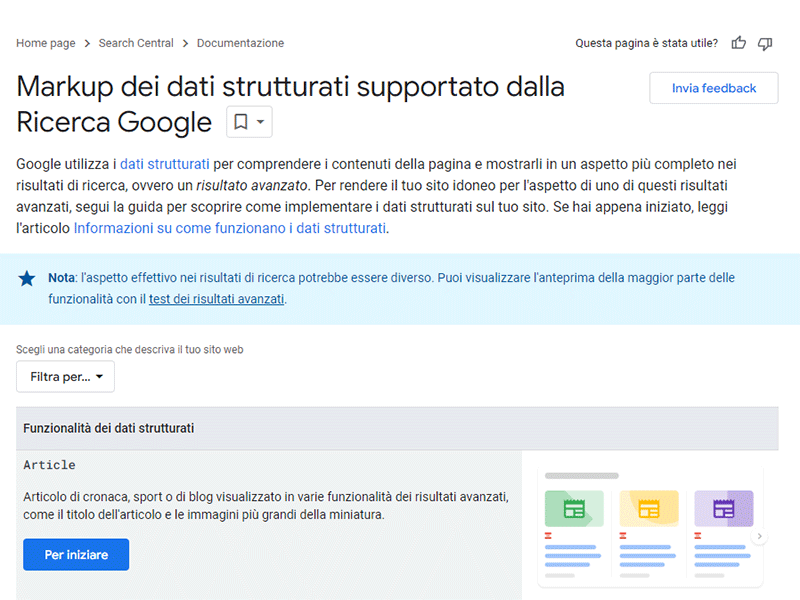
Not all Schema.org markups are for you. If your company provides training courses, you may need the Course template.
If you are in retail, try looking at the “Product” markup specification.
While if you run a recipe blog, Recipe is what you need so users could preview info on ingredient quantities, preparation time, cost etc.
Two things that web marketers experience firsthand
We experience that anything that helps Google better understand your site’s content helps SEO in some way, and that SEO helps your business attract new potential customers.
Markups also make life easier for users by providing much more information.
Can they improve the user experience during contact with your website?
We think so. And you shouldn’t underestimate the power of a good user experience, right from the first encounter.
One thing is certain, and the data tell us so.
Milestone Research, the research division of Milestone Inc. analyzed more than 4.5 million searches to find that users click on advanced results (rich snippets) much more than on basic results.
CTR (Click trough Rate or percentage of clicks) rises to 58 percent (up from 41 percent).
I hope I have given you good reasons to implement schema.org on your Web site or E-commerce.
Why not take this opportunity and give yourself an extra chance to attract new customers online?
Basically, you just have to copy a piece of code into your html.
How to implement markup schema org on our website
In this article you will find two different ways to implement Schema.org markups on your website.
The first solution is manual and uses the Google Assistant. The second is significantly simpler and uses a WordPress Plugin.
How to Generate Data Markup with Google Assistant
There is very good news. There is a way to generate the Schema in a simplified way that you can copy and paste into your html code: it’sGoogle’s Structured Data Markup Assistant.
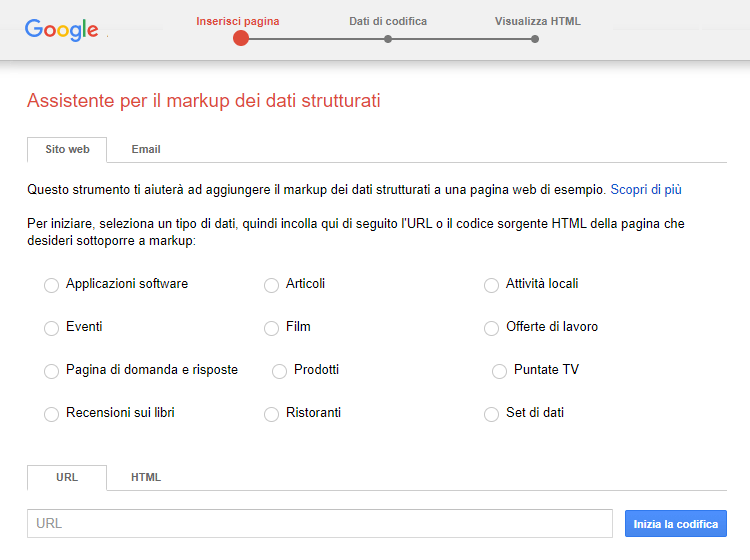
Very briefly, here is what you need to do to get your structured html data in a few clicks.
- Open theMarkup Assistant;
- Select the model that is right for you;
- Paste the URL of the page to which you want to add Schema.org markup;
- Click on “Start Encoding.”
At this point, your page is loaded by the Assistant, in the section on the left.
Very good: there are a few more steps to be taken.
- Click on significant portions of text and images in the section on the left and mark them with tags on the right (e.g., Author, Image, Editor, etc.). You can also add missing tags by hand;
- Brand any information you want to appear in your rich snippet;
- Click on Create HTML in the upper right corner.
Done?
You should now have html code with structured data in front of you. In the drop-down menu select the programming language you prefer. Memo: Google recommends JSON-LD.
- Copy the html code;
- Paste it into your CMS page and update it;
- Check the result before going online with an advanced results test.
Is your website built with WordPress? Use these plugins
Here are some plugins you can use to install Schema.org on WordPress:
- Schema: This free plugin is easy to use and allows you to add structured data in JSON-LD format, recommended by Google. It supports different schema types for categories or post types and integrates well with other SEO plugins.
- Schema Pro: A premium plugin that offers support for a wide range of schema types. It automates the addition of schema markup to new posts and pages and supports custom post types and custom fields.
- All In One Schema Rich Snippets: A free plugin that allows you to add schema markup to create rich snippets. It is easy to use and supports different types of structured data such as articles, reviews, events, and more.
- Schema and Structured Data for WP & AMP: This plugin offers a wide variety of schema types and integrates with Google AMP. It is flexible and allows you to customize the presentation of schema markup.
- WP SEO Structured Data Schema: Another plugin that helps implement structured data according to Schema.org guidelines. It is compatible with various SEO plugins and allows you to add schema markup without having to write code.
These plugins simplify the integration of Schema.org on WordPress, improving the visibility of the site on search engines through the use of structured data.
We know the web and we know how to grow your business
This article dedicated to Markup and Schema.org demonstrates how many activities, strategies, information and techniques we need to implement every day to win over our competitors.
Because this is the reality. If we excel on search engines we have more Business opportunities and we relegate our competitors to the second or third page of Google.
Knowing the web (and web marketing) allows you to take advantage of many more opportunities to:
- Increase traffic to the site;
- Doing lead generation;
- Attracting new customers.
If you are an Entrepreneur, Marketing or Sales Director, your job is to lead the company, increase business and margins.
If you want… you can decide to entrust your Strategy to our SEO Agency. We have the expertise to build a tailored SEO strategy for of your Company.
In fact, what works for other organizations may not necessarily work for your company. Each reality is unique: you have your own user niche, your own values, your own history, your own goals.
This is precisely what you should take into account when using the Web to promote your business or products (schema org product).
Only a marketing strategy tailored to your particularities allows you to achieve your goals and really attract new interested prospects.
The work of Factory Communication is just that. Finding the way to your success in the market, through a thorough understanding of web marketing and its mechanisms.
FAQ Schema org
Schema.org is a structured data vocabulary created by Google, Bing, Yahoo!, and Yandex to standardize the way information about websites is presented to search engines. This helps search engines better understand the content of web pages and provide richer, more relevant search results.
Using Schema.org can improve visibility in search engines, as structured data allows you to create more informative rich snippets. These snippets can attract more user attention in search results, improving click-through rates and the overall user experience.
Schema.org supports a wide range of data types, including articles, reviews, products, events, FAQs, and many others. This allows webmasters to describe various elements of their web pages in detail, improving understanding by search engines.
Schema.org markup can be implemented using several formats, such as JSON-LD, Microdata, or RDFa. JSON-LD is often recommended for its simplicity and compatibility. The markup is inserted into the HTML code of the page to describe the content in a structured way.
Yes, Schema.org was developed in collaboration with major search engines, including Google, Bing, Yahoo!, and Yandex, to ensure universal compatibility. This makes Schema.org a widely accepted standard for implementing structured data on the Internet.
If you are interested in SEO Strategies and Search Engine Optimization activities, you can also read these articles:
- llms.txt indexes your site for ChatGPT and Gemini
- Fast hosting for WordPress: why it’s critical for SEO
- Google SGE: if you have a site you need to know what it is!
- Being first on Google: watch out for the shenanigans!
- International SEO for a multilingual strategy
- SEO analysis of your website
- Ultimate SEO checklist for Your E-commerce!