



Messenger Rooms Facebook and Google Meet: distant but growing closer
We have all noticed how, in this period, our work, school and social habits have changed profoundly.
Face-to-face meetings have given way to video calls and virtual meetings.
In this unusual scenario, where digitization takes center stage, there are many and diverse software platforms and apps most widely used by young and old.
The ones most in use, for work, are definitely: Skype, Zoom, Hangout.
Which one did we choose in Factory Communication?
Unchanged: We, too, have found our favorite these days: with Valarea we made an exciting and efficient meeting in 6, sharing the screen and exchanging notes, documents, presentations.
The others?
Other applications are the ones that we all have in our pockets, in this article we talk about just 2 big innovations, introduced by the two Big Social par excellence:
- Messenger Rooms Facebook
- Google Meet
1. Messenger Rooms Facebook
Now let’s see how Facebook’s video calling app works.
For work, for study, for leisure and friendship, physically distant but increasingly close thanks to new forms of online connection.
1.1 What is Messenger Rooms Facebook?
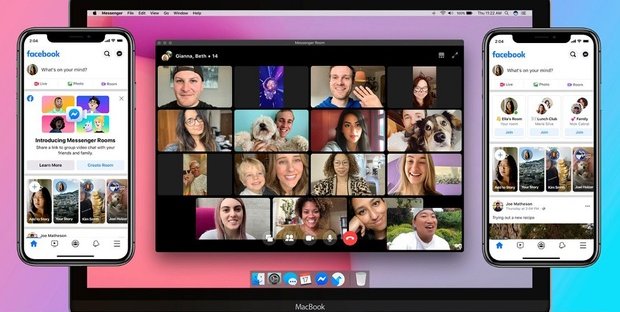
Have you already heard about the new feature launched by Facebook? It is Messenger Rooms, the new service that allows up to 50 users to participate in the same video call.
How?
You can connect from all devices, desktop and mobile, with no time limit and completely free of charge.
What if I don’t have a Facebook account?
“You can create your virtual room not only for meetings in the moment but also for those planned in the future […] And invitations can be sent to everyone with a simple link, even to those who don’t have an account,” the platform clarified.
The so-called room, can be opened directly on Mark Zuckerberg’s blue social or within the instant messaging app Messenger.
1.2 Messenger Rooms Facebook: how do I create my room?
To create a room on Messenger or Facebook, simply turn on your webcam and audio.
No more need to call ahead or schedule an appointment on the calendar, simply open a Facebook Room and share it through your wall, Groups or Events for people to drop in.
Also, if friends or members of a community open their Rooms by giving you access, you can see them on Facebook and join them.
When you are invited to a Room, you can log in either from your smartphone or computer, without having to download anything.
To make the experience as real as possible, there are backgrounds and filters with mood lighting.
It will, therefore, be possible to have a chat in a luxurious apartment on the water, on a dream beach or in the mountains.
Messenger Rooms is available for testing in Italy as early as this week and will be rolled out to the rest of the world in the coming weeks.
1.3 Issue of privacy and security
The creator of the video call can decide whether to limit the conversation to only invited users or leave it open to any strangers, perhaps interested in the topic being discussed.
From this point of view, the freedom offered by the service is really wide: if you want, you can even broaden the access criteria and allow those who are not part of the author’s friends, or even do not even have a Facebook account, to enter the room by clicking on the link.
2. Google Meet: what it is and how it works
Fast and secure video calls for school and work
Google Hangouts Meet is a group video calling tool that is as useful for private communication as it is for business or school
2.1 What is Google Meet?
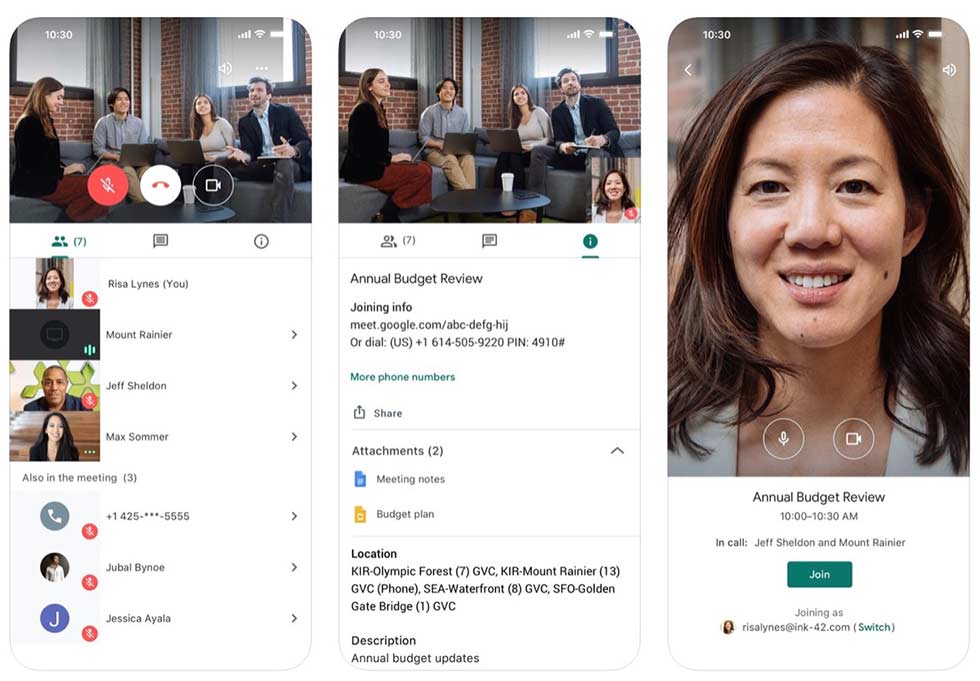
Google Meet is a video calling system that is extremely easy to use, yet has advanced features that make it ideal for any business.
The version for businesses is called precisely Google Hangouts Meet: the name was later simplified to “Meet” while the version for individuals placed the emphasis, for differentiation, on the term Hangouts.
In fact, Meet was actually born out of Hangouts, inheriting some of its function and evolving its ambitions toward business (especially smart working) and educational areas.
Google Meet allows “single” video calls as well as video conferences with up to 250 simultaneously connected users.
All with extreme simplicity and intuitiveness: as we will see in a moment, initiating a video call with Google’s Meet requires no specific equipment or prior technical knowledge.
2.2 How does Google Meet work?
In fact, you will only need to press one button to start the live broadcast and another button to invite people to participate.
With two clicks (or presses on the smartphone display), in short, you will be ready to present your work project or start an online lesson with your class.
The platform itself will take care of everything else: images and audio can be captured with the camera and microphone of the PC or smartphone or, alternatively, via external microphone and camera.
Hangouts Meet works indifferently on PCs and smartphones.
In the first case it will be sufficient to have a browser installed (supports Chrome, Firefox, Edge and Safari) without the need to use clients or plugins of any kind.
In the second you will have to install the app from the Play Store (for Android devices) or App Store (for iPhones and iPads) and grant the appropriate permissions.
The initiation of the video call, as mentioned, is almost immediate, as are the ways to invite and participate in the conversation.
At the end of the conference, you may decide to save the recording to the cloud space linked to your profile.
2.3 Who can use Google Meet?
To take advantage of Meet, it is necessary to use the G Suite, the set of services that Google makes available for a fee to businesses. Meet is a business service that cannot be enjoyed free of charge by ordinary users, but only by corporate or educational entities. However, there are options offered by Google to take advantage of it at no cost: in case you have a non-profit organization, membership is free.
In addition, due to the early 2020 health emergency, Google has decided to offer Meet free of charge to all educational institutions, of all levels, until September 30, 2020.
2.4 How to make a video call?
The easiest way is to open a new browser window, open meet.google.com, and start the video conference by clicking on the “Join a meeting or start it” button.
In the window that appears, enter the nick name you prefer and start the videoconference.
On the next screen will appear, within a small overlay window, all the data needed to invite other people to participate in the online class or conference.
We find the link for direct access to the “room,” the phone number with PIN code to participate by phone, and a form to send the invitation by e-mail.
The procedure for creating a video conference from the app is not much more complex.
Once the app is launched, it will be enough to press the “+ New Meeting” button and wait a few moments: again, a window will appear with all the necessary data to invite other users to participate.
2.5 How to participate in a video call?
To take part in a conference created with Hangouts Meet, you do not need to have a Google account.
You will need, instead, to have received an e-mail invitation or link to access the “room” directly.
Once the interface loads you will have to choose a user name and log in.
If you want, you can also participate in a conference with Google Meet via phone: a phone number and a code to type from the phone’s keypad also appears in the data window.
By following the phone wizard you will enter the virtual room even without the need for an active camera, thus being able to participate in the discussion just the same.
3. A brief reflection: what are the real benefits for your company?
3.1 Secure video meetings for your business
Stay connected with the entire team with enterprise-grade video conferencing capabilities based on Google’s robust and secure infrastructure.
3.2 Protect your privacy
Take advantage of the same secure infrastructure, built-in protection and global network used by Google to protect your data and safeguard your privacy.
3.3 Attend meetings without being interrupted
Meet eliminates all the inconveniences that can arise while participating in a business video call.
All you have to do is set up the meeting and share a link, without worrying about whether your colleagues or clients have the right account or plug-ins.
With a light and fast interface and efficient participant management, even a video call with many people becomes a breeze.
3.4 Designed for every type of business
Meet is fully integrated with G Suite, so you can join meetings directly from an event or Calendar email invitation. Connect from a computer, phone or conference room…you’ll find all the important event details exactly where you need them.
3.5 Attend meetings wherever you are
With iOS and Android apps designed specifically for Meet, you can view the day’s meetings with their important information directly from Calendar, and then participate with a single tap.
In the Enterprise version of G Suite, each meeting is associated with a phone number to call to participate.
This way, all guests can access without any difficulty, even if they are traveling without Wi-Fi or data connection.
4. All other social news.
WhatsApp, Instagram and Live Streaming
As mentioned at the beginning of the article, the launch of Messenger Rooms is not the only novelty in the Facebook universe. It will, in fact, implement entirely new features to nurture even more virtual connection between distant people. These fit perfectly into this historical period in which feeling close has become an increasingly strong necessity.
4.1 WhatsApp and group video calls.
The first news concerns Whatsapp, the instant messaging application first launched in 2009 and later acquired by the Facebook Inc. group in 2014.
This app already gave users the ability to create group video calls, but the maximum number of people who could participate was four.
It has now been expanded to eight, and this will thus facilitate any business meetings or meetings among larger groups of users.
4.2 “Live with” and “Donate” on Facebook
Other new features include Facebook live streaming.
The “ live with” function to add other users to live video will be available again, and a “Donate” button can be used to start a fundraiser.
4.3 Messenger and immersive wallpapers
At Messenger will be introduced, however, new immersive backgrounds, filters and augmented reality effects, which will allow us to recreate familiar places and situations, such as a birthday party or a vacation among friends, while of course remaining each at home.
4.4 Instagram even more live
On Instagram, it will, in addition, be possible to comment directly from the desktop of one’s PC on live broadcast videos, and these videos will be able to be saved directly to one’s IGTVs.
So the initiatives, born after the Covid-19 pandemic, to help people far away feel somewhat closer continue, and to incentivize people to stay at home as much as possible, even as Phase 2 begins, to prevent the spread of infection.
Want to learn more about how to grow your Business? Don’t miss these sections of our site: