


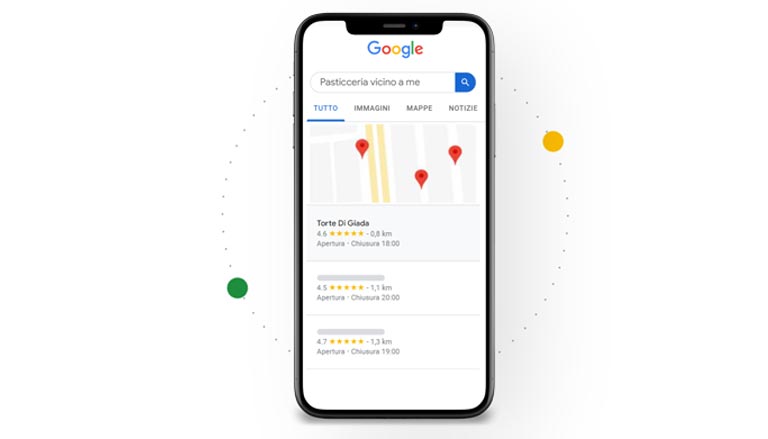
Google My Business is Google’s platform that allows you to greatly increase your company’s presence on Google.
There are so many Channels and Tools available to structure one’s Marketing Strategy and position our Company on Google.
We can decide to do everything on our own, or rely on Agencies, such as Factory Communication, to do it for you.
Like any marketing activity, before preparing the strategy, it is essential to define the positioning of your business, based on the Market and your buyer persona.
Today we want to tell you about Google My Business the Google suite.
In Italy few people know about it and clearly, few use it. But it can be your best ally.
My Business the suite to position your Company on Google
Let’s find out in detail why it is essential for the growth of your business, especially when it is positioned on the ground.
It is quickly said. Because it is precisely integrated with Google’s search engine. And every element entered (news, post, Event, etc.), is correctly indexed in Google’sSERP, and thus made visible to everyone.
Not only that. Google My Business can be considered a hybrid communication channel, as it has special features that other social channels do not have.
For example, in the statistics panel you can see with which query (keyword) the user found our activity.
Google My Business is based, first of all, on Google Maps. So every “thing” posted on Google Maps, is geo-referenced.
As we always say, it is essential to be present where our possible customers are.
Google My Business is definitely a strategic channel for all geo-localized businesses, which have one or more outlets in the territory.
They have an opportunity to increase the number of customers near them.
The benefits of using Google My Business are numerous
If the page is consistently and properly populated and edited, it will enable the creation of a kind of “Identity Card” of the company’s values, products and services.
Every item uploaded to Google My Business, is quickly and correctly indexed in Google’s SERP (results list) and then made visible to everyone.
As we always say, being without data is like traveling at high speed on the highway with the headlights off.
Therefore, when choosing which Communication channel to adopt for the Strategy, it is crucial to take into consideration the information we can get from Google My Business.
Company on Google: Brand Pages vs. Local Pages
The first step, after completing registration, is to create the page, we are then given 4 options:
- Product/Brand Page
- Page Local
- Entertainment
- Community
Companies predominantly use the first two types of pages, so let’s compare them.
Brand Pages
These are Google Pages dedicated to specific Brands or products, Organizations or Artists.
These pages are characterized because they do not contain an address or any other contact info, you can post photos and content and view statistics.
We recommend them to all those, Businesses, Activities and Public figures who do not need to tie their image to a place or be reached physically.
Place pages or also called Local
Local pages are characterized by being connected to Google Maps. We recommend them for all businesses that need to be located. Stores, Bars, Restaurants, Hotels, Stores etc.
The creation of the page starts right with the location on the map, once the Maps tab is created you can proceed with the customization of the Local page by entering the description, photos and content.
In addition to the address, all direct contact info can be entered:
- telephone number,
- fax number
In addition to this info, it is possible to enter opening hours and view reviews and statistics.
Place pages are integrated with Google Maps, within 30 days of registration the point of sale receives a verification card containing a personal code that, when entered on the page, marks it as verified and thus will show up in the SERP (the list that buy when a search is made) thus facilitating contact with the point of sale.
In mobile browsing (now 60 percent of total browsing), the display of this result prevails and comes first in search, offering, through direct connection with Google Maps, the possibility of being guided to the point of sale with one click.
Through the use of statistics you will be amazed to find out how many Leads have contacted you by phone by clicking on the number entered on the Local page or reached out to you, using your services or purchasing your products.
It is therefore easy to see why it is important for your business to use this service.
Product Management Section
Whatever store you have (clothes, furniture, perfume etc.) this feature can be extremely useful.
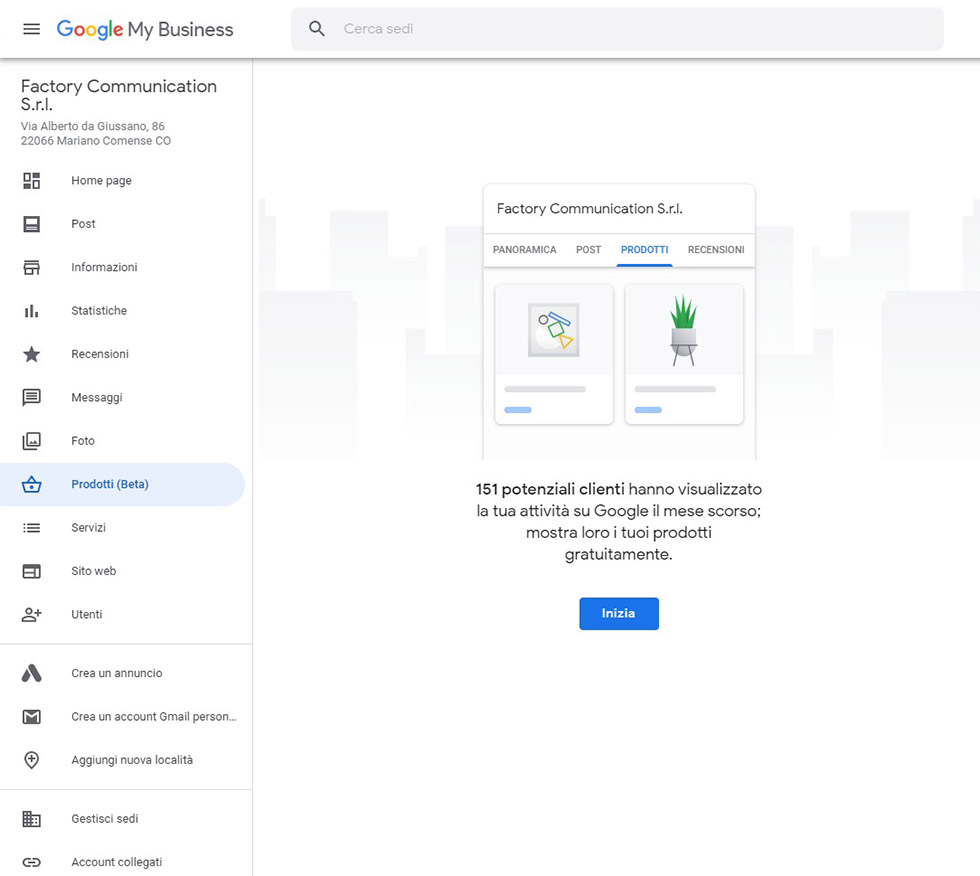
When you access your tab on Google My Business, you will find the new Products feature in the left side menu.
Simply click “Start” to build your own online store.
Product sheet and collections
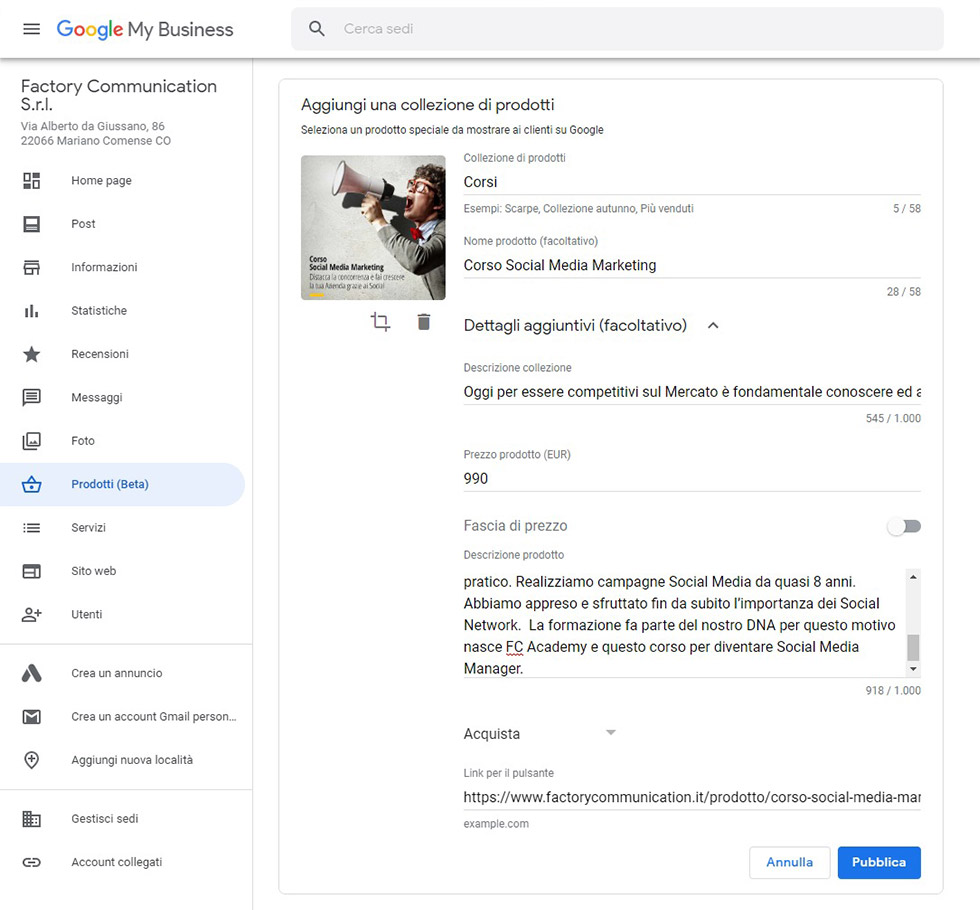
A collection refers to a family of products. It consists of:
- 58-character title. Right number of keystrokes to be indexed and displayed on the SERP (list of search results)
- Description collection, consisting of a maximum of 1,000 keystrokes
Each individual product consists of:
- Product name (optional) also consisting of 58 characters
- Product description, consisting of a maximum of 1,000 characters
- Product price (EUR) which can also be transformed into price range, indicating minimum and maximum
- Product Image
- Call to Action : Order online, Buy, Learn more, Go to offer
- Link for button: If you enable the call to action (CTA), space appears to enter the link that leads to the product
Inserted product
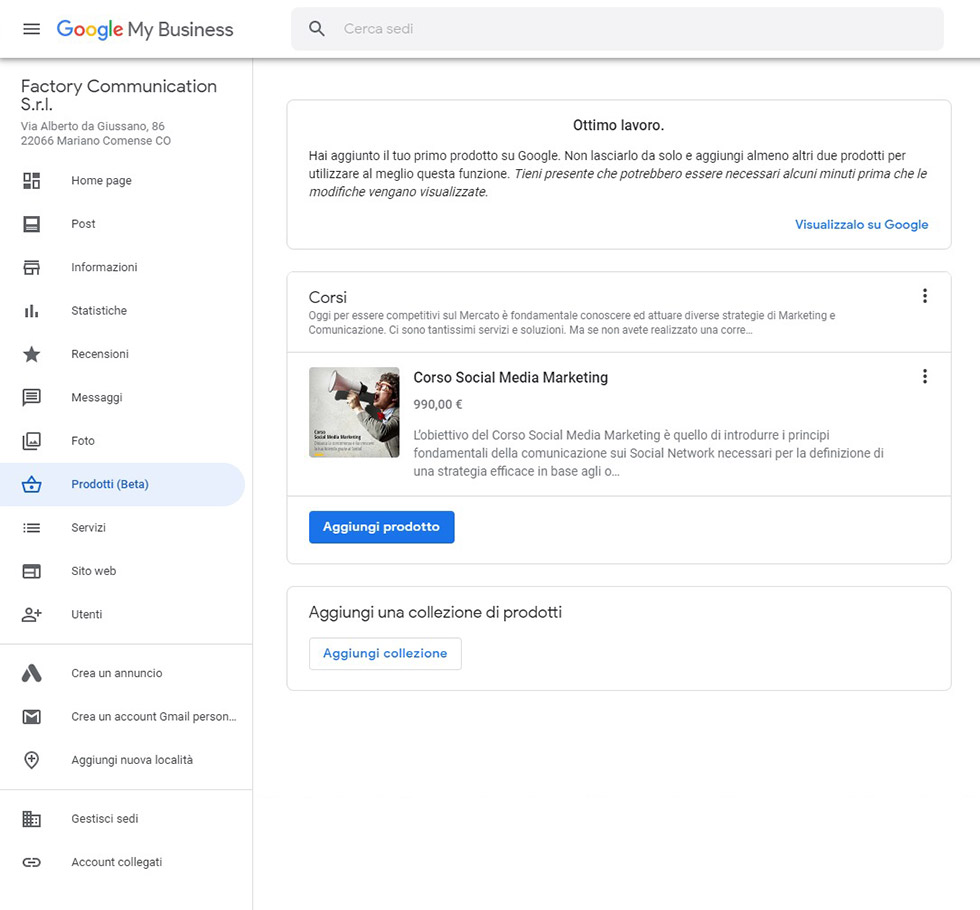
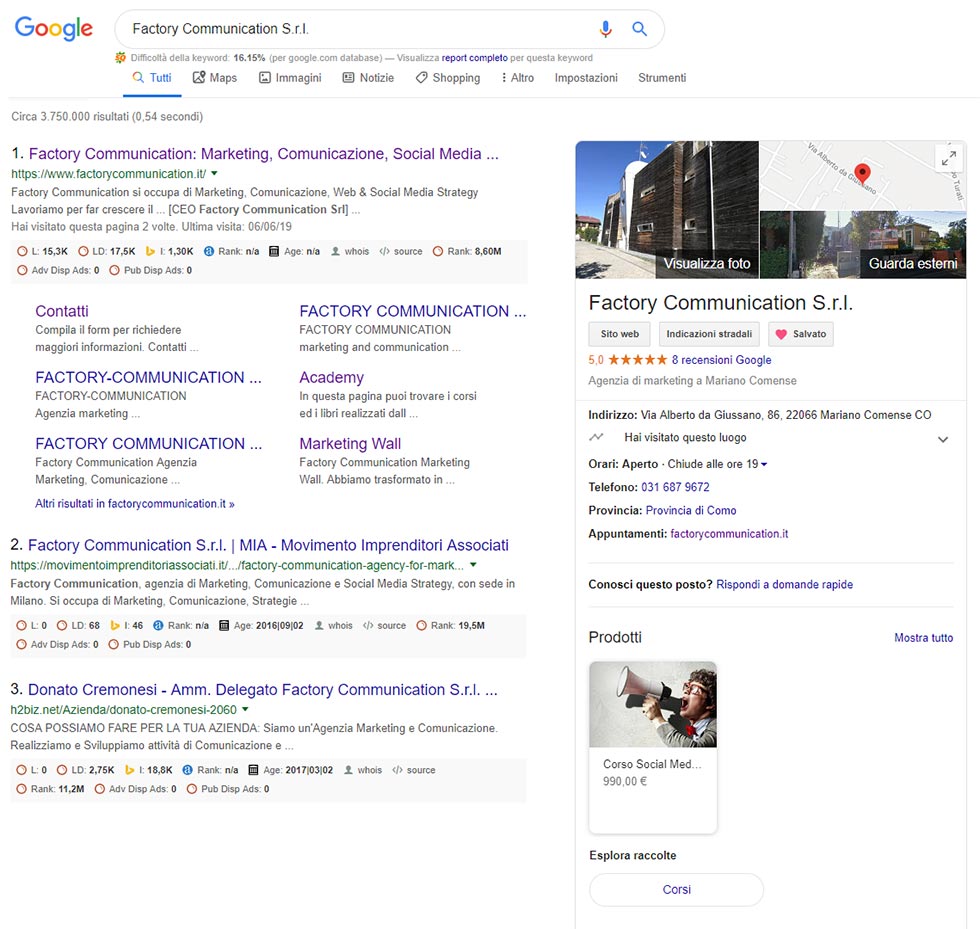
And here is the screen below, which you display, after the product is entered.
Google informs us that for proper indexing, it recommends 3 collections and 5 products per collection.
And here is the fact sheet of Factory Communication, after doing a Google search.
As you can see, the newly entered product is already available for purchase.
Google My Business Post Section
Creating a post is an extremely quick and easy task:
- Ability to insert images, photos and text, maximum 300 words.
- Specify a date in case it is an event
- Insert buttons related call to action: i.e., invitation to Action: book, request more information etc.
It is also important to know that:
- Google My Business posts have a 7-day shelf life
- A maximum of 10 Posts can be present at the same time
- It is possible to access the analytics statistics panel, to understand how interesting our Post is and how effective our activity is.
Features for restaurants that want to rank on Google
Factory Communication has managed the Marketing and Communication Strategy of nearly 50 restaurant businesses in recent years.
Google My business has always been a cornerstone of the activities carried out by the agency as it allows local businesses to be placed on Google MAPS and thus generate the right visibility for accommodations.
As with any business and Company, visibility is a key element.
In the case of Restaurants and Pizzerias, we talk about visibility in the territory. Unlike a Brand that distributes products regionally and nationally, a Restaurant needs to intercept, primarily, users, within a radius of 10 to 15 km from its location.
If you also want to improve the visibility of your restaurant, you should use Web Marketing strategies that are based on the Local Seo. That is, activities that aim to make your Restaurant visible locally.
One of the preferred channels is definitely Google My Business.
Google’s free service allows you to create:
- A geo-referenced restaurant card, that is, directly linked to the location on the map,
- A site, complete with all contact information, on which you can post news and, extremely important, your own menu
And now let’s look at the sections of Google My Business that are useful for catering.
Where and when: address section and times
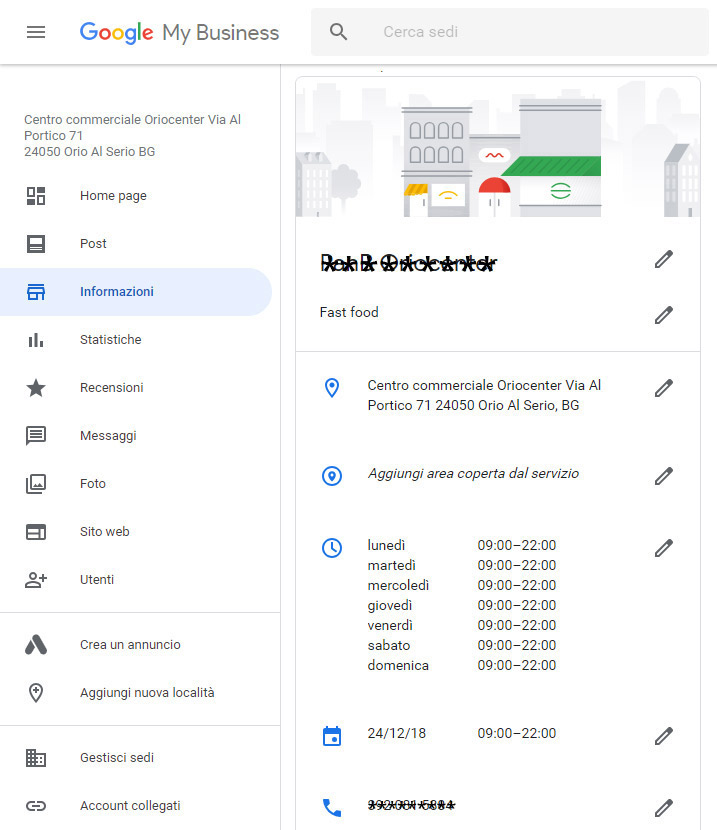
In this section of the Google My Business tab, it is essential to enter the correct address of our Restaurant, as it will place it directly on the Google Maps map and all the opening hours.
As you can see in the image it is also possible to specify special times for holidays, events etc.
Links and menus section
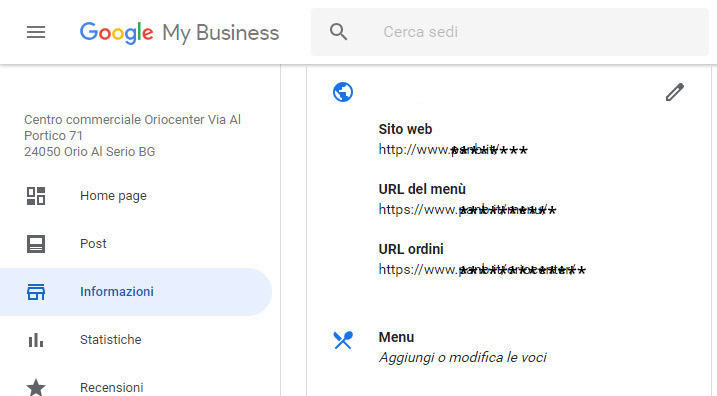
If your restaurant has its own site, you can enter the main url (address) and those of the menu and reservations in this section.
In this way, the user who navigates to your tab will be able to see all this useful information.
A key element concerns the menu. It is indeed possible to enter, in detail, your own menu, which will be published on the site linked to the Google My Business tab.
Services Section
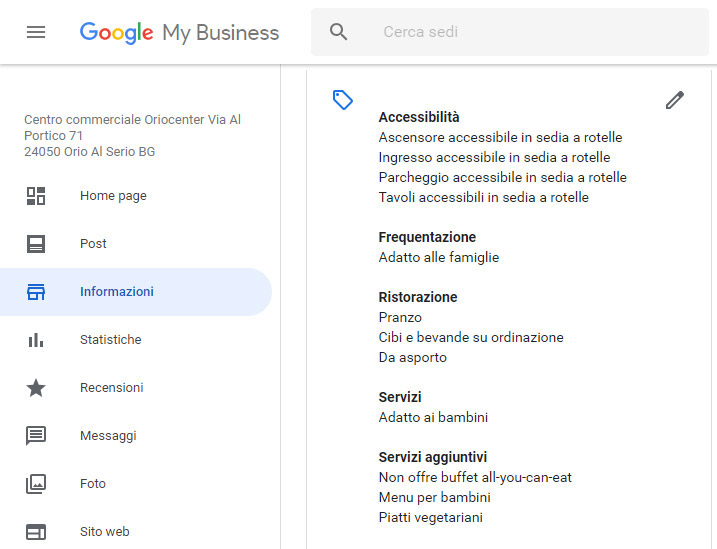
The more information we give users, the greater the opportunities for them to decide to come to our restaurant.
Therefore, it is essential to complete this section extremely clearly and precisely.
Wheelchair accessible places are visible on Google Maps
According to a recent ISTAT survey more than 3 million people with severe disabilities live in Italy, www.aib.it reports a slightly more accurate figure: about 2 million 824 thousand disabled people, including 960 thousand men and 1 million 864 thousand women.
A proportion of these people make use of wheelchairs to make their movements.
It is clear how, leaving aside the human aspect, which is fundamental and includes the equal right for all to access all primary and public services, it is clear how a shrewd manager can make a difference.
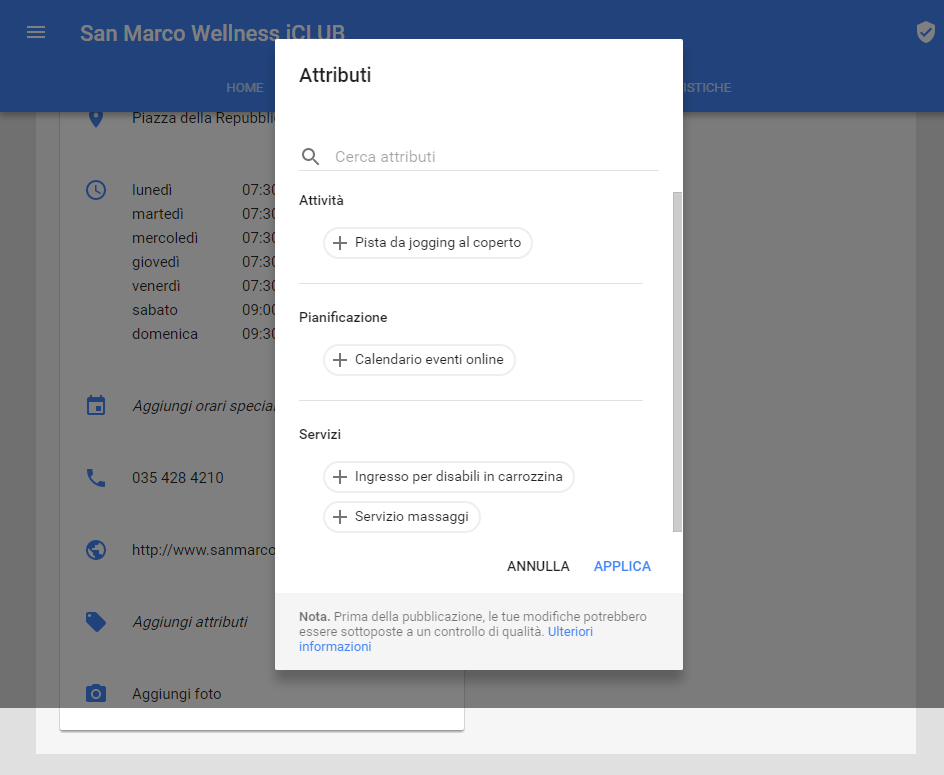
Making one’s premises “up to standard” is not only a moral and ethical duty but also a chance to increase one’s Clientele.
And Google wants to reward all those businesses that decide to make their premises “one-size-fits-all” by giving them more visibility in their local searches.
Now in addition to making WiFi access visi bile, viewing a virtual tour, seeing opening hours, it is also possible to define whether a venue is handicap accessible
If the strictly human aspect has not yet convinced you, then consider the Business aspect as well.
Having additional services on your Google My Business tab is definitely rewarding.
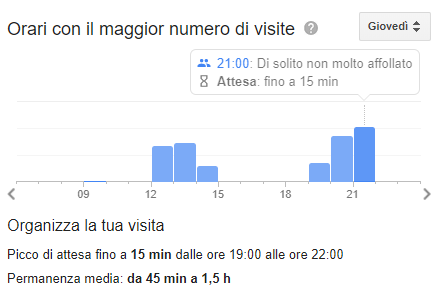
Google My Business communicates wait time
Google makes available through its Search and Maps services, a very useful piece of information: the waiting time to sit at the first free table at any restaurant.
Selecting a restaurant from the search results will suffice to scroll down to find out how long there is a wait before you can be seated at a table if you do not have a reservation.
But what are the benefits for restaurateurs?
This is definitely a good opportunity for businesses to take advantage of a suitable advertising space, just to make themselves more known.
A space that allows them to offer, in addition, an additional service to users, informing them about the waiting time to be able to sit at the table.
Improving, as a result, customer care service and related internal management and organization of orders, reservations and room staff.
View the most popular dishes from restaurants “nearby”
This function is for both regular users and Local Guides.
Why is this function so important for restaurants?
Because it becomes a rewarding, or penalizing, element for your restaurant.
More simply. If there are 10 restaurants in your area, Google Maps allows the user to choose the Restaurant, based on how popular its dishes are.
This requires, however, that first of all the users, upload photographs of the dishes, possibly, complete with a description.
In this way Google rewards the managers who are most active and most liked by users.
Inevitably it makes others less popular. This does not mean that your products are not good.
Local Guides enter this “game” overwhelmingly, because they are the most active ones on Maps.
I met a Local Guide Level 7, who periodically receives invitations from restaurants.
She is a guest for dinner and in return publishes a review about the restaurant.
This is because the most active Local Guides, receive so many likes to both the reviews and photos they post.
Statistics section related to your company’s ranking on Google
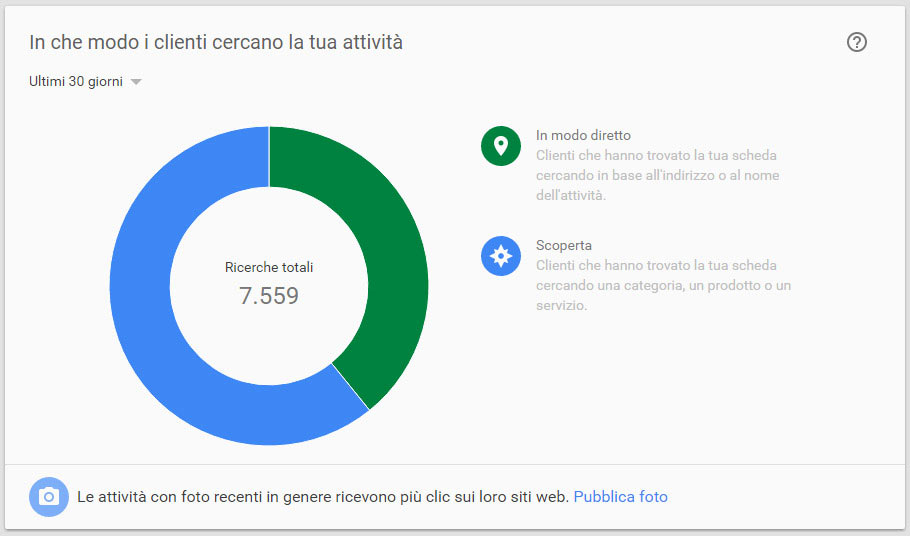
To prove its validity, we show you the statistics of a Google+ Page of one of our Clients, a Restaurant, which in the last 30 days totaled 7,559 searches.
How customers search for your business
- Directly: 2872 Customers (or about 38%) found the board by searching based on the address or name of the business.
This means that they already knew the Restaurant, the goal was to find more information, contacts, or how to reach it.
So thanks to Google+ we helped our contact and made sure they reached the Restaurant. - Discovery: 4687 Customers (or about 62%) found your board by searching for a category, product or service.
This figure is even more important, because it means they didn’t know your business and found it by doing a search.
What other tool allows you to be so visible for totally free?
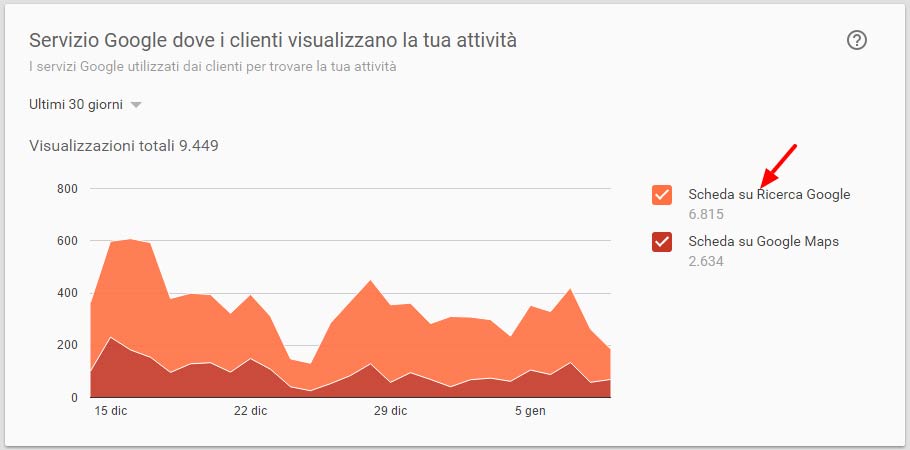
Google service where customers view your business
- Tab on Google Search: 6,815. This means that several Customers searched for the Restaurant’s references directly in Google, probably without immediately posing the problem of where it was located but, probably, searching for the website for more information.
- Google Maps tab : 2,634. In this case the search was done on Google Maps, and it highlights how important the location of the Restaurant was.
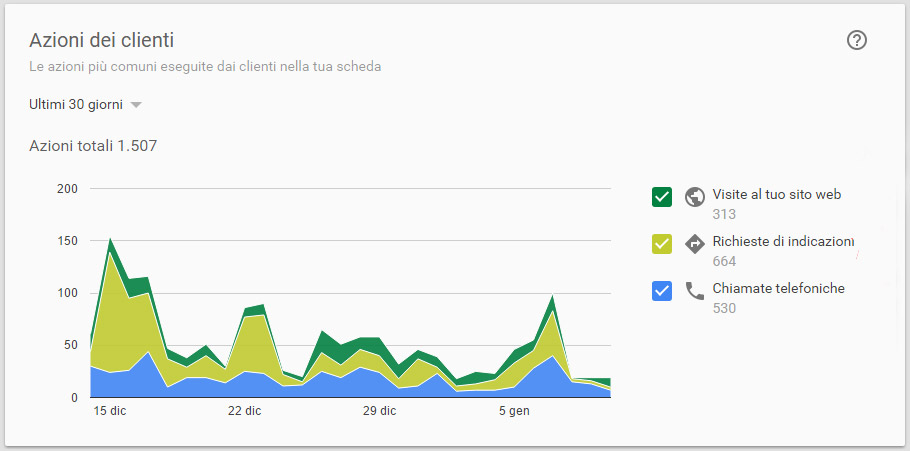
Customer actions
The most common actions performed by customers on your board.
In this case, the data comment on themselves. As you can see the Actions generated by visits produced 1,507 total actions, broken down as follows:
- 313 Visits to the Web site to make the Reservation (where to land is defined during page setup);
- 664 They used the Google+ page to view useful information to reach the Location;
- 530 Phone calls for information and/or reservations;
If you have a Restaurant try to put a value on these numbers.
If we consider the phone calls alone equal to 530 and assume that of these only 20% made a reservation for a table of 2 people we get 530×20%= 106 reservations.
If the average receipt for two people is 30 euros, it means that in thelast month Google Plus has generated for your restaurant about 3,180 euros in revenue (106×30).
How does that sound?
Feel free to move the values as you like, reduce the percentages, but the Business that Google+ can create for you is really high. Let me remind you that we did not use any Adwords campaigns to achieve this goal.
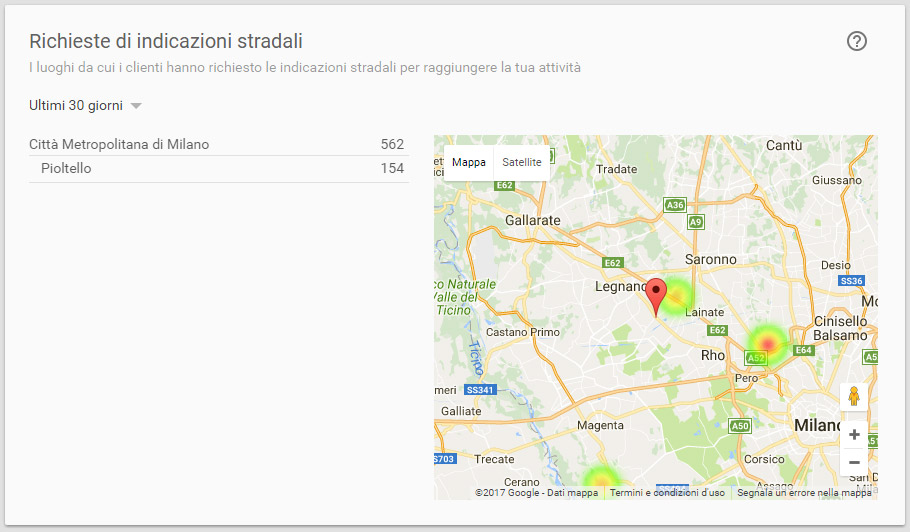
Requests for directions
The places from which customers have requested directions to your business.
This is very useful information, for example, to know whether the return of a communication activity done in a neighboring city to ours.
Phone calls
When and how often customers call your business.
Again, the figure is definitely evident and requires no comment.
The only note is the consistency of the calls, basically every day from Monday to Friday the minimum fee is about 50.
How many phone calls do you receive in your restaurant from possible new Customers? (it is assumed that a person who habitually frequents a restaurant already has the number saved in the Phone Book).
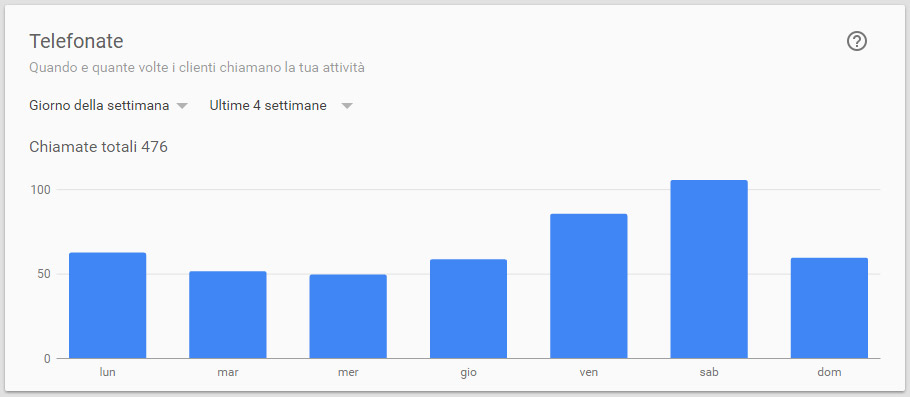
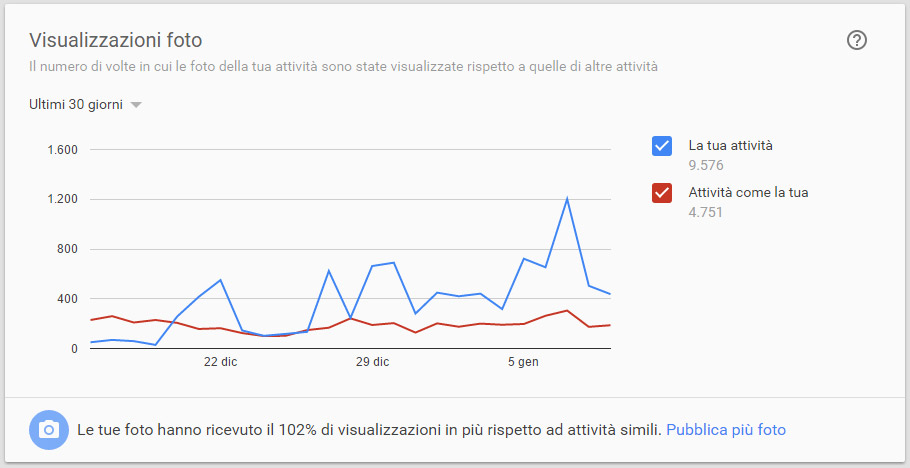
Photo views
The number of times your activity’s photos were viewed compared to those of other activities.
Again, the figure is extremely clear.
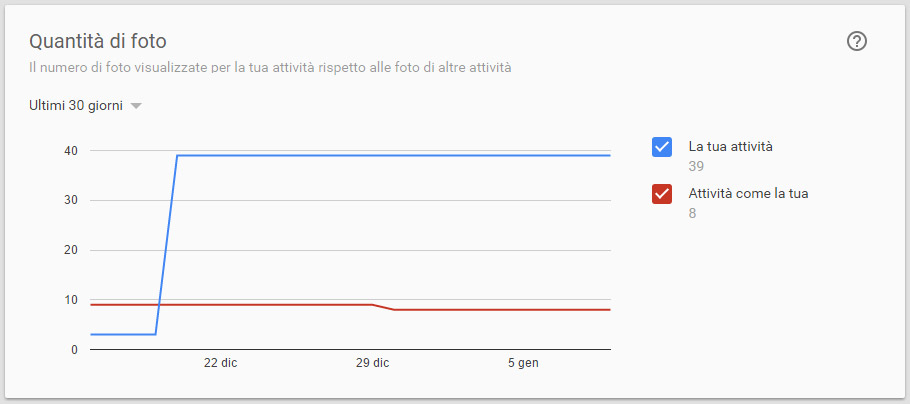
Amount of photos
The number of photos uploaded for your business compared to photos from other businesses. The spike you see on December 20 refers to the upload of a photo album made at the Restaurant.
As you can see it greatly affects the statistics of the page.
We’re sure we’ve given you lots of great reasons to create or improve your business’ Google My Business tab.
There are so many features available, and every day Google supplements the tab with new features and techniques.
Therefore, keeping one’s Google My business tab up-to-date and well-indexed not only requires a lot of time, but also continuous training, testing and verification of new features.
We at Factory Communication Marketing, Communication, Web & Social Media Strategy Agency do this on a daily basis for our Clients.
If you want to be successful on the Web and defeat your competition, you need to set up the right Social Media & Web Marketing strategy.
We can do it for you.
Did you find this article interesting? You can explore further by reading these articles.
- SEO consulting for restaurants: Increase your online visibility
- Three effective ways to use video in your B2B strategy
- Four Christmas campaigns that made marketing history
- New frontier for zero results on Google?
- How to use Google Trends to implement your content marketing strategy
- Automatic video playback in Google search results
- Image SEO: our 8-point checklist
- Temp Agency? Google For Jobs can be your Competitor