




In this article we explain how to analyze your competitors’ advertisements on Facebook and Instagram thanks to Meta Ad Library.
If you are reading this article you have probably typed one of these keywords into Google:
- facebook ads library
- fb ads library
- instagram ad library
- bookstore facebook ads
- library ad facebook
The world of ADS immediately makes us think of paid campaigns carried out on major online channels such as Facebook ADS, Instagram ADS, Linkedin ADS or Google ADS and other platforms.
Very useful tools to increase the visibility of our brand or, again, to bring paid traffic to our sites, e-commerce, portals or more simply directly to your Company Facebook Page.
What is Facebook ADS
Facebook Ads is the advertising platform of Meta (the company that owns Facebook, Instagram, and Messenger) that allows anyone from individuals to businesses to create and serve paid ads within these platforms.
Creating ADS on Facebook and Instagram today is increasingly simple and intuitive.
Why use Facebook Ads?
- Reach a huge audience: Billions of people use Meta’s platforms daily, giving you enormous potential for visibility.
- Precise segmentation: You can show your ads only to the people most relevant to your business, avoiding wasted budget.
- Measuring results: With built-in analytics tools, you can constantly monitor the performance of your campaigns and optimize your strategies.
- Flexibility: You can start and stop campaigns at any time, tailoring your budget and messages to your needs.

Facebook and Instagram ADS library
Going to the listings page on Facebook.com, one of the first slogans we read is just “We offer do-it-yourself listings for every skill level.”
I would say that is very true: whether you are a specialist or a junior figure, don’t be afraid to approach Facebook.
In fact, the platform provides the average user with a number of tools, simple or complex, depending on their needs, to make their own ADSs.
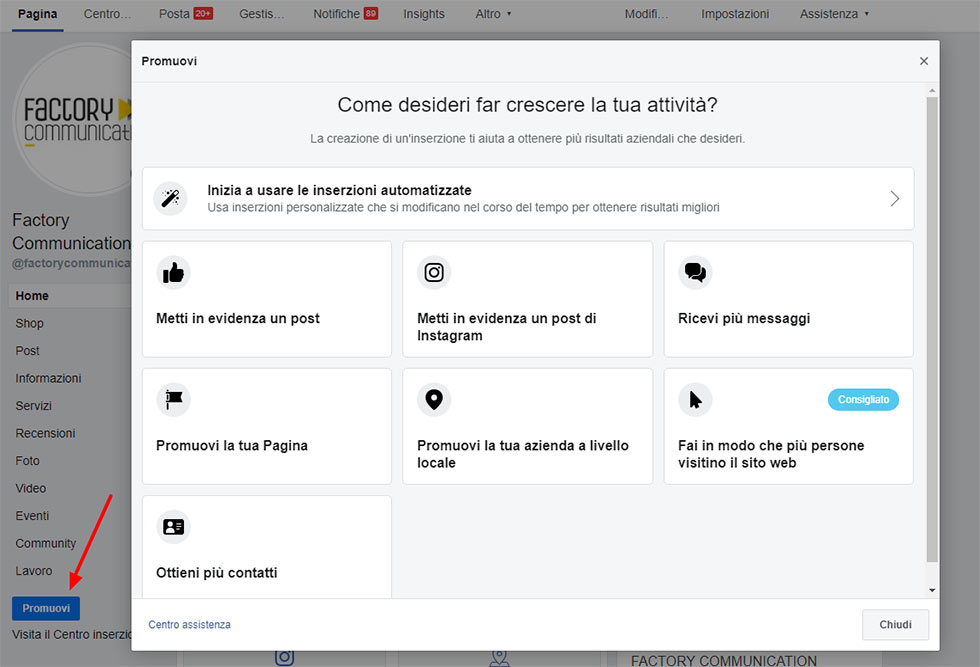
On Facebook pages we find the classic “Promote” or “Highlight post” buttons , two very simple functions that allow you to start creating your ads by simply setting:
- Target
- Button with CTA
- Audience
- Positioning Advertisement
- Budget and Duration
Certainly with “Highlight the post” you can’t target, or otherwise create a fully functioning campaign.
To create campaigns with more specific audiences or with more advanced features, comes Business Manager, Facebook’s ADS management platform.
MORE INFO: Facebook Business Manager what it is and how it works
Business Manager is the free tool for creating and managing Facebook ads, a tool created to make it easier for companies or agencies to organize and plan advertisements.
For some time now, a conversion and audience tracking system has been adopted by Facebook, the Pixel, a useful tool to fully track a user’s actions on their site or portal coming from ads created on Facebook.
Tracking is critical to understand if our ADV Campaign is effective and is producing the expected Revenue and Marketing results.
Business Manager is divided into 5 categories:
- Plan,
- Create,
- Manage,
- Measure and Report,
- Resources and Settings.
Why have Meta Library Listings been made available?
Today, Facebook is focusing so much on transparency in order to regain the trust of its more than 2.3 billion users.
For the past few months, it has been releasing its own platform with a complete collection of all active ads at the time of search.
In fact, Facebook after the scandals of the 2016 U.S. presidential election decided to put politicians’ budgets and advertisements for individual pages on the social network in the clear.
Facebook’s ad archive, previously launched in May 2018, included only ads related to political or social issues.
With this new feature, all active ads on anything are shown, as well as inactive political and release ads.
Here then is where Facebook goes a step further by creating the Ad Library: this is access to a real database that allows you to view all active Ads regarding Facebook products.
How does Meta Listing Library work?
We know that over the years, many tools for ad analytics have come out.
But among these, none, has ever been able to offer a complete overview of active listings for a user.
Facebook AD Library is really very useful not only to analyze your competitors but also to have a good look at how big brands invest in Adv.
The process is very simple.
By linking to the FB ad library page you will be redirected to the Facebook ad library page.
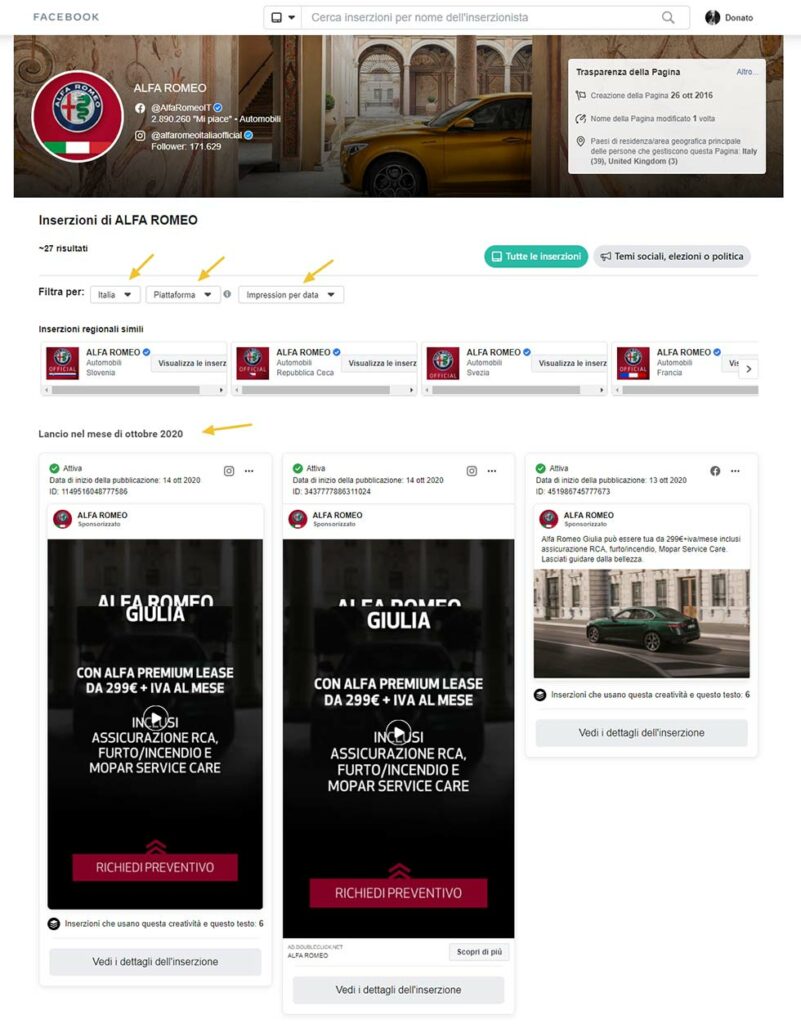
By typing in the name you are interested in, you will be able to see all of the campaigns it has run, while in the upper right-hand corner you will find “Page Transparency,” which is information such as the date the page was created, whether it has changed names over time, and even the countries of primary residence of the people running it.
In the example given, we went to browse the advertisements of Alfa Romeo.
In detail those active on Facebook, with territoriality Italy:
Clicking on the chosen page will show in the bottom section the active Ads and any variants in testing. In this section you can also see some active Ads in the past and when they were launched.
As you can see, in this first section we wanted to analyze Alfa Romeo sponsorships, via Facebook.
This tool also allows you to go and select the different countries in which a company announces itself, in case it has set up multiple pages for multiple countries.
As well as, the platform offers the ability to view active ads not only on Facebook but also on Instagram, Audience Network and Messenger, obviously by changing the date range chosen.
Facebook ad library is a real source of inspiration for making Facebook ads.
What is most interesting is that the content of this section of Facebook changes depending on the referenced page.
For example, for sensitive and political topics, there is much more information available.
In addition to these that I just showed you, you can also view the total spend in Adv, any disapproval received, demographic characteristics of the profiled audience, etc.
More than a matter of curiosity, what is Meta Listing Library really useful to us for?
As we have already mentioned, this tool was made available by Facebook’s social platform in the interest of transparency, given the scandals that have hit it in recent months.
But in addition to curiosity, for those interested in studying the Social Media Marketing Strategies. Ad Library becomes very useful.
By studying what competitors are doing, in fact, this tool can be a source of inspiration for the creation of sponsored advertising campaigns, or for the creation of content in a quicker and more visual way.
Recall that the whole part of the campaigns was until now already visible within the page (on the left side, under Info & Ads).
This new Library version, in addition to allowing you to view a history for certain pages, saves time and makes it easier to compare multiple advertising campaigns.
Advanced filters (a kind of Hashtag for selecting Adv by topics or other simpler criteria) are not yet available in this version.
Why use Meta Listing Library
Library ADS Facebook remains, however, a very useful and quick tool to test for those who want to fully understand how the best manage their budgets and which advertising strategies deliver the best results on Facebook.
Attention! in some cases it has turned out that if the advertiser uses Business Manager, it is not possible to see all his listings.
Currently, only those activities can be viewed through the quick commands available within the page (Example: Highlight Post and others).
Of course, there are other techniques and tools for “Spying” on competitors and related listings.
Those listed in this in the article are the fastest and most affordable.
They allow you to analyze Competitors’ Facebook Ads in minutes without having to waste time or analyze data upon data.
With this information you can monitor your favorite listings and take notes to build an effective listing that brings results even without being a great expert.
Happy Facebook Business to All 🙂 🙂
Want to learn more about how to grow your Business? Don’t miss these articles from our website:
- Lead Generation on Linkedin with Linkmatch for HubSpot
- WhatsApp catalog: what it is and how this sales tool works
- Doing marketing on Facebook: our tips
- Facebook video streaming for groups and events!
- Advertising campaigns: our 8-point checklist
- Meta Listing Library: spy on competitors on Facebook and Instagram