

You’ve built a community that follows you, your platform metrics are solid, and brands are reaching out to you.
Then comes the question that will shape the next five years of your business: How many of the people who discover you go through Google before they even reach your profile?
And where do they end up once they’ve found you?
Until recently, that part of the route was too long.
Instagram and TikTok insights reveal what’s happening within the app; Google search, however, has been a bit of a blind spot—even though it’s the gateway for people searching for you by name, those looking for the topics you discuss, and those considering whether to hire you.
Starting in July 2026, that dark spot will be illuminated.
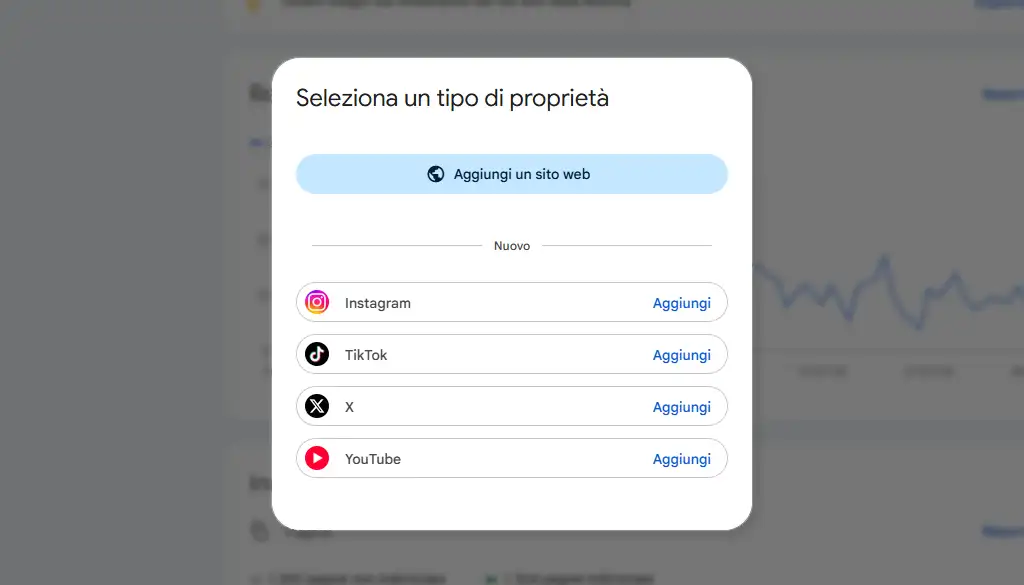
Google has introduced a new property type in Search Console—platform properties—that links Instagram, TikTok, X, and YouTube accounts and shows how their content performs in Search.
Let’s see what it actually measures, how it works, and—most importantly—what decisions it enables for those who make a living from content.
What has Google released, and when?
There are two dates, and it’s best to keep them separate, because almost all Italian media coverage stopped at the first one.
On July 7, 2026, the Search Central Blog announced platform properties: a new type of resource that complements domain and URL prefix properties, with a phased rollout over the following weeks.
On July 29, the second announcement—the one that seals the deal—was made: the feature became available globally, and Google simultaneously published an official guide on how to analyze the performance of social media and video content.
There is a precedent, and it helps explain this change. In December 2025, Search Console introduced social channels: they were automatically detected based on the linked website and appeared only in the Insights report.
The platform’s features are another story. You add them yourself, you verify them yourself, they work even for those who haven’t launched a website yet, and they generate three comprehensive reports.
There are four supported platforms at launch: Instagram, TikTok, X, and YouTube. Facebook and LinkedIn are not included on the list for now.
What is a Search Console property?
A platform property is a type of resource in Google Search Console that links an Instagram, TikTok, X, or YouTube account and displays the clicks, impressions, CTR, and average position for that content in Google Search, Discover, and Google News.
You can check this by logging into the platform, and it also works for those who post exclusively on social media.
How does it differ from a domain property?
The key difference lies in the proof of ownership. Ownership is verified through a DNS record or a file uploaded to the server: it presupposes ownership of a website.
One feature of the platform is that it allows users to log in with their social media accounts, making it the first Search Console resource available to those who work exclusively on social media platforms.
Otherwise, the experience is the same as what anyone who already has a website is familiar with: the same property selector, the same reports, the same filters, and the same export options.
What it measures, and what remains for native insights
This is the most common misunderstanding, and it’s worth clarifying it before opening the panel.
The scope of the data
The platform’s metrics measure only the performance of content on Google’s platforms—Search, Discover, and Google News—when that content appears there.
Views that occur within the platform are tracked by the native tools: the number of times a Reel has appeared in the feed is still recorded by Instagram.
There are three main areas where social media content appears in Search: the short video carousel, the recent posts carousel, and the “What People Are Saying” section.
They appear in brand searches—your name, the name of your show—and in searches related to current events, entertainment, and lifestyle.
These are spaces that a well-maintained profile can capture with relative ease, and they offer real visibility to those who haven’t met you yet.
How Stories and Videos Are Counted
Three key figures you should know before interpreting the charts.
- Instagram Stories that appear in Search generate impressions; if someone clicks on one, a click is recorded.
- Videos played in the Google viewer still count as a click, even when playback remains within the Google environment.
-
On the Insights page, the summary tab tallies all clicks on Google—including image, video, and news searches—while the lists below focus on web search.
The two totals may therefore differ, and here’s why.
How to Link Your Instagram Profile to Google Search Console
The process takes just a few minutes for each account.
The Steps
- Open Search Console and use the property selector in the sidebar, or go directly to the welcome screen, then select “Add property.”
- In the list of supported options, locate the platform you want and click “Add” next to its name.
- Follow the on-screen instructions: Verification is done by logging into your social media account, which securely authorizes the connection.
- Once the verification is complete, a confirmation message will appear. The first data will arrive in a few days.
If you manage multiple profiles on the same platform, or accounts on different platforms, repeat the process for each one: each account is a separate entity with its own reports. If you’ve already claimed your Google search profile, your verified accounts will be added automatically.
Keep the connection active
For security reasons, Google periodically verifies ownership. When external access expires, the connection is interrupted, and access to the reports is suspended until the verification is completed again. Once restored, the entire history becomes available again: this is a temporary interruption, and the data remains secure.
The three available reports
1. Yield
Total clicks, impressions, average CTR, and average position for the selected property. The data can be filtered by post, search query, country, device, and time period, and can be exported.
When content receives traffic from Discover and Google News, the corresponding tabs for those platforms also appear. The default time frame is 28 days.
2. Insight
A visual representation of the same data: traffic trends over the last 28 days, top-performing content, countries of origin for the audience, and—the most valuable element for anyone planning an editorial strategy—query groups, which collect search terms by topic and display them categorized as “top,” “rising,” and “declining.”
Goals
Tracking click-based growth milestones, such as reaching a new threshold for total clicks from Search in the last 28 days.
It is the lightest of the three parts and serves primarily to set the pace for a project that spans several months.
Five Analyses a Creator Can Start Doing Right Away
The official guide, published on July 29, outlines some practical applications. Here are the five that truly change the way we work.
-
The 24-Hour Filter.
Is a post published yesterday taking off for a specific search term? The 24-hour filter shows this almost in real time. Now is the right time to repost the same topic on other channels while interest is still high. -
Reels vs. posts, Shorts vs. long videos.
Using the URL filter, the formats are compared: /reels/ vs. /p/ on Instagram, /shorts/ vs. /watch/ on YouTube. The result shows which format captures the search demand on Google—which is different from which format generates the most engagement in the feed. -
A comparison of platforms.
By exporting the data for each platform, you’ll discover, for example, that a long tutorial performs well on YouTube, while the short version on TikTok doesn’t generate much engagement. This insight guides you in repurposing what you’ve already produced, rather than rushing to create new content. -
Notes.
Search Console lets you mark a date on the graph. Noting the day you rewrote a caption or a video title allows you to measure the impact of that change in the weeks that follow: SEO applied to social media content becomes a verifiable practice. -
Query groups.
The trending topics in the Insight report show where to focus your efforts for the following month, based on what people are actually searching for. It’s keyword research, with the difference that here the keywords come from your actual audience.
Why a successful social media creator also needs the web
The queries that lead people to your social media content are questions asked on Google: they originate outside the platform and end up on someone else’s site.
Having your own website turns that same question into a lasting connection—a newsletter, a waiting list, a request for collaboration—and into an archive that continues to rank even when the feed algorithm changes.
A Google search belongs to the site that hosts it
There is a detail in the new reports that deserves more attention than it has received.
If a search today leads people to one of your Reels, that search exists independently of Instagram: people will still be typing it in next month, and the result will go to whoever serves it best.
Today it’s you, with content hosted on a platform that decides on its own how much of it to show.
Tomorrow it could be someone else’s webpage on the same topic.
Here’s why these reports are interesting beyond mere curiosity.
Query groups indicate which topics you already have organic search traffic for; a website built around those same topics consistently captures that traffic with content that no algorithm can demote.
The two work together: social media drives discovery and connection, while the web retains users, converts them, and stands the test of time. It’s an ecosystem, rather than two separate worlds looking at each other.
The business benefit follows closely behind. A media kit that also shows organic traffic to your site—along with the search queries that drive it—tells a brand something that followers alone don’t reveal: that this audience has a specific intent, a theme, and a direction.
That’s the issue that makes or breaks a negotiation.
What’s Changing for Managers and Talent Agencies
Those who manage multiple creators now have access to comparative insights that were previously unattainable: each account is a separate entity, so it’s now possible to compare which profiles on the roster are generating demand on Google, on which topics, and in which countries.
It helps guide campaign allocation, develop proposals with an added layer of insight, and identify the creators for whom a web ecosystem would yield the most significant leap forward.
Finally, there is a reason to activate the properties today even if a plan isn’t ready yet: revenue starts flowing as soon as the verification is complete, so every week of delay is lost revenue.
Frequently asked questions
The two sources address different questions and complement each other. Native insights provide information about user behavior within the app: saves, shares, and reach in the feed. Platform metrics show how often that content is found through Google Search, Discover, and Google News. A complete picture emerges when you analyze both.
Open Search Console, select “Add Property” from the selector, find Instagram in the list of supported platforms, and complete verification by logging into your account. Verification is immediate, while the first data points appear in the reports after a few days. Each profile must be added individually.
The analysis is performed by logging into your social media account, so this feature is also available to those who post exclusively on social media platforms. In fact, the data it provides is the best starting point for deciding which topics to build a website around, because it shows the search queries your audience is already making on Google.
Data collection begins at the time of verification: the charts show only the days following the connection. Those who activate the property today will have a useful historical data set in three months, and this is the most compelling reason to proceed immediately.
There are four platforms that can be linked: Instagram, TikTok, X, and YouTube. Facebook and LinkedIn are not currently included in the list, which Google may expand in the future.
It takes a few days after setup for the metrics to be collected and processed. In the first few weeks, the charts show partial data, covering only the days for which data has already been collected. The default report interval is 28 days.
For the first time, creators can see how much of their visibility comes from Google searches, which keywords are driving that traffic, and from which countries.
This data serves both as a reflection of the work already done and as a roadmap for what remains to be done: the topics for which there is already demand form the foundation upon which to build a digital space that belongs to those who inhabit it.
Do you want to turn your social media influence into an ecosystem that also drives conversions online?
Learn more about our consulting services for creators and talent, or request a free consultation so we can analyze your channels and the search demand they generate on Google together.