


The release of WordPress 7.0 probably marks the platform’s biggest leap in the past decade.
The main novelty is simple to tell and complex to fully understand: artificial intelligence goes natively inside the CMS that now powers about 40 percent of the websites on the planet.
Until yesterday, your business site was basically a passive tool: publishing content, collecting contacts, displaying products.
As of WordPress 7.0 it can begin to behave like an intelligent collaborator, capable of generating text, classifying content, creating images and interacting with your workflows via AI agents.
This article helps you understand what has really happened, why it is a historic change, and most importantly what it means for your SME in the next 12-24 months.
We do this with an approach that puts the entrepreneur, not the developer, at the center: technology explained in an accessible way, concrete examples from the industries we know best, and honest reflection on the risks that purely technical articles tend to overlook.
WordPress 7.0: what has really changed
Finding your way around the new release requires an essential map. WordPress 7.0 introduces dozens of new features, yet three macro areas concentrate the strategic value for those running a business.
Native integration with AI: the most important leap
WordPress becomes an infrastructure-ready platform for artificial intelligence.
It means the CMS offers a standardized way to talk with large language models (LLMs) such as Anthropic’s Claude, OpenAI’s GPT or Google’s Gemini.
Before, each AI plugin managed its own connection, its own API keys, its own rules. Now there is a single interface that all compatible plugins can use.
This is the key step toward what the community calls “agentic WordPress”: a site that can natively interact with external AI agents through standardized interfaces.
Translated: your site can become the tool through which AI works, not just the object on which AI is applied.
The new blocks and editor with iframe
On the editorial side come blocks that address the day-to-day needs of content publishers: the Breadcrumb block (for hierarchical navigation), the Icon block (for inserting SVG icons without third-party plugins), customizable navigation overlays for mobile, significant improvements to the Paragraph, Image, Cover and Grid blocks.
The post editor now loads in an iframe, a technical choice that protects the theme styles from conflicts with the admin interface.
For those managing the site, it means a more stable and predictable editing experience, with fewer visual surprises between back-end and front-end.
The new administration experience
The administration panel has been redesigned to modernize the appearance and reduce inconsistencies between the old screens and the block editor.
Content revisions are now presented as visual previews highlighting changes in yellow, deletions in red, and additions in green, at the individual block level.
It’s a small ergonomic revolution: figuring out what has changed between two versions of a post no longer requires re-reading everything.
AI connectors: what they are and why they change the rules of the game
The concept of a “connector” is probably the most important element for business technology decision makers to understand. It is worth devoting a few minutes to it.
A single interface for OpenAI, Anthropic and Google
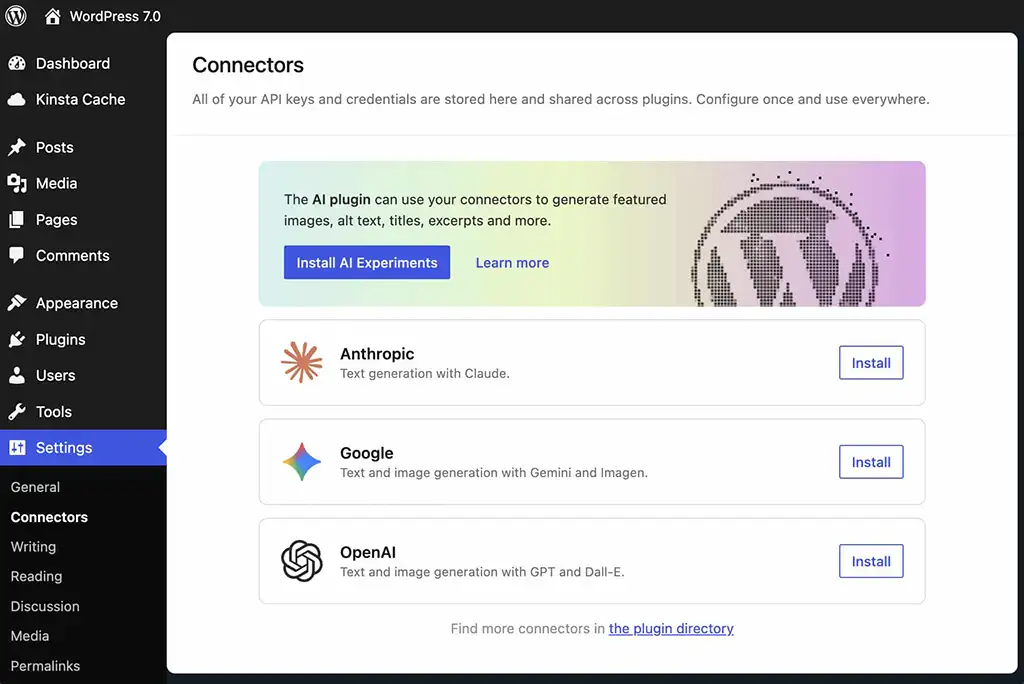
WordPress 7.0 introduces a new entry in the settings dedicated to Connectors.
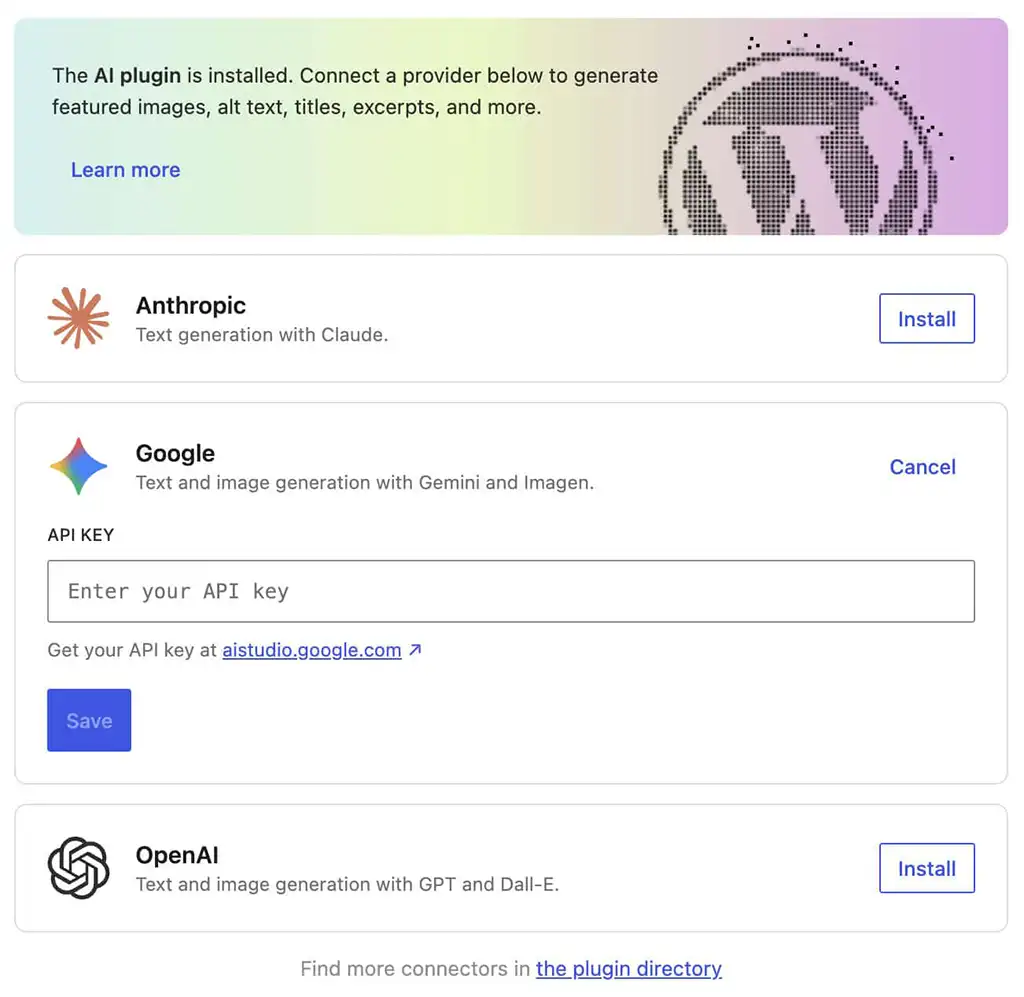
From there you configure the API keys of your favorite AI providers once, and all compatible plugins can use them automatically. The release includes three predefined connectors–OpenAI, Anthropic and Google–and an API that allows developers to register new ones.
In practice, for a developer the simplest example of an AI call inside WordPress becomes something like this:
$ai_response = wp_ai_client_prompt( “Write a professional WordPress post” ) ->generate_text();
Two lines of code, and you can generate AI content using the provider configured at the site level. The same code works with Claude, with GPT or with Gemini: the CMS takes care of the translation.
The switchboard metaphor: WordPress as an enterprise AI hub
To understand the strategic value, imagine the old corporate telephone switchboard. It used to be that each department had its own line, its own numbers, its own operators.
When the company installed a unified switchboard, all calls went through a single point of control: permits, costs, registrations, integrations with CRM were managed in one place.
WordPress 7.0’s AI connectors do exactly the same thing with artificial intelligence. Your site becomes the switchboard through which all AI requests from all plugins pass: a single point of governance, security, cost control and portability.
Tomorrow you want to change AI providers? You update a single configuration, without rewriting anything.
WordPress agentico: what it means for the SME entrepreneur
The term “agentic” sounds abstract, yet it describes a very concrete paradigm shift. It is worth translating it into business language.
From the showcase site to the site that works with you
An agent site is one where AI can perform actions: create a post, update a product, categorize a piece of content, respond to a user request, integrate with CRM.
It does so through the Abilities API, a new interface that exposes WordPress functionality in a format understandable to both humans and machines.
For your SME, this means that the site can stop being just a passive showcase and start behaving like an operational tool.
An example: a customer fills out a contact form, AI automatically classifies the request, assigns it to the right employee, prepares a customized draft response, and schedules a follow-up.
All this inside WordPress, without jumping between ten different tools.
Concrete examples in the four areas
Food & Beverage.
A restaurant or winery can use WordPress 7.0 to automatically generate SEO-optimized product sheets for each wine label, with sensory descriptions consistent with the brand tone and automatic tags (varietal, vintage, food pairing). The entrepreneur adds the photo and technical data, the AI does the rest.
Fashion & Luxury
A handcrafted clothing brand can leverage integrated AI image generation to create mood boards consistent with the collection, graphic variants of the same photos for different social platforms, and multilingual editorial content from a single product sheet in Italian.
Finance & Legal
A consulting firm can automatically create disclosure summaries of regulatory news from technical sources, maintaining an institutional tone of voice and a recurring structure that the model learns from already published content. The professional validates and signs, the AI prepares the basis.
Tourism & Hospitality
A hotel or agritourism can automatically generate in-depth territory pages (events, itineraries, seasonal experiences) from a few lines of brief, in multiple languages, with editorial consistency across all pages of the site. The editor updates each season, the site realigns.
Real opportunities: 5 things your SME can do now
Translated into an operational list, here are five concrete applications of the AI built into WordPress 7.0 within the reach of a structured SMB.
1. Automatic generation of SEO-friendly content
Product briefs, blog articles, service descriptions: the AI can produce the first draft in seconds, leaving the higher-value work-verification, contextualization, brand voice-to the team. The result is a speed of publication that until yesterday was unthinkable for a lean structure.
2. Smart categorization and tagging
Any new content published can be automatically categorized in the right category and enriched with relevant tags consistently throughout the site.
For those who have hundreds of articles or products, it is a huge gain in terms of user experience and internal SEO.
3. AI-generated images with brand consistency
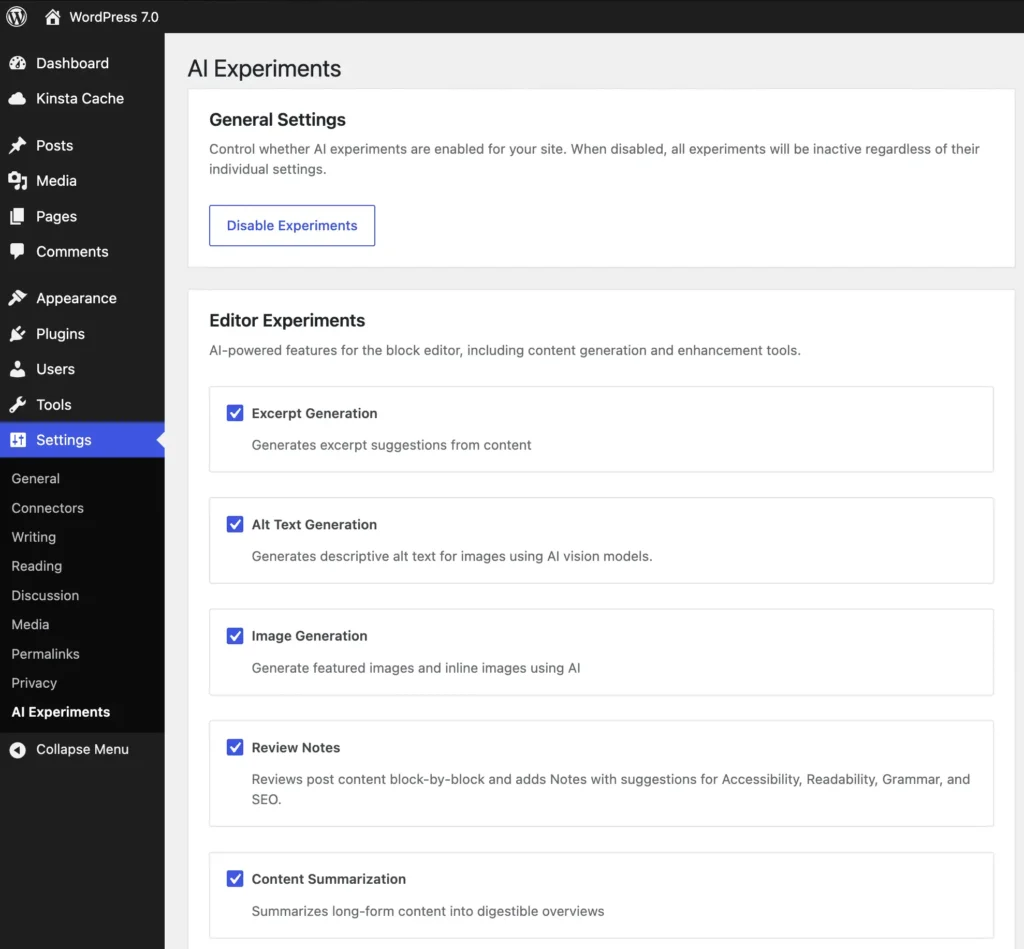
The AI Experiments plugin and related tools allow you to generate featured images, alt text, and visual content from prompts.
By defining a brand style once, you can produce consistent visual assets for blogs, product sheets and landings in minimal time.
4. Visual reviews and real-time collaboration
The new revision system visually highlights changes at the block level.
For those working in teams-agency, internal marketing department, external freelancers-it means faster approval flows and fewer overwriting errors.
5. Personalization of the user experience
With the new viewport-based block visibility property (mobile, tablet, desktop) and the ability to customize each element with dedicated CSS, it is possible to build truly adaptive experiences without the need for external plugins.
The hidden risk: when AI at the site becomes a problem
A good consultant always tells two things: where the value lies and where the risks lie.
WordPress 7.0 opens up tremendous opportunities; however, it also introduces three areas of focus that deserve lucid reflection before we leave.
Dependence on external vendors and data privacy
Each AI request travels to third-party servers: OpenAI, Anthropic, Google.
WordPress does not send requests without explicit consent, however once connectors are activated, data from your site begins to flow out of your perimeter.
It is critical to clearly govern what content can be processed by AI, where it is stored, for how long, and what contractual clauses cover the flow.
WordPress 7.0 per impostazione predefinita e senza un esplicito consenso e senza la configurazione del servizio non invia richieste o dati a nessun servizio di AI.
Generic, indistinguishable, soulless content
AI is a democratization tool: it makes capabilities accessible to everyone that previously required specialized skills.
The downside is that all sites are in danger of starting to sound the same.
The voice of the brand, the original perspective, the direct testimony of the entrepreneur-these are the elements that distinguish one company from another and that AI alone can only superficially replicate.
The loss of editorial control
More automation means potentially fewer human eyes on published content.
For an SME, this can result in factual errors, inconsistencies with the corporate position, and content that does not truly reflect the founder’s vision.
Speed is valuable; however, it requires robust editorial governance that grows along with AI adoption.
The Factory Communication framework: ethical AI applied to WordPress 7.0
These are the issues that in Factory Communication we work on every day with Italian SME entrepreneurs.
Our view on AI integration in enterprise sites stems from a simple belief: technology makes sense when it liberates people, not when it replaces them.
Technology serving people, not vice versa
Ethical AI for us means designing flows in which artificial intelligence deals with what is repetitive, predictable, automatable-and people focus on what is strategic, relational, creative.
On WordPress 7.0 this translates into concrete choices: which blocks to automate, which content to always run through human review, which decisions to delegate to the template and which to keep firmly in the hands of the team.
The Factory Strategy System methodology applied to the website
The Factory Strategy System is our four-step cyclical framework – Analyze, Strategize, Activate, Amplify – that we apply to every strategy project, including AI integration on WordPress.
We start with an audit of the current site (what’s there, what works, where AI can really bring value), define the adoption strategy (what use cases, in what order, with what governance), activate concrete integration on priority blocks and flows, and amplify the results by measuring ROI, editorial quality, and SEO spillovers.
When AI makes sense and when humans are better
The question is not “AI yes or AI no.” It is: what combination of AI and human intervention produces the best outcome for my customer, my brand, my community.
In my experience, the areas where AI offers immediate net gain are first draft content, classification, translation, and generation of consistent visual assets.
The areas where humans remain indispensable are strategic vision, customer relations, decisions that have reputational impact, and content that speaks to the company’s values.
How to prepare for the transition: an operational checklist
In closing, here are the concrete steps we recommend for an SME entrepreneur in the next six months.
1. Technical audit of the current site
Before turning on any AI connector, you need to know what you are working on: installed WordPress version, theme, plugins in use, compatibility with Block API v3, performance status, quality of existing content.
Without an accurate starting picture, any AI integration risks amplifying pre-existing problems.
2. Gradual AI adoption strategy
It is best to start with one or two high-value, low-risk use cases-typically the generation of alt text for images, the first draft of blog articles, or the automatic classification of content-measure the results for a few months, and then gradually expand.
AI adoptions that fail are almost always those that tried to automate everything right away.
3. Team formation and internal governance
AI built into the CMS really works when the team knows how to use it.
It means training those who publish content, setting clear editorial guidelines on what AI can and what AI should stay out of, identifying an internal contact person to preside over quality over time.
Technology alone is not enough-you need a corporate culture to go with it.
AI is magical; however, humans are even more so.
If you want to develop your new site, contact us.