



These days, many entrepreneurs are receiving the same email: “starting today, you can register your business on ChatGPT, get ahead of your competitors”.
The news is true: OpenAI has opened ChatGPT up to businesses.
The message, however, lumps together features available in Italy, features reserved for the United States, and a promise that OpenAI itself does not make.
We went ahead and registered: profile created, domain verified, identity check passed.
In this guide you’ll find out what Business Hub is, who can use it from Italy, how to proceed step by step, and what to really expect afterwards.
Our point of view
by Donato Cremonesi, CEO and founder
Today, ChatGPT presents Business Hub as a new feature for businesses.
In my view, however, it’s the first step towards an ecosystem very similar to the one Google built over twenty years.
The new profile resembles, in a stripped-down form, what used to be called Google My Business: category, address, hours, photos, contact details.
Some pieces of this ecosystem already exist.
ChatGPT shows local listings with a map and, on iPhone, lets you choose between Apple Maps and Google Maps.
It uses Yelp reviews under license.
Perplexity, for its part, invites merchants to share their catalog.
The next step could be a tool for building a website directly inside the assistant.
I believe that, little by little, all AI assistants will be pushed to integrate these technologies and collect data at the source.
Listings, websites and maps are the fastest way to get up-to-date information directly from businesses and users, and every assistant needs this to give good answers.
Anthropic, for example, does not currently offer businesses a profile to claim: for local searches, Claude relies on Google Maps data.
Tomorrow it might, especially after its Nasdaq listing on November 19, the largest in history.
For a business owner, the implication is concrete: it pays to stake out these listings from the start, with identical data everywhere, as many have learned to do with Google.
What is ChatGPT Business Hub
On November 10, 2026, OpenAI introduced Businesses in ChatGPT in beta.
It’s a program that lets businesses claim their profile within ChatGPT, keep their information up to date, and understand how people interact with them.
According to OpenAI, ChatGPT is used by 1.2 billion people every week.
Business Hub is the panel where everything is managed: it can be opened from chatgpt.com/business-hub or from the ChatGPT sidebar.
Business Hub and ChatGPT Business are two different things
The names are similar and cause confusion.
ChatGPT Business is the paid subscription that lets a team use ChatGPT for work.
Business Hub concerns your business’s presence in the answers ChatGPT gives to users.
To register, all you need is a ChatGPT account and a verifiable business: no subscription, no advertising account required. We used a free account.
Within the panel, OpenAI offers the option to upgrade to ChatGPT Business and to promote the agent for a fee: these are optional, and the profile works without them too.
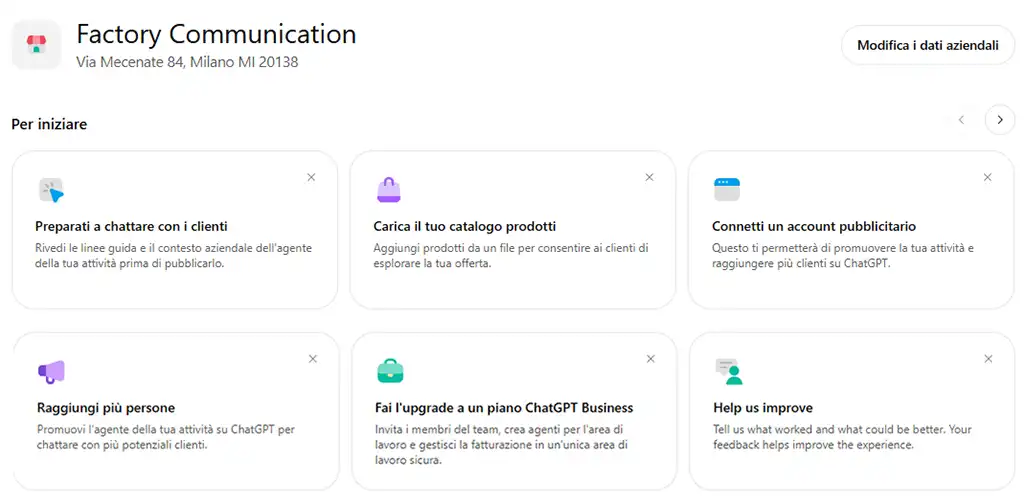
What you can do from the panel
After verification you can:
- correct and complete your business information, from the description to the contact details;
- upload a product catalog from a file, indicating the countries of sale and, if needed, the currencies;
- read insights on your business’s presence in responses;
- create a Business agent, in markets where the program allows it.
What the insights show
The panel shows four metrics, over the last 7 or 28 days: mentions, profile views, website clicks, and the five topics most discussed in the responses where the business appears.
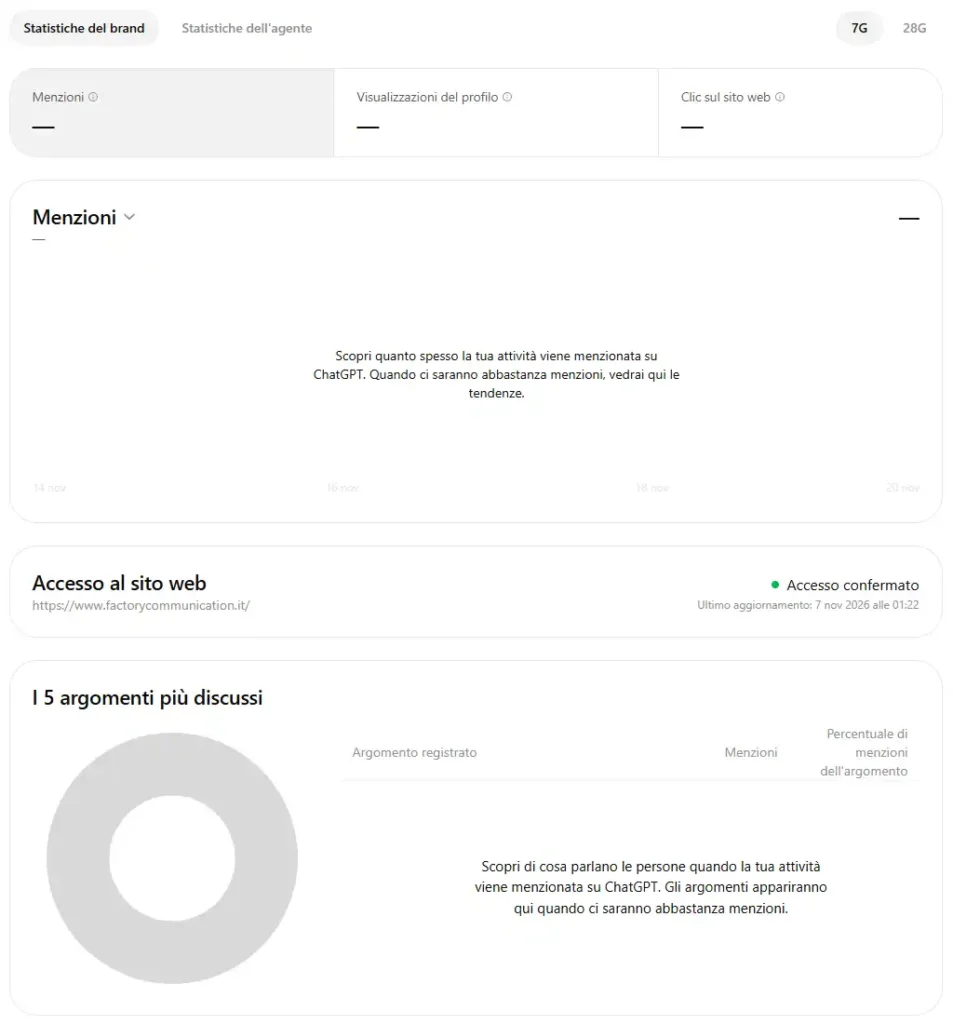
A detail many summaries overlook: for an online business, a mention counts when ChatGPT references the website, while the brand name alone doesn’t count.
The data is aggregated: the business sees trends, never individual conversations.
As long as mentions are few, the charts stay empty, as happened with our profile during the first week.
The panel also checks that ChatGPT can access the website: “Access confirmed” is the first signal to check.
Image (screenshot)
File name: business-hub-insights-overview.jpg
Alt text: Overview of ChatGPT Business Hub with mentions, profile views, website clicks and confirmed site access
Source: ChatGPT_2.jpg, uploaded in chat on 11/21/2026
Can an Italian business register on ChatGPT?
Yes, if the business operates online. Business Hub is open to eligible businesses in countries where ChatGPT is available, and we completed registration from Italy, at no cost.
Shops, restaurants and hotels can currently only claim existing listings in the United States. Business agents are reserved for US e-commerce and online services.
Online businesses can register today
If your business sells or operates online and has a website, you can claim the profile ChatGPT has already built, or create one from scratch.
The fastest way to find out is to search for your business name in Business Hub.
If it appears, you can claim it; if the list is empty and the business is eligible, you’ll find the option to add it.
Shops, restaurants and hotels: the local profile is coming later
For businesses with a physical location, OpenAI currently only allows claiming listings that already exist in the United States.
For a restaurant in Bergamo or a hotel on Lake Garda, registration is therefore on hold.
This waiting period is valuable time: it’s the moment to put in order the information ChatGPT is already gathering from the web.
Business agents are currently US-only
The assistant that responds to customers within ChatGPT is available to eligible US e-commerce and online services.
It explains products and terms, and leaves purchases, bookings and order verification to the website.
In the panel, the “Agent builder” option is already visible: for our profile it’s still unavailable, as OpenAI is rolling it out gradually, by business type.
OpenAI plans to extend it to other markets and categories, without giving any dates.
Image (screenshot)
File name: business-hub-agent-builder.jpg
Alt text: ChatGPT Business Hub message indicating the agent builder is not yet available
Source: ChatGPT_4.jpg, uploaded in chat on 11/21/2026
How to register your business on ChatGPT, step by step
What to prepare before you start
Before opening Business Hub, it’s worth having the following ready:
- a ChatGPT account you’ll use permanently to manage the profile;
- access to one of the verification channels: the business phone, the business email, the domain’s DNS panel, or your Shopify store;
- a valid ID document, the business’s registration details and, if required, proof that you can represent it;
- the information to publish, identical to what’s on the website: name, address, contact details, services.
First step: proving your connection to the business
Open Business Hub, search for your business, and choose a verification method from those offered.
There are four options: SMS or automated call to the business number, code sent to the business email, TXT record in the domain’s DNS, or linking with Shopify.
ChatGPT only shows the methods valid for your business.
Once verification is complete, OpenAI reviews the request.
Second step: identity verification with Persona
Once the request is approved, whoever manages the profile completes verification with Persona, the identity service chosen by OpenAI: an ID document and a photo of your face.
This step is what unlocks publishing changes, the catalog, the insights, and the blue verified-business badge.
Third step: filling in the profile
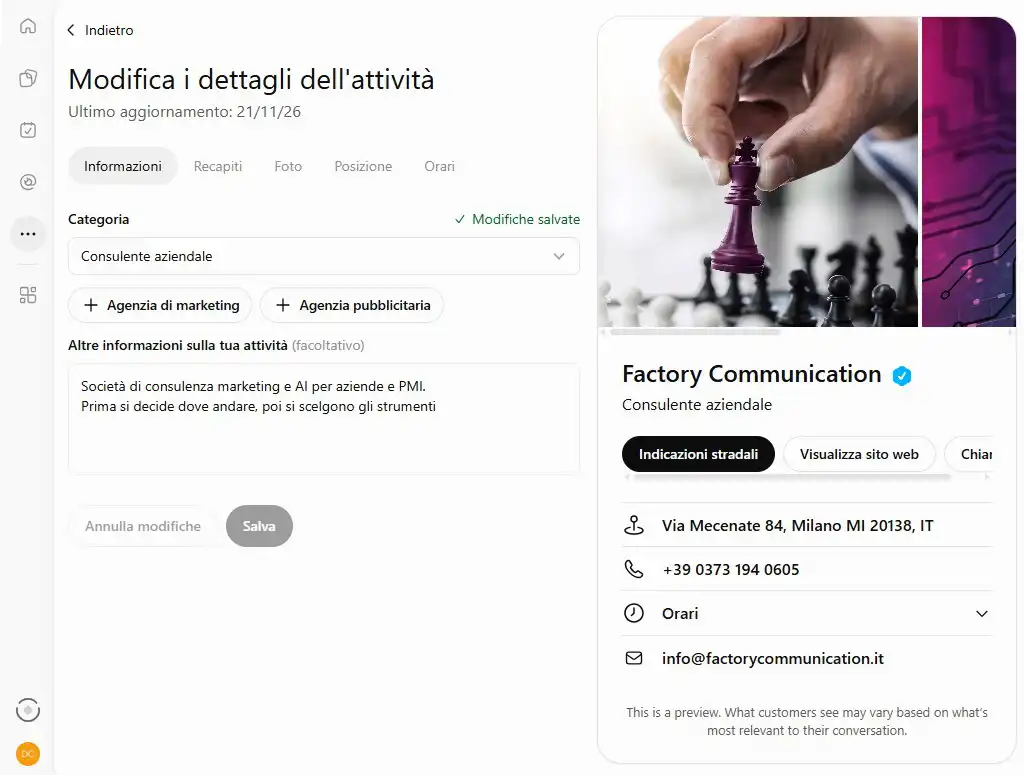
The profile is filled in from “Edit business details”, across five sections: information, contact details, photos, location and hours.
For now, you can choose only one category: we selected “Business consultant”.
The description field is optional, but it’s worth using: it’s the text ChatGPT can use to present the business.
We uploaded three images, which make the profile more recognizable.
Next to the fields, a preview shows the profile as customers will see it, with buttons for directions, the website and calling. OpenAI notes that what appears may vary depending on the conversation.
There is also a limitation of the beta phase: the address search doesn’t yet recognize all Italian locations.
For our operational office in Crema, the address wasn’t found, so we entered our registered office in Milan instead.
It’s worth checking right away that the suggested address is correct, and noting your actual location in the description.
Image (screenshot)
File name: business-hub-edit-profile.jpg
Alt text: Editing the business profile in ChatGPT Business Hub with category, description and preview of the verified profile
Source: ChatGPT.jpg, uploaded in chat on 11/21/2026
Our experience: profile created from scratch and verified via DNS
Factory Communication didn’t have a profile on ChatGPT: we created one from scratch, verified it with a DNS record and completed it with Persona.
A practical tip about the record: many DNS panels automatically append the domain name.
In the host field, you should therefore enter only the first part of the name ChatGPT shows you.
If you paste the full name, the domain ends up repeated twice and verification fails.
What registration does, and what’s still left to build
It corrects your data; visibility is built through content
OpenAI states this clearly in its guide: claiming your profile does not guarantee greater visibility or control over ChatGPT’s independent recommendations, and advertising does not influence those answers.
Registration serves one specific purpose: when ChatGPT talks about you, it uses correct, up-to-date information.
Whether you’re chosen among the answers depends on how clear, consistent and citable your website and the sources that talk about you are.
This is the work we call Generative Engine Optimization.
From the Yellow Pages to ChatGPT: the same job, a new directory
Anyone who built a business before the 2000s remembers the Yellow Pages ad: being listed was essential, and the difference came from how you were described.
The principle remains the same: a directory the customer consults before choosing.
What changes is who compiles the answer: a model that decides which businesses to name based on everything it finds online, instead of alphabetical order.
For the business owner, the criterion becomes one: the same information, identical, across every source, starting with local visibility on Google.
Insights as a first thermometer
Insights finally put a number to a question many business owners ask themselves: does ChatGPT talk about us?
Mentions, profile views, clicks and topics help establish a starting point and see whether your content efforts are producing results.
The same thing happens on Google, where Google’s AI Overview often answers before the search results: being cited becomes a metric alongside the click.
What to do now, based on your business
If your business operates online
Register now: the practical part takes little time.
Complete the description, connect your catalog if you sell products, and note the date.
After 28 days, check your first insights.
In the meantime, make your website more readable for language models, for example with an llms.txt file.
If you have a shop, restaurant or hotel
Use the waiting period to align your name, address, hours and services across your website, Google profile, directories and social media.
Ask ChatGPT what it knows about your business and note any inaccuracies.
That’s your list of fixes to make: today on your sources, tomorrow on your profile.
Either way: someone in charge and regular checks
Decide who in your company manages the profile and how often it gets reviewed.
A profile that’s verified and then forgotten is just old data with a blue badge.
Want to know what ChatGPT says about your business?
We help you prepare your registration, check the information models find about you, and build content worth citing.
This is the work we do every day with our SEO services.
Tell us about your business, and we’ll start with a snapshot of where you stand today.
Frequently asked questions about ChatGPT Business Hub
Yes. Claiming it requires a ChatGPT account, even a free one, with no subscription and no advertising account required. ChatGPT Business, the subscription for teams, is a different product.
An ID document for verification with Persona. OpenAI may also request the business’s registration details and proof that you’re authorized to represent it.
Italian businesses that operate online can do it today: we did. Businesses with a physical location can currently only claim existing listings in the United States.
The practical part is short: entering a code or a DNS record. This is followed by OpenAI’s review and Persona verification, with timing that can vary during this beta phase.
Registration makes your data correct. Your presence in responses depends on ChatGPT’s independent recommendations, which OpenAI states it does not guarantee, and therefore on the quality of the content that talks about you.
Businesses only receive aggregated data: mentions, profile views, clicks and topics. OpenAI states it does not share users’ conversations, including those with Business agents.
The function is similar: managing the business’s official information. Google shows it in search results and on maps, ChatGPT uses it in responses. It’s worth maintaining both with identical data.
The person who completes identity verification and can prove they represent the business. A consultant can support you in preparation and technical verification; the identity check itself remains personal.