


An article that gets all green lights from Yoast can remain invisible on Google for months. This is something many business owners have experienced, and it raises a legitimate question: So what’s the point of the plugin?
The short answer is that Yoast is very useful, as long as you know what it measures.
Its metrics assess a text’s formal compliance: presence of the keyword, paragraph length, and heading structure. Whether the content is relevant to what people are actually searching for remains a human decision.
This article explains what Yoast SEO does, how to set it up, and where the line is drawn between the tool’s role and that of the decision-maker.
What is Yoast SEO?
Yoast SEO is a WordPress plugin that handles the technical and editorial aspects of search engine optimization: title tags and meta descriptions, XML sitemaps, structured data, breadcrumbs, canonical URLs, and real-time text analysis.
It is available in both a free version and a Premium version, and works on both news sites and WooCommerce stores.
It is one of the most widely installed extensions in the world, with frequent updates and broad compatibility with the most popular themes and page builders.
We’ve been using it since 2016 on all the sites we manage, and the main reason is the same one that makes it useful to you: it moves the technical work into the editor, where writers can control it.
What Yoast Does for You
The value of the plugin lies in the tasks it performs automatically—tasks that would otherwise require manual code changes.
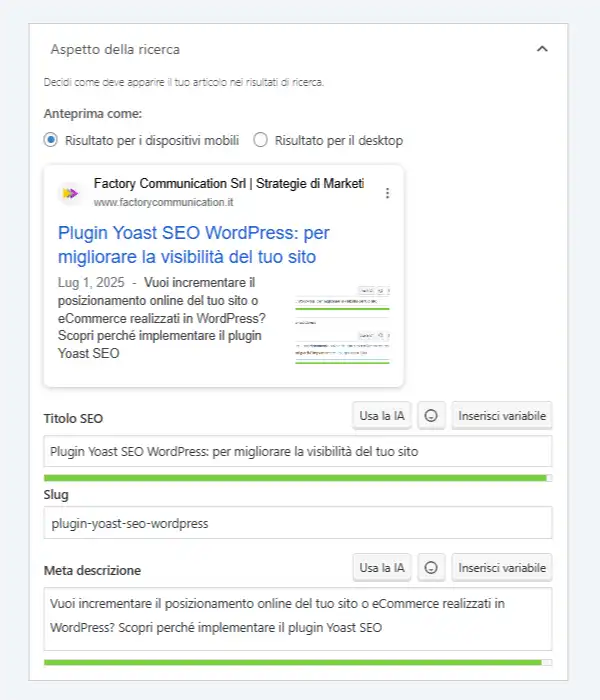
Title and meta description with preview
Yoast provides a dedicated field for the SEO title and description, along with a preview showing how the page will appear in search results. You can immediately see if the text fits within the available space and make any necessary adjustments before publishing.
These are the two factors that determine how many people choose your result from among those displayed. The preview turns a blind choice into an informed one.
XML Sitemap and Structured Data
The plugin generates and updates the XML sitemap with every new post, so search engines can find new content within a few hours instead of weeks.
When it comes to structured data, it automatically generates the site’s Schema.org graph: organization, author, article, and contact page.
This information allows a search engine to understand what kind of content it is dealing with, and today it also plays a role in determining whether the content appears in AI-generated results.
Internal Link Suggestions
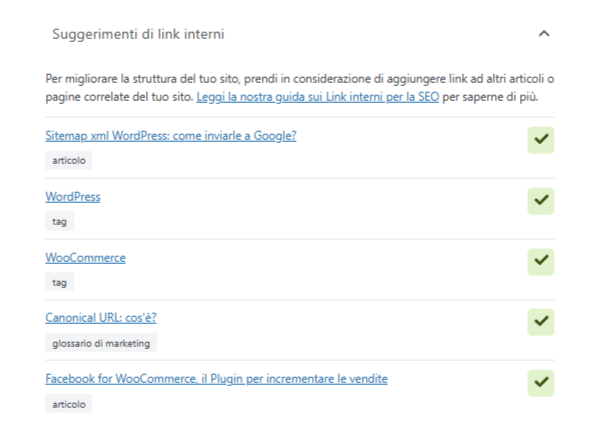
As you write, Yoast Premium analyzes the text and suggests pages on your site that cover related topics.
The list appears in a sidebar, showing the type of content: article, tag, glossary entry, or page. Each item is inserted at the cursor’s current position.
The value lies in repurposing what you’ve already published. On a site with a few hundred pieces of content, it becomes difficult to remember off the top of your head which pages deserve to be linked to, and the typical result is a blog where recent articles link to one another while those from three years ago remain isolated.
Autocomplete brings the archive back into circulation.
A tip: Evaluate each suggestion rather than accepting them all at once. The plugin analyzes the similarity between texts, so it also suggests pages that cover the same topic but with a different intent. A useful link is one that takes the reader where they want to go, and that’s up to you to decide.
We explain the criteria we use to organize links within a website in our guide on pillar pages and topic clusters.
Breadcrumbs and canonical URLs
Breadcrumbs show readers where they are on the site and indicate the hierarchy among the pages to search engines. Yoast generates them and makes them easy to add to the theme.
The canonical URL specifies which version of a page should be considered the correct one when the same content is accessible via multiple paths. The plugin sets this automatically and allows you to modify it as needed.
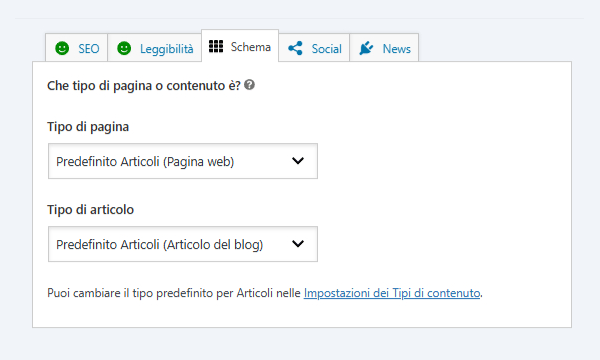
Social Media Profiles
When someone shares one of your pages on LinkedIn, Facebook, or WhatsApp, the platform generates a preview that includes an image, title, and description.
Without specific instructions, it takes the SEO title and the first image it finds, sometimes with curious results: the client’s logo at the bottom of the page, or a description cut off mid-sentence.
Yoast’s Social tab lets you set those three elements separately from the metadata for search engines.
This distinction matters because the two platforms have different goals: a Google title focuses on the keyword, while a LinkedIn title aims to pique the curiosity of people scrolling through their feed.
The practical tip is about image.
An image designed for sharing—with dimensions of 1,200 by 630 pixels and text that’s legible even in thumbnail view—can significantly increase the number of people who engage with your post. This is especially true for content you already know you want to share on your company’s channels.
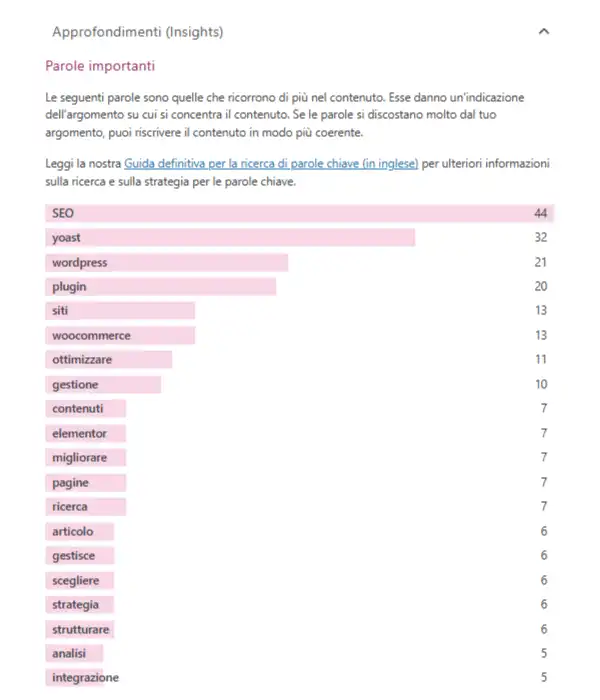
Real-Time Text Analysis
As you write, a sidebar evaluates your chosen keyword and the text’s readability. It flags long paragraphs, complex sentences, subheadings that are too far apart, and the absence of the keyword at the beginning of the text.
It’s worth taking a closer look at this feature, because it’s the one that’s most often misunderstood.
The FAQ block and the FAQPage template
Among the blocks that Yoast adds to the WordPress editor, there is one dedicated to frequently asked questions (the one you’ll find at the end of this article).
Enter questions and answers just as you would with any list, and the plugin automatically generates the FAQPage markup required by Schema.org: search engines receive each pair already labeled as such, instead of having to recognize it from the text.
It’s a feature of the free version, and it’s worth understanding its true value today.
Since 2023, Google has been displaying results enriched with FAQs for a limited number of institutional and healthcare websites, so the visual impact on the results page remains modest.
The focus has shifted elsewhere: a short, self-contained answer—and one explicitly labeled as such—is exactly the format that artificial intelligence systems use when generating a response.
In other words, Yoast’s FAQ block is now more effective at getting cited within the generated answers than at improving visibility in standard search results.
That’s reason enough to use it on every page that answers frequently asked questions. We’ve compiled writing guidelines and examples in our guide on how to use FAQs on your website or e-commerce site.
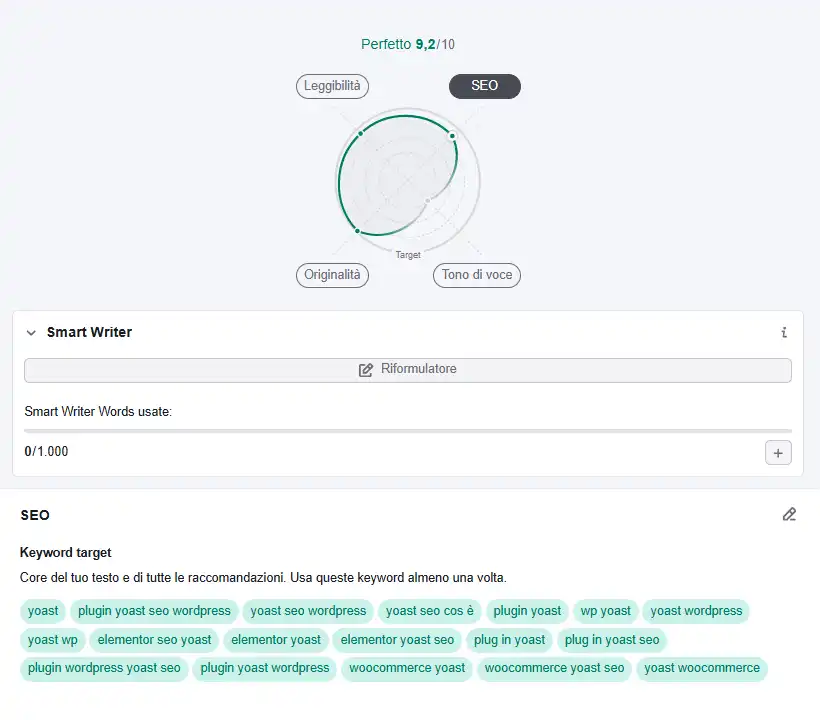
What does Yoast’s green traffic light actually measure?
Yoast’s green light measures a text’s formal compliance with a checklist: the presence of the keyword in the title, subheadings, and opening paragraph; paragraph length; and the presence of links. It evaluates the form. Whether the content is relevant to people’s actual search queries remains a human judgment.
This distinction matters, because chasing “green” at all costs leads straight to a well-known problem. If the plugin asks for more instances of the keyword, the temptation is to repeat it. Repeated enough times, this becomes keyword stuffing, which search engines recognize and penalize.
We have an example of this right here at home. One of our pages was ranking for 127 different search terms but never made it to the top spot for any of them, because the text contained 14 variations of the same keyword. The plugin was satisfied.
Google found a page that was somewhat similar to many queries, rather than being very similar to just one.
Here’s the rule of thumb we follow: the green light is a final check, never a writing goal. Write for the person who will read it, then open the sidebar and make sure you’ve followed the rules. When you reverse the order of these two steps, the text suffers.
How to Set Up Yoast SEO Step by Step
Installation takes just a few minutes. The configuration that makes all the difference requires a few informed decisions.
Installation and Initial Setup
Search for “Yoast SEO” in the WordPress plugins section, install it, and activate it. When you first launch it, a setup wizard will appear asking for your site type, organization name, logo, and social media profiles.
Please fill out these fields carefully: they populate the Schema.org graph and define how the site appears to search engines. The name and logo become the organization’s identity within the structured data.
Settings to Review Right Away
There are three settings that should be checked as soon as the plugin is activated.
- Types of content to display in search results.
WordPress generates archive pages by author, date, and format. On a site with only one author, the author archive duplicates the blog. Yoast allows you to exclude it from search results. - Breadcrumb structure.
It should align with the site’s actual architecture, with the category serving as an intermediate level when the blog is organized by categories. - Connection to Search Console.
The plugin integrates with Google Search Console and displays alerts within WordPress about pages with indexing issues.
The keyword for each page
Yoast asks you to specify a keyword for each piece of content. This is the most critical step, because that choice guides the entire subsequent analysis.
The key factor is consistency between the keyword and the page’s intent. A page that explains a concept is geared toward informational searches; one that presents a service is geared toward commercial searches.
Assigning the same keyword to two different pages causes them to compete with each other, and as a result, the search engine chooses one at random.
The plugin remains neutral on this point: it records the keyword you provide and evaluates the text based on that keyword. The choice depends on your strategy, as we explain in the SEO copywriting guide.
Title and meta description
Yoast lets you create automatic templates for entire content types and override them on a case-by-case basis. Two practical guidelines: the title works best when it’s 60 characters or fewer, and the description when it’s 145 characters or fewer. If the text exceeds those limits, it will be truncated in search results.
Yoast on WooCommerce and Elementor
Two additions deserve their own paragraph, because they address very different needs.
WooCommerce
The Yoast WooCommerce SEO plugin adds features designed specifically for online stores: structured product data including price, availability, and reviews; dedicated sitemaps for the product catalog; and control over archive pages and filters.
The most noticeable benefit relates to rich results: when product data is formatted correctly, the search engine can display the price and availability right on the results page.
With a large catalog, the impact on the click-through rate is measurable. We explore this topic in more detail in our SEO consulting guide for WooCommerce.
Elementor
Users who build pages with Elementor will find the Yoast sidebar within the visual editor, with the same analysis features available in Gutenberg.
A useful check for any site built with a page builder: make sure the analysis actually reads the content of the blocks. In some configurations, the plugin only evaluates the text saved in the classic editor and returns incomplete results.
Free or Premium: How to Decide
The free version covers everything most business websites need: title and meta tags, sitemaps, structured data, breadcrumbs, text analysis, and canonical URLs.
The Premium version adds features that become increasingly important as your site grows: optimization for multiple keywords and synonyms per page, automatic suggestions for internal links, redirect management when you change a URL, social media previews, and integration with Semrush to bring keyword analysis directly into the editor.
The deciding factor is scale. A website with a few dozen pages and a single author works well with the free version. A website with hundreds of pieces of content, multiple editors, and URLs that change over time will find that the redirect manager and internal linking suggestions save a significant amount of time.
What Remains in the Hands of Decision-Makers
Yoast handles the formal and technical aspects.
Four decisions fall outside its scope, and those are the ones that determine the outcome.
- Which search terms are worth targeting.
The plugin evaluates the keyword you enter—and even accepts incorrect ones. - How topics are distributed across the pages.
The content-group architecture—featuring a main page and its related articles—is designed in advance. - What can be said that’s different from what those who already hold those positions have said?
A text that is conformist and generic remains conformist and generic. - What images accompany the text and how they are described.
A chapter that goes beyond the plugin and is quite substantial: we’ve included it in our guide to image SEO.
At Factory Communication, we treat Yoast for what it is: an excellent performer. The decisions that guide its work are made early on, in collaboration with those who know the company.
Want to find out if your website’s setup is heading in the right direction? Request a free consultation.
Frequently asked questions
Yes, the free version covers titles and meta descriptions, XML sitemaps, structured data, breadcrumbs, canonical URLs, and text analysis. The Premium version adds optimization for multiple keywords, internal linking suggestions, and redirect management.
Yoast ensures that the site is technically sound and search engine-friendly, which is a necessary condition. Search engine rankings result from a combination of content quality, site architecture, and domain authority. The tool lays the groundwork; the strategy sets the direction.
It indicates that the text complies with the plugin’s list of formal checks: keywords are present in the required locations, paragraphs are of appropriate length, and subheadings are distributed appropriately. It assesses the text’s form and leaves the evaluation of its relevance to the actual question to human judgment.
Yes, with both. For WooCommerce, there’s a dedicated extension that adds structured product data and a catalog sitemap. With Elementor, the analytics sidebar appears within the visual editor.
Yoast and its main alternatives offer the same basic features but with different approaches. The key factor is consistency: switching plugins partway through requires migrating your settings, so it’s worth taking a few extra minutes to evaluate your initial choice.
An annual audit covers most cases. It’s a good idea to perform it earlier if the site’s structure changes, if new types of content are added, or if indexing warnings appear in Search Console.
How to position your WordPress site on search engines and AI
Want to learn more about WordPress and WooCommerce? Also read these articles:
- Image SEO: How to Optimize Photos and Graphics for Google
- SEO Optimization for a WordPress Site
- Schema.org: What It Is and Why It Matters for SEO
- XML Sitemap for WordPress
- Breadcrumbs: What They Are and What They’re Used For
- Keyword Stuffing: Why You Should Avoid It
- Creating a site with Elementor
- SEO Consulting for WooCommerce
- WordPress Site Support and Maintenance